- Posts: 40
- Thank you received: 0

Language problems
- Joyce van Heerden
-
 Topic Author
- Offline
- Senior Member
-

Less
More
9 years 2 weeks ago #95734
by Joyce van Heerden
Language problems was created by Joyce van Heerden
Hi.
I have just acquired EB and I'm trying to set it up... The whole thing needs to be in dutch.
I'm sorry if I'm overlooking something obvious, but I cannot figure out how to do this.
Even something simple like the string "EVENTS BOOKING - EVENT CATEGORIES" (see attachment).
Where do I change that?
Or should it change itself? If so, where do I tell EB to use the Dutch language pack?
Thanks.
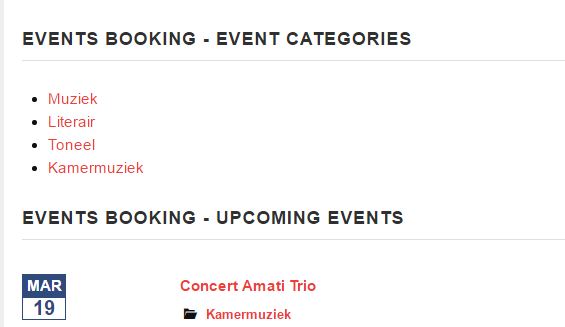
I have just acquired EB and I'm trying to set it up... The whole thing needs to be in dutch.
I'm sorry if I'm overlooking something obvious, but I cannot figure out how to do this.
Even something simple like the string "EVENTS BOOKING - EVENT CATEGORIES" (see attachment).
Where do I change that?
Or should it change itself? If so, where do I tell EB to use the Dutch language pack?
Thanks.
Please Log in or Create an account to join the conversation.
- Tuan Pham Ngoc
- Away
- Administrator
-

9 years 2 weeks ago #95745
by Tuan Pham Ngoc
Replied by Tuan Pham Ngoc on topic Language problems
Hello
These strings are title of the modules. So go to Extensions -> Modules, click on the module to edit and change the title directly from there
Regards,
Tuan
These strings are title of the modules. So go to Extensions -> Modules, click on the module to edit and change the title directly from there
Regards,
Tuan
The following user(s) said Thank You: Joyce van Heerden
Please Log in or Create an account to join the conversation.
- Joyce van Heerden
-
Topic Author
- Offline
- Senior Member
-
Less
More
- Posts: 40
- Thank you received: 0
9 years 2 weeks ago #95747
by Joyce van Heerden
Replied by Joyce van Heerden on topic Language problems
Oh dear, I should have thought of that myself!!
Thank you!
Cheers, j.
Thank you!
Cheers, j.
Please Log in or Create an account to join the conversation.
- Joyce van Heerden
-
Topic Author
- Offline
- Senior Member
-
Less
More
- Posts: 40
- Thank you received: 0
9 years 2 weeks ago #95768
by Joyce van Heerden
Replied by Joyce van Heerden on topic Language problems
Sorry, but here I am again...
Here's the next string I want to translate, again, I can't figure out how to do it: Event Date...
Thanks!
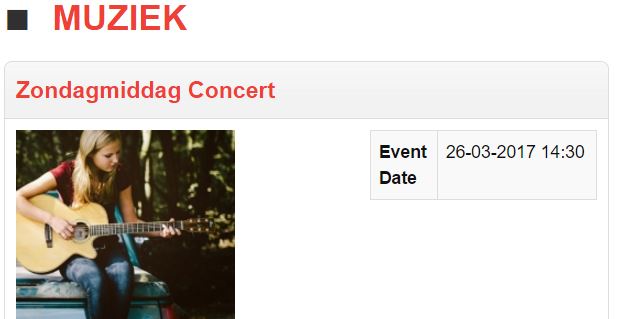
Here's the next string I want to translate, again, I can't figure out how to do it: Event Date...
Thanks!
Please Log in or Create an account to join the conversation.
- Tuan Pham Ngoc
- Away
- Administrator
-
9 years 2 weeks ago #95793
by Tuan Pham Ngoc
Replied by Tuan Pham Ngoc on topic Language problems
Hello
Go to Events Booking -> Translation, you will see the language item and can change it. See eventbookingdoc.joomservices.com/basic-setup/translation for more information about what need to be translated while using Events Booking in none English language
Tuan
Go to Events Booking -> Translation, you will see the language item and can change it. See eventbookingdoc.joomservices.com/basic-setup/translation for more information about what need to be translated while using Events Booking in none English language
Tuan
Please Log in or Create an account to join the conversation.
- Joyce van Heerden
-
Topic Author
- Offline
- Senior Member
-
Less
More
- Posts: 40
- Thank you received: 0
9 years 2 weeks ago #95805
by Joyce van Heerden
Replied by Joyce van Heerden on topic Language problems
Good Morning.
Thank you.
I should have explained better: I've read the documentation (I always RTFM first ), and I've changed the field in the translation screen (see screenshot), but it's not showing up.
So I cleared cache, closed and restarted everything (laptop, browser, joomla), but it's still not showing...
Do you want me to make a ticket?
Thanks, cheers, j.
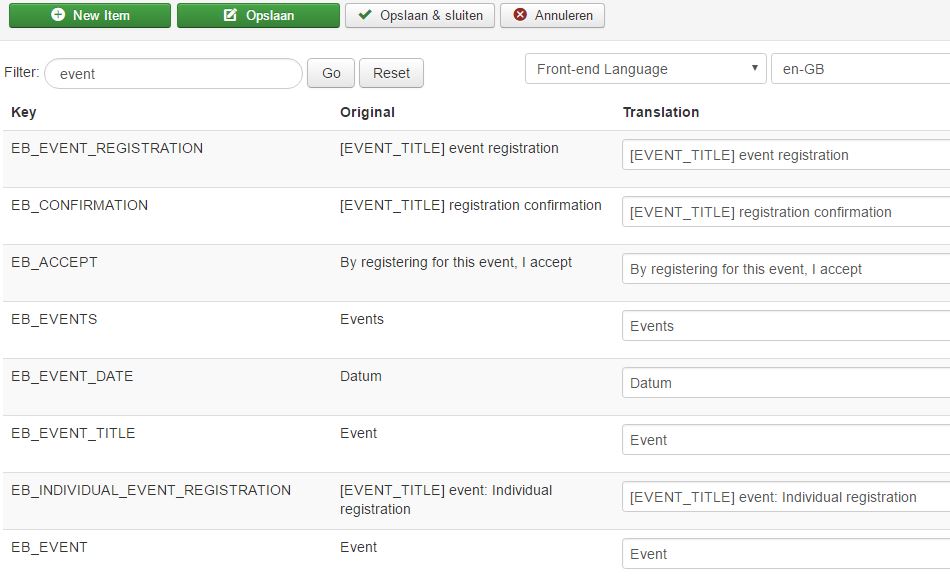
Thank you.
I should have explained better: I've read the documentation (I always RTFM first
), and I've changed the field in the translation screen (see screenshot), but it's not showing up.So I cleared cache, closed and restarted everything (laptop, browser, joomla), but it's still not showing...
Do you want me to make a ticket?
Thanks, cheers, j.
Please Log in or Create an account to join the conversation.
- Tuan Pham Ngoc
- Away
- Administrator
-
9 years 2 weeks ago #95825
by Tuan Pham Ngoc
Replied by Tuan Pham Ngoc on topic Language problems
Hello
Look at the screenshot, I see that you are changing Translation for English language. However, I guess in your site, you are using different language (German, correct) ?
If so, in the language dropdown, please select de-DE instead of en-GB, then do the translation and check it again
If it still doesn't work, then Yes, submit a support ticket so that we can check it for you
Tuan
Look at the screenshot, I see that you are changing Translation for English language. However, I guess in your site, you are using different language (German, correct) ?
If so, in the language dropdown, please select de-DE instead of en-GB, then do the translation and check it again
If it still doesn't work, then Yes, submit a support ticket so that we can check it for you
Tuan
The following user(s) said Thank You: Joyce van Heerden
Please Log in or Create an account to join the conversation.
- Joyce van Heerden
-
Topic Author
- Offline
- Senior Member
-
Less
More
- Posts: 40
- Thank you received: 0
9 years 2 weeks ago #95834
by Joyce van Heerden
Replied by Joyce van Heerden on topic Language problems
BINGO!
That fixed it, thanks a lot!
Language is Dutch (nl-NL) = what we speak in the Netherlands, not in Germany
It's a pity the chosen language in the translator screen doesn't stick, it always defaults back to English, even though Dutch is the default language on the site. I'll just have to remember to change it before I do any translating (and there's a lot of translating to be done!).
Thanks again, cheers, j.
That fixed it, thanks a lot!
Language is Dutch (nl-NL) = what we speak in the Netherlands, not in Germany
It's a pity the chosen language in the translator screen doesn't stick, it always defaults back to English, even though Dutch is the default language on the site. I'll just have to remember to change it before I do any translating (and there's a lot of translating to be done!).
Thanks again, cheers, j.
Please Log in or Create an account to join the conversation.
- Tuan Pham Ngoc
- Away
- Administrator
-
9 years 2 weeks ago #95844
by Tuan Pham Ngoc
Replied by Tuan Pham Ngoc on topic Language problems
What's your site default language? We can implement some code to help it easier for you to maintain it if needed. We can default it to site default language or maybe, user default language
Let me know if it is needed and we can find a solution
Tuan
Let me know if it is needed and we can find a solution
Tuan
The following user(s) said Thank You: Joyce van Heerden
Please Log in or Create an account to join the conversation.
- Philipp
- Offline
- Senior Member
-
9 years 2 weeks ago - 9 years 2 weeks ago #95868
by Philipp
Replied by Philipp on topic Language problems
I have also done this (for German), and I found it very helpful do edit the ini file directly, stored in
[joomla root]\language\[your language code]\[your language code].com_eventbooking.ini
Not only is this the more comprehensive list, as some items used to be missing from the language editor (some should have been fixed in the latest version, I did not test this myself). I also found to search/replace common strings at once to be more intuitive, but that might just be me...
[joomla root]\language\[your language code]\[your language code].com_eventbooking.ini
Not only is this the more comprehensive list, as some items used to be missing from the language editor (some should have been fixed in the latest version, I did not test this myself). I also found to search/replace common strings at once to be more intuitive, but that might just be me...
Last edit: 9 years 2 weeks ago by Philipp.
The following user(s) said Thank You: Joyce van Heerden
Please Log in or Create an account to join the conversation.
Moderators: Tuan Pham Ngoc
Support
Documentation
Information
Copyright © 2026 Joomla Extensions by Joomdonation. All Rights Reserved.
joomdonation.com is not affiliated with or endorsed by the Joomla! Project or Open Source Matters.
The Joomla! name and logo is used under a limited license granted by Open Source Matters the trademark holder in the United States and other countries.
The Joomla! name and logo is used under a limited license granted by Open Source Matters the trademark holder in the United States and other countries.