
PDF Indexer - Joomla PDF and DOC indexer
Documents Indexer makes the information inside your files searchable on your Joomla website. It extracts and indexes content from PDF, Word (DOC and DOCX), and Excel (XLSX) documents, so visitors can find relevant files by searching for the words they contain—not just their filenames. Administrators can index entire folders and subfolders, making it easier to manage large document collections. With integration into Joomla’s search tools, including Smart Search, Documents Indexer helps turn a library of stored files into a useful, searchable resource
PDF Indexer for Joomla
Make your documents searchable. Index PDF, Word, and Excel files automatically.
See PDF Indexer in Action
Watch how visitors can find information inside documents on your Joomla website.
Key Features
Everything you need to make documents searchable
Multiple File Formats
Index PDF, DOC, DOCX, and XLSX documents automatically. Content is extracted and stored in the database for fast searching.
Bulk Indexing
Index entire folders and subfolders with one click. Save time when managing large document libraries.
Native Joomla Search
Seamlessly integrates with Joomla's standard search. Find documents by their content, not just filenames.
Auto-Sync
Automatically index new documents and remove deleted files from the search index. Keep everything synchronized.
EDOCMAN Integration
Works perfectly with EDOCMAN document management extension. Index and search documents managed by EDOCMAN.
Modern & Compatible
Supports Joomla 3.x, 4.x, 5.x, 6.x and PHP 7.x, 8.x. Integrated with Joomla Update System for easy updates.
Ready to Make Your Documents Searchable?
Get PDF Indexer today and improve your site's document search experience.
Purchase NowLatest Product Updates
Explore the latest improvements and new features released for Documents Indexer.
Troubleshooting
1. Issue: pdftotext: Permission denied
When you index documents and receive the following error:
/components/com_docindexer/lib/binaries/linux/pdftotext: Permission denied
in the indexed content of PDF files, you can resolve this by changing the file permission:
- Navigate to:
/components/com_docindexer/lib/binaries/linux/pdftotext - Change the file permission to 777
- The issue will be resolved
2. How to Set Up a Cron Task to Index New Documents Automatically
Step 1: Enable the Plugin
Publish the plugin: Documents Indexer - Cron task
This plugin has several important parameters:
- Integrate with Edocman documents: Select "Yes" if you want to index documents in the Edocman documents folder
- Number of Documents to be Indexed: With each execution, Documents Indexer cannot index all documents at once. You should specify the number of documents to be indexed per run. The default is 5.
Step 2: Configure Cron Job
By default, Document Indexer uses a system plugin to trigger the indexing process. This means it requires someone to access the site (search engine bots are also counted) to trigger the process. Sometimes, this is not reliable or may cause multiple documents to be indexed if your site has very high traffic. To address this limitation, you can set up a cron job from your hosting account to trigger document indexing instead.
? Instructions:
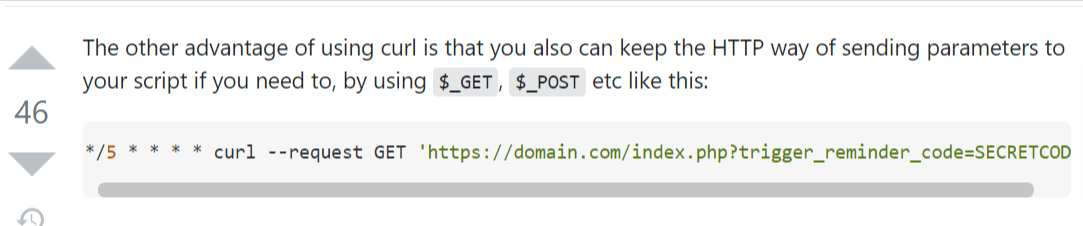
Set up a cron job to make a request to this URL using CURL. Note that you should use CURL so that variables can be passed in the GET request. See this guide for detailed instructions.
URL format:
https://domain.com/index.php?trigger_code=SECRETCODE
- Replace
domain.comwith the URL of your site - Replace
SECRETCODEwith the secret string you entered in the "Trigger Code" parameter of the plugin
This will ensure the indexing process is only triggered when a request is made to that URL (which should be kept secret as no real users will access it). This approach is more reliable than relying on a system plugin.
Example cron job setup:
Documents Indexer 7.1 Released with Download Notification Emails
Documents Indexer 7.1 introduces a powerful new feature for Joomla websites: Download Notification Emails. Site administrators can now receive automatic email notifications whenever a document is downloaded from the frontend.
This update helps Joomla site owners monitor document activity more effectively, improve file management workflows, and stay informed about important downloads.
What’s New in Documents Indexer 7.1?
The main highlight of Documents Indexer 7.1 is the new download email notification system. When a valid frontend document download occurs, the extension can automatically send an email to selected administrators or custom recipients.
This is especially useful for Joomla websites that manage customer documents, private files, digital resources, internal documents, product files, or downloadable assets.
Key Features
- Enable or disable download notifications directly from the configuration page.
- Set notification recipients to define who receives download alert emails.
- Choose email format, including Plain Text or HTML.
- Customize email subject and message content to match your website’s communication style.
- Use dynamic tags to include document, user, date, IP address, and site information.
- Automatically notify administrators when users download documents from the frontend.
Dynamic Email Tags
Documents Indexer 7.1 supports dynamic tags, allowing you to automatically insert download-related information into the notification email.
Why This Update Matters
With download notification emails, Joomla administrators can better understand how documents are being accessed, who is downloading them, and when download activity happens. This makes Documents Indexer a more practical solution for Joomla document management and file download tracking.
About Documents Indexer
Documents Indexer is a Joomla extension designed to help website owners organize, index, display, and manage documents more efficiently. It is developed by Joom Donation, a trusted provider of Joomla extensions.
Learn more about Documents Indexer and other Joomla extensions at www.joomdonation.com.
Documents Indexer 7.1 is Now Available
Upgrade today to use Download Notification Emails and improve document download tracking on your Joomla website.
Visit Joom Donation🚀 PDF Indexer 7.0 — What's New
Four major improvements that make document indexing on Joomla more flexible, easier to use, and more reliable.
1. Index PDFs from Any Folder
You can now index PDF files stored in any folder on your server — not just the default location. This gives teams full control over where documents are stored.
- Choose a custom folder path directly from the admin panel
- Optionally scan all subfolders automatically
- File downloads and previews always resolve to the correct source
- Fully backward-compatible — existing setups are unaffected
2. Refreshed Admin Interface
The indexing screens have been redesigned to match the modern Joomla admin look and feel, making them cleaner and easier to navigate.
- Clean card-based layout using Bootstrap 5
- Consistent styling across all indexing screens
- Easier to read and use for all administrators
3. Faster Folder Setup
Setting up a custom folder path is now quicker and less error-prone, especially for non-technical administrators.
- A "Fill Joomla Root" button auto-fills the base path for you
- Just type the subfolder name to complete the path
- Fewer mistakes, faster configuration
4. Smart Search Now Works Reliably
A critical fix ensures that indexed documents are immediately discoverable through Joomla Smart Search — both for new files and re-indexed ones.
- New documents appear in search results right after indexing
- Re-indexed documents update search results correctly
- Indexing and search are now fully connected end-to-end
📊 Summary of Improvements
| Area | Improvement | Benefit |
|---|---|---|
| Flexibility | Custom folder indexing | Index PDFs from any location |
| Usability | Redesigned admin UI | Cleaner, easier to navigate |
| Setup Speed | Auto-fill path button | Faster, error-free configuration |
| Search Quality | Smart Search fix | Documents found immediately after indexing |
PDF Indexer 7.0 is ready for production.
More scalable, more dependable, and built for real Joomla deployments.
Introducing PDF Indexer 5.0
Smarter, Faster, Better Document Management
We're excited to announce the release of PDF Indexer 5.0, bringing significant improvements and modern compatibility to your document management experience.
What's New
? Enhanced Compatibility
PDF Indexer 5.0 is fully compatible with Joomla 6 and the latest PHP versions, ensuring your extension stays up-to-date with current web technologies and security standards.
? Redesigned Administration Interface
We've completely revamped the backend interface to provide a more intuitive and user-friendly experience. Configuration settings and document management are now easier than ever to navigate, allowing you to manage your documents with greater efficiency and less complexity.
? Built-in Update System
Stay current effortlessly with our new integrated update feature. You can now update Documents Indexer directly from your Joomla backend without the need for manual downloads or installations.
? Automatic Update Notifications
Never miss an important release again. PDF Indexer 5.0 automatically notifies you when a new version of Documents Indexer is available, keeping you informed about the latest features, improvements, and security patches.
Upgrade to PDF Indexer 5.0 today!
Experience a more streamlined, modern approach to document indexing and management in Joomla.