- Posts: 125
- Thank you received: 4

Hide Thumbnail image in Main Event Page
- Alex
- Topic Author
- Offline
- Premium Member
-

Less
More
9 years 8 months ago #84854
by Alex
Hide Thumbnail image in Main Event Page was created by Alex
Is it possible to hide the thumbnail image that appears in the category list from appearing on the main page of that event?
I want to use the same/similar image in the description section only larger in size (more banner shaped) and it looks bad to have both appear on the same page.
I want to use the same/similar image in the description section only larger in size (more banner shaped) and it looks bad to have both appear on the same page.
Please Log in or Create an account to join the conversation.
- Tuan Pham Ngoc
- Offline
- Administrator
-

9 years 8 months ago #84865
by Tuan Pham Ngoc
Replied by Tuan Pham Ngoc on topic Hide Thumbnail image in Main Event Page
Hi Alex
It is not possible. However, I think you can try this option ;
1. Go to Events Booking -> Configuration, look at Themes tab, find the config option "Display Event Large Image", set it to Yes
2. Now, the large image (instead of thumbnail) will be displayed and you won't have to insert the image into description of Events Booking anymore
If that option doesn't work for you (this feature only added to the extension recently, so you will need to make sure your site running 2.8.1 of Events Booking to see this option), you can submit a support ticket, I will ask my developer modify code to hide the thumbnail for you
Regards,
Tuan
It is not possible. However, I think you can try this option ;
1. Go to Events Booking -> Configuration, look at Themes tab, find the config option "Display Event Large Image", set it to Yes
2. Now, the large image (instead of thumbnail) will be displayed and you won't have to insert the image into description of Events Booking anymore
If that option doesn't work for you (this feature only added to the extension recently, so you will need to make sure your site running 2.8.1 of Events Booking to see this option), you can submit a support ticket, I will ask my developer modify code to hide the thumbnail for you
Regards,
Tuan
Please Log in or Create an account to join the conversation.
- James Riley
-

- Offline
- Platinum Member
-

9 years 8 months ago #84972
by James Riley
James Riley .: EventBooking user since 2014 ::: JoomDonation user since 2016 :.
.: grfx & web design / IT / AV @ St. Therese Institute of Faith and Mission, Bruno, SK, Canada :.
Replied by James Riley on topic Hide Thumbnail image in Main Event Page
You should be able to do this with line in EB's custom.css file. This wouldn't require core code alternation and would therefore be upgrade-safe  Post a link to a sample event and I can guide you if you'd like.
Post a link to a sample event and I can guide you if you'd like. James Riley .: EventBooking user since 2014 ::: JoomDonation user since 2016 :.
.: grfx & web design / IT / AV @ St. Therese Institute of Faith and Mission, Bruno, SK, Canada :.
Please Log in or Create an account to join the conversation.
- Alex
- Topic Author
- Offline
- Premium Member
-
Less
More
- Posts: 125
- Thank you received: 4
9 years 8 months ago #84985
by Alex
Replied by Alex on topic Hide Thumbnail image in Main Event Page
Thanks Tuan. I'll have a look. at that new config option before opening a ticket.
Please Log in or Create an account to join the conversation.
- Alex
- Topic Author
- Offline
- Premium Member
-
Less
More
- Posts: 125
- Thank you received: 4
9 years 8 months ago - 9 years 6 months ago #84986
by Alex
Replied by Alex on topic Hide Thumbnail image in Main Event Page
Thanks for the offer James.
Last edit: 9 years 6 months ago by Alex.
Please Log in or Create an account to join the conversation.
- James Riley
-
- Offline
- Platinum Member
-
9 years 8 months ago - 9 years 8 months ago #84991
by James Riley
James Riley .: EventBooking user since 2014 ::: JoomDonation user since 2016 :.
.: grfx & web design / IT / AV @ St. Therese Institute of Faith and Mission, Bruno, SK, Canada :.
Replied by James Riley on topic Hide Thumbnail image in Main Event Page
Based on your current live settings, try adding the following to your media/com_eventbooking/assets/css/custom.css file:
:to remove the image from ALL event detail pages on your site:
to target only this page:
If you have turned OFF the option for "display large image", then that might effect the "eb-event-large-image" tag. If so, right-click on the image and select "Inspect / Inspect Object / Inspect Element / etc" from the pop-up menu. You should see the "<img etc etc etc>" tag highlighted in some code. Look for the "class" attribute, and replace "eb-event-large-image" with the "eb-event..." class you see there.
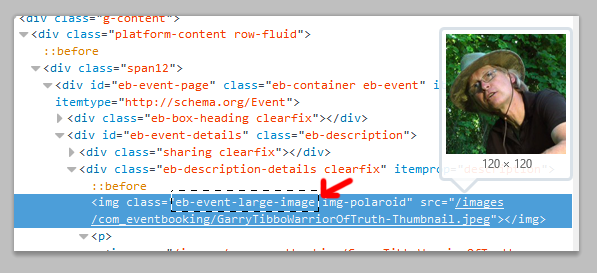
:to remove the image from ALL event detail pages on your site:
Code:
#eb-event-page .eb-event-large-image {display:none;}
to target only this page:
Code:
body.com_eventbooking.itemid-171 .eb-event-large-image {display:none;}
If you have turned OFF the option for "display large image", then that might effect the "eb-event-large-image" tag. If so, right-click on the image and select "Inspect / Inspect Object / Inspect Element / etc" from the pop-up menu. You should see the "<img etc etc etc>" tag highlighted in some code. Look for the "class" attribute, and replace "eb-event-large-image" with the "eb-event..." class you see there.
James Riley .: EventBooking user since 2014 ::: JoomDonation user since 2016 :.
.: grfx & web design / IT / AV @ St. Therese Institute of Faith and Mission, Bruno, SK, Canada :.
Last edit: 9 years 8 months ago by James Riley.
The following user(s) said Thank You: Tuan Pham Ngoc, Alex
Please Log in or Create an account to join the conversation.
- Alex
- Topic Author
- Offline
- Premium Member
-
Less
More
- Posts: 125
- Thank you received: 4
9 years 8 months ago - 9 years 8 months ago #84995
by Alex
Replied by Alex on topic Hide Thumbnail image in Main Event Page
Worked like a charm! The all event option was ideal!
Thanks for your help James!
Alex
Thanks for your help James!
Alex
Last edit: 9 years 8 months ago by Alex.
Please Log in or Create an account to join the conversation.
- James Riley
-
- Offline
- Platinum Member
-
9 years 8 months ago #84998
by James Riley
James Riley .: EventBooking user since 2014 ::: JoomDonation user since 2016 :.
.: grfx & web design / IT / AV @ St. Therese Institute of Faith and Mission, Bruno, SK, Canada :.
Replied by James Riley on topic Hide Thumbnail image in Main Event Page
Glad I could help!
James Riley .: EventBooking user since 2014 ::: JoomDonation user since 2016 :.
.: grfx & web design / IT / AV @ St. Therese Institute of Faith and Mission, Bruno, SK, Canada :.
Please Log in or Create an account to join the conversation.
- Tuan Pham Ngoc
- Offline
- Administrator
-
9 years 8 months ago #85009
by Tuan Pham Ngoc
Replied by Tuan Pham Ngoc on topic Hide Thumbnail image in Main Event Page
Maybe it is the time to introduce a new config option to allow hiding it (not loading it completely instead of just hiding using css) in the next release
Tuan
Tuan
Please Log in or Create an account to join the conversation.
- Alex
- Topic Author
- Offline
- Premium Member
-
Less
More
- Posts: 125
- Thank you received: 4
9 years 8 months ago #85029
by Alex
Replied by Alex on topic Hide Thumbnail image in Main Event Page
Hi Tuan,
I like the option of having it visible as thumbnail images with the intro text and hiding it when visitors click thru to the main description page. For now the css option works great!
Overall it's a great extension!
Alex
I like the option of having it visible as thumbnail images with the intro text and hiding it when visitors click thru to the main description page. For now the css option works great!
Overall it's a great extension!
Alex
Please Log in or Create an account to join the conversation.
Moderators: Tuan Pham Ngoc
Support
Documentation
Information
Copyright © 2026 Joomla Extensions by Joomdonation. All Rights Reserved.
joomdonation.com is not affiliated with or endorsed by the Joomla! Project or Open Source Matters.
The Joomla! name and logo is used under a limited license granted by Open Source Matters the trademark holder in the United States and other countries.
The Joomla! name and logo is used under a limited license granted by Open Source Matters the trademark holder in the United States and other countries.