- Posts: 64
- Thank you received: 1

Need help with Joomla? We are available for hire to help with Joomla customization, upgrades, maintenance, and custom development.
Explore our services Advanced Download Analytics:Per-file Statistics by Date Range & Categories
- Johnny
- Topic Author
- Offline
- Senior Member
-

Less
More
6 months 3 weeks ago #177798
by Johnny
Advanced Download Analytics:Per-file Statistics by Date Range & Categories was created by Johnny
Edocman is already an incredible document management tool, but as our libraries grow, so does the need for actionable data. Currently, we lack a streamlined way to audit how our content is performing over specific periods.I would like to propose a high-priority feature: Comprehensive Download Reporting with Granular Filters.The Proposed Feature:A dedicated reporting interface that allows administrators to export download statistics based on:
- Date Range: Ability to select specific periods (e.g., Monthly, Quarterly, or Yearly reports).
- Category & Sub-categories: A recursive filter to pull data from a parent category including all its nested sub-folders.
- Per-File Granularity: A breakdown showing the exact download count for every single file within those filters, rather than just a total sum.
- Reporting Requirements: Many of us need to provide stakeholders with monthly engagement metrics. Doing this manually for individual files is nearly impossible.
- Content Optimization: Without knowing which files are "dead" and which are "trending" within a specific timeframe, we cannot effectively manage our storage or prioritize updates.
- Auditing: For compliance and resource allocation, we need to know exactly what is being accessed and when.
The following user(s) said Thank You: Thore Olaf Kühn
Please Log in or Create an account to join the conversation.
- Mr. Dam
- Away
- Administrator
-

Less
More
- Posts: 13807
- Thank you received: 1816
6 months 3 weeks ago #177799
by Mr. Dam
Replied by Mr. Dam on topic Advanced Download Analytics:Per-file Statistics by Date Range & Categories
Hi there,
Thank you for your excellent suggestion!
We agree that this is a very useful idea and will definitely look for ways to improve the Download Chart feature in Edocman.
If anyone else has feedback or suggestions, please feel free to contribute so we can make this feature even better.
Thanks
Dam
Thank you for your excellent suggestion!
We agree that this is a very useful idea and will definitely look for ways to improve the Download Chart feature in Edocman.
If anyone else has feedback or suggestions, please feel free to contribute so we can make this feature even better.
Thanks
Dam
The following user(s) said Thank You: Thore Olaf Kühn, Johnny
Please Log in or Create an account to join the conversation.
- Thore Olaf Kühn
- Offline
- New Member
-

Less
More
- Posts: 12
- Thank you received: 0
1 month 2 weeks ago #179494
by Thore Olaf Kühn
Replied by Thore Olaf Kühn on topic Advanced Download Analytics:Per-file Statistics by Date Range & Categories
Hi everyone,
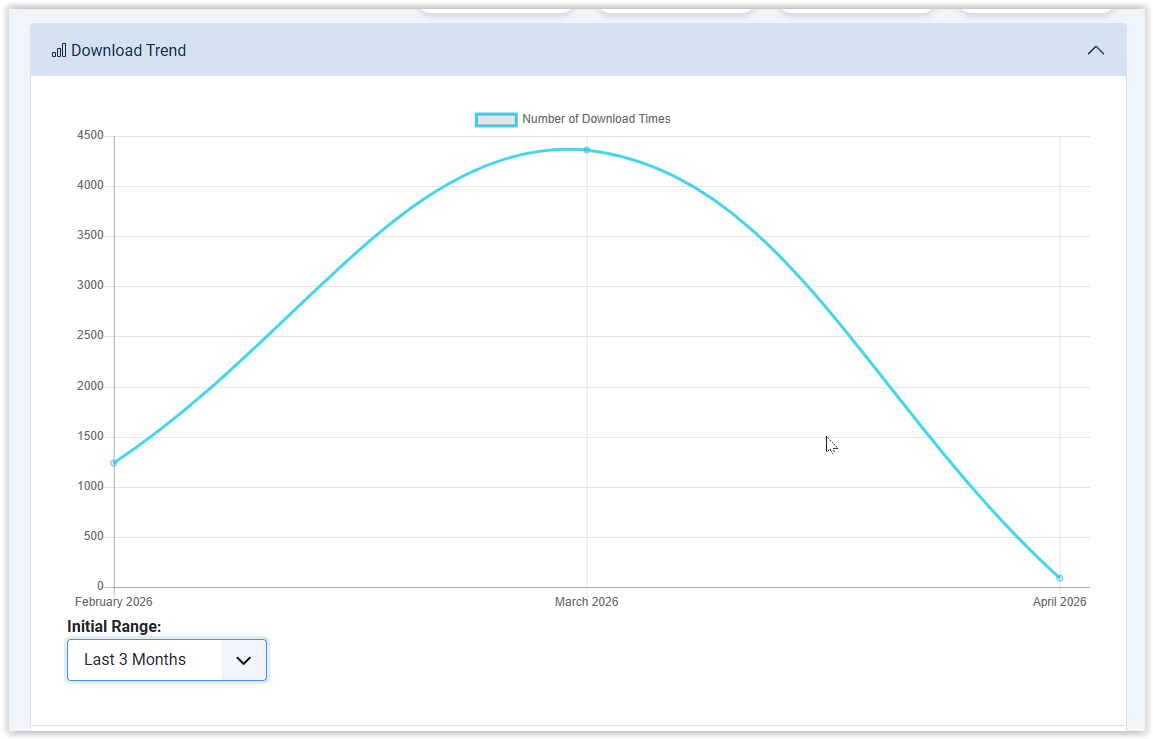
I used the download chart for the first time today, and I’m really impressed. I highly recommend this feature to any Edocman users who need to manage extensive collections of materials.
We now have the ability to evaluate the performance of our materials. Thanks to @Dam and the Joomdonation team. I do have one small request, though: could the filters be placed above the chart instead of to the left? The reason is that we have many categories with similar names that only differ at the very end; in the current position, these names get cut off.
@Jonny: Many thanks for the detailed requirements you provided, which led to the implementation of these features. I fully agree with your assessment.

Best regards,
Thore
I used the download chart for the first time today, and I’m really impressed. I highly recommend this feature to any Edocman users who need to manage extensive collections of materials.
We now have the ability to evaluate the performance of our materials. Thanks to @Dam and the Joomdonation team. I do have one small request, though: could the filters be placed above the chart instead of to the left? The reason is that we have many categories with similar names that only differ at the very end; in the current position, these names get cut off.
@Jonny: Many thanks for the detailed requirements you provided, which led to the implementation of these features. I fully agree with your assessment.
Best regards,
Thore
Please Log in or Create an account to join the conversation.
- Mr. Dam
- Away
- Administrator
-
Less
More
- Posts: 13807
- Thank you received: 1816
1 month 2 weeks ago #179497
by Mr. Dam
Replied by Mr. Dam on topic Advanced Download Analytics:Per-file Statistics by Date Range & Categories
Hi Thore,
Thank you very much for your kind feedback. I’m really glad to hear that you like the new download chart feature and that it is useful for evaluating the performance of your documents/materials.
Regarding your request about moving the filters above the chart instead of keeping them on the left: yes, I understand the issue. When there are many categories with similar long names, showing the filters in the left column can cut off the important part of the category name.
I will review this layout and see if we can improve it in the future update. Moving the filters above the chart, or making the filter area wider/more flexible, should make the page easier to use for sites with large document collections.
Thanks again for your feedback and for sharing the screenshot. It is very helpful for improving the feature.
Best regards,
Dam
Thank you very much for your kind feedback. I’m really glad to hear that you like the new download chart feature and that it is useful for evaluating the performance of your documents/materials.
Regarding your request about moving the filters above the chart instead of keeping them on the left: yes, I understand the issue. When there are many categories with similar long names, showing the filters in the left column can cut off the important part of the category name.
I will review this layout and see if we can improve it in the future update. Moving the filters above the chart, or making the filter area wider/more flexible, should make the page easier to use for sites with large document collections.
Thanks again for your feedback and for sharing the screenshot. It is very helpful for improving the feature.
Best regards,
Dam
Please Log in or Create an account to join the conversation.
Moderators: Mr. Dam
Support
Documentation
Information
Copyright © 2026 Joomla Extensions by Joomdonation. All Rights Reserved.
joomdonation.com is not affiliated with or endorsed by the Joomla! Project or Open Source Matters.
The Joomla! name and logo is used under a limited license granted by Open Source Matters the trademark holder in the United States and other countries.
The Joomla! name and logo is used under a limited license granted by Open Source Matters the trademark holder in the United States and other countries.