- Posts: 7
- Thank you received: 0

Need help with Joomla? We are available for hire to help with Joomla customization, upgrades, maintenance, and custom development.
Explore our services
Please post all pre-sales questions of all products on this forum
RentAmarillo.net Update
- Michael
- Topic Author
- Offline
- New Member
-

Less
More
4 months 1 week ago #178544
by Michael
RentAmarillo.net Update was created by Michael
Dam,
I am still having an issue uploading the OS Property update. If attempt it as an UPDATE, I keep getting:WarningError connecting to the server: 403
Before updating ensure that the update is compatible with your Joomla! installation.
You are strongly advised to make a backup of your installation before you start updating.ErrorFailed to download package. Download it and install manually from www.joomdonation.com/index.php?option=co...ckage&document_id=91 .
If I try it as an INSTALL, I get a Pink Bar ERROR, and a Blue Bar message: Joomla! Extensions Directory™ (JED) now available with Install from Web on this page. By selecting "Add Install from Web tab" below, you agree to the JED Terms of Service and all applicable third party license terms.
I know you helped a few years ago and hate to ask again, but, is it possible you can take a look at the Joomla Admin for us? I am fine giving you that info.
Mike
I am still having an issue uploading the OS Property update. If attempt it as an UPDATE, I keep getting:WarningError connecting to the server: 403
Before updating ensure that the update is compatible with your Joomla! installation.
You are strongly advised to make a backup of your installation before you start updating.ErrorFailed to download package. Download it and install manually from www.joomdonation.com/index.php?option=co...ckage&document_id=91 .
If I try it as an INSTALL, I get a Pink Bar ERROR, and a Blue Bar message: Joomla! Extensions Directory™ (JED) now available with Install from Web on this page. By selecting "Add Install from Web tab" below, you agree to the JED Terms of Service and all applicable third party license terms.
I know you helped a few years ago and hate to ask again, but, is it possible you can take a look at the Joomla Admin for us? I am fine giving you that info.
Mike
Please Log in or Create an account to join the conversation.
- Mr. Dam
- Away
- Administrator
-

Less
More
- Posts: 13789
- Thank you received: 1811
4 months 1 week ago #178545
by Mr. Dam
Replied by Mr. Dam on topic RentAmarillo.net Update
Hi Mike,
Thank you for your email.
To update OS Property from your Joomla backend, please follow these steps:
1. Go to this page and create your Download ID:
joomdonation.com/download-ids.html
2. Copy the Download ID and enter it in the OS Property Configuration page in your Joomla administrator area.
Then go to Extensions > Plugins and make sure the plugin OS Property Installer package is published/enabled.
After that, you should be able to update OS Property directly from your site backend.
Please try these steps and let me know if you still have any issue.
Kind regards,
Dam
Thank you for your email.
To update OS Property from your Joomla backend, please follow these steps:
1. Go to this page and create your Download ID:
joomdonation.com/download-ids.html
2. Copy the Download ID and enter it in the OS Property Configuration page in your Joomla administrator area.
Then go to Extensions > Plugins and make sure the plugin OS Property Installer package is published/enabled.
After that, you should be able to update OS Property directly from your site backend.
Please try these steps and let me know if you still have any issue.
Kind regards,
Dam
Please Log in or Create an account to join the conversation.
- Michael
- Topic Author
- Offline
- New Member
-
Less
More
- Posts: 7
- Thank you received: 0
4 months 6 days ago #178567
by Michael
Replied by Michael on topic RentAmarillo.net Update
Dam,
I did as you instructed and still got a Pink Bar Warning. I checked the Extensions Database and came across what I have inserted below (images). Does this have anything to do with the problem I am having? Also, now the website is not even showing up. I do have it backed up, but also sure so long as I can see and use the admin area, the issue is probably missing code somewhere.
Thoughts?
Thank you, Dam.
Mike
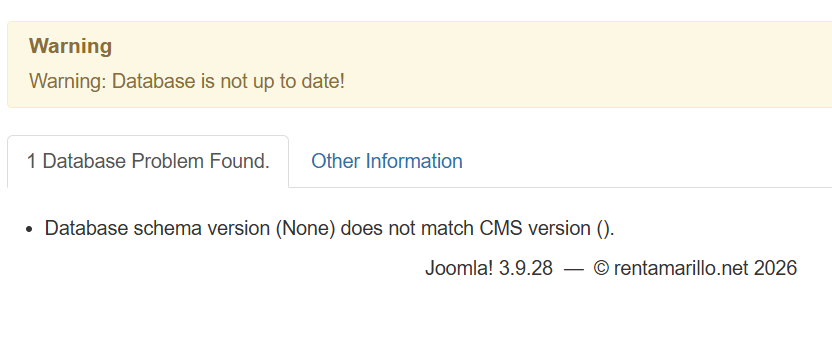
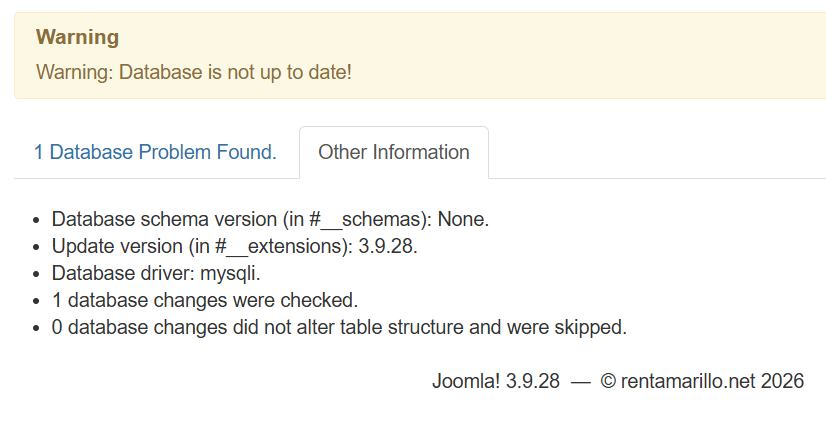
I did as you instructed and still got a Pink Bar Warning. I checked the Extensions Database and came across what I have inserted below (images). Does this have anything to do with the problem I am having? Also, now the website is not even showing up. I do have it backed up, but also sure so long as I can see and use the admin area, the issue is probably missing code somewhere.
Thoughts?
Thank you, Dam.
Mike
Please Log in or Create an account to join the conversation.
- Mr. Dam
- Away
- Administrator
-
Less
More
- Posts: 13789
- Thank you received: 1811
4 months 6 days ago #178568
by Mr. Dam
Replied by Mr. Dam on topic RentAmarillo.net Update
Hi Michael,
Please try updating your Joomla database structure so it matches your current Joomla version.
You can do that by following these steps:
- Login to your Joomla administrator area.
- Go to System.
- Under Maintenance, click Database.
- If Joomla reports that the database structure is not up to date, click Update Structure.
- After that, please clear Joomla cache and check the site again.
This process will synchronize the database structure with the Joomla version you are currently using.
Thanks
Dam
Please try updating your Joomla database structure so it matches your current Joomla version.
You can do that by following these steps:
- Login to your Joomla administrator area.
- Go to System.
- Under Maintenance, click Database.
- If Joomla reports that the database structure is not up to date, click Update Structure.
- After that, please clear Joomla cache and check the site again.
This process will synchronize the database structure with the Joomla version you are currently using.
Thanks
Dam
Please Log in or Create an account to join the conversation.
Moderators: Tuan Pham Ngoc, Giang Dinh Truong, Mr. Dam
Support
Documentation
Information
Copyright © 2026 Joomla Extensions by Joomdonation. All Rights Reserved.
joomdonation.com is not affiliated with or endorsed by the Joomla! Project or Open Source Matters.
The Joomla! name and logo is used under a limited license granted by Open Source Matters the trademark holder in the United States and other countries.
The Joomla! name and logo is used under a limited license granted by Open Source Matters the trademark holder in the United States and other countries.