- Posts: 120
- Thank you received: 1

Need help with Joomla? We are available for hire to help with Joomla customization, upgrades, maintenance, and custom development.
Explore our services
Questions about Payment Form extension
Payments Time Zone
- lcabezas
- Topic Author
- Offline
- Premium Member
-

Less
More
3 weeks 2 days ago #179655
by lcabezas
Payments Time Zone was created by lcabezas
Hi,
Our Joomla configuration Time Zone is set to Singapore which is UTC+8.
However, every time someone pays using our Forms, the recorded time used on the Payment records in PMF is UTC+8.
Ex. I just tried a test Payment and our current time is 22:32, the Payments shows 14:32.
Using 3rd-party payment gateway shows the correct time zone on their payment transaction logs.
Where can we set the time zone used by PMF?
Regards,
Lito
Our Joomla configuration Time Zone is set to Singapore which is UTC+8.
However, every time someone pays using our Forms, the recorded time used on the Payment records in PMF is UTC+8.
Ex. I just tried a test Payment and our current time is 22:32, the Payments shows 14:32.
Using 3rd-party payment gateway shows the correct time zone on their payment transaction logs.
Where can we set the time zone used by PMF?
Regards,
Lito
Please Log in or Create an account to join the conversation.
- Tuan Pham Ngoc
- Offline
- Administrator
-

3 weeks 2 days ago #179656
by Tuan Pham Ngoc
Replied by Tuan Pham Ngoc on topic Payments Time Zone
Hi Lito
The extension should show the datetime base on timezone configured on Global Configuration of your site. Exactly what time you are talking about so that I can check the code?
Tuan
The extension should show the datetime base on timezone configured on Global Configuration of your site. Exactly what time you are talking about so that I can check the code?
Tuan
Please Log in or Create an account to join the conversation.
- lcabezas
- Topic Author
- Offline
- Premium Member
-
Less
More
- Posts: 120
- Thank you received: 1
3 weeks 2 days ago #179657
by lcabezas
Replied by lcabezas on topic Payments Time Zone
Hi Tuan,
That's also my understanding. However, that is not what we are getting.
Joomla Configuration Time Zone is Singapore - see attached.
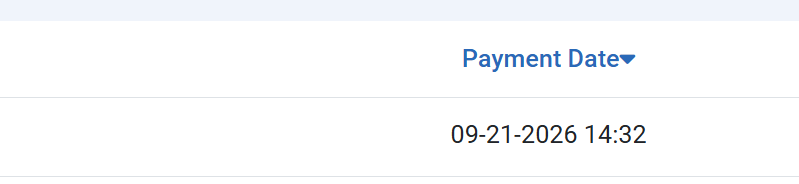
Payments record shows 14:32 (see attached) which I test 10:32PM or 22:32 local time here in the Philippines which is also UTC +8.
Joomla Time Zone was set to Manila before but I changed to Singapore, just to make sure it is UTC+8.
That's also my understanding. However, that is not what we are getting.
Joomla Configuration Time Zone is Singapore - see attached.
Payments record shows 14:32 (see attached) which I test 10:32PM or 22:32 local time here in the Philippines which is also UTC +8.
Joomla Time Zone was set to Manila before but I changed to Singapore, just to make sure it is UTC+8.

Please Log in or Create an account to join the conversation.
- Tuan Pham Ngoc
- Offline
- Administrator
-
3 weeks 2 days ago #179658
by Tuan Pham Ngoc
Replied by Tuan Pham Ngoc on topic Payments Time Zone
Could you please check to see if your account is set to use a different timezone ?
Keep in mind that when display time, if the user sets time zone in his account, it will take higher priority than the time zone of your site
Tuan
Keep in mind that when display time, if the user sets time zone in his account, it will take higher priority than the time zone of your site
Tuan
Please Log in or Create an account to join the conversation.
- lcabezas
- Topic Author
- Offline
- Premium Member
-
Less
More
- Posts: 120
- Thank you received: 1
3 weeks 2 days ago #179659
by lcabezas
Replied by lcabezas on topic Payments Time Zone
Account Time Zone is set to Use Default. I also changed this to Singapore, but same result.
BTW, I checked the Email logs, and the time is correct there. It's only on the Payments view that is displaying UTC+8 Time.
See attached images.
Regards,
Lito
BTW, I checked the Email logs, and the time is correct there. It's only on the Payments view that is displaying UTC+8 Time.
See attached images.
Regards,
Lito
Please Log in or Create an account to join the conversation.
- Tuan Pham Ngoc
- Offline
- Administrator
-
3 weeks 2 days ago #179660
by Tuan Pham Ngoc
Replied by Tuan Pham Ngoc on topic Payments Time Zone
Thanks. Found the code and fixed it. It should be displayed in user timezone (if configured) and fallback to website timezone now
Regards,
Tuan
Regards,
Tuan
Please Log in or Create an account to join the conversation.
- lcabezas
- Topic Author
- Offline
- Premium Member
-
Less
More
- Posts: 120
- Thank you received: 1
3 weeks 2 days ago #179661
by lcabezas
Replied by lcabezas on topic Payments Time Zone
Thanks, Tuan, for fixing it.
Regards,
Lito
Regards,
Lito
Please Log in or Create an account to join the conversation.
- Tuan Pham Ngoc
- Offline
- Administrator
-
3 weeks 2 days ago #179662
by Tuan Pham Ngoc
Replied by Tuan Pham Ngoc on topic Payments Time Zone
You're welcome
Tuan
Tuan
Please Log in or Create an account to join the conversation.
Moderators: Tuan Pham Ngoc
Support
Documentation
Information
Copyright © 2026 Joomla Extensions by Joomdonation. All Rights Reserved.
joomdonation.com is not affiliated with or endorsed by the Joomla! Project or Open Source Matters.
The Joomla! name and logo is used under a limited license granted by Open Source Matters the trademark holder in the United States and other countries.
The Joomla! name and logo is used under a limited license granted by Open Source Matters the trademark holder in the United States and other countries.