- Posts: 20
- Thank you received: 0

Need help with Joomla? We are available for hire to help with Joomla customization, upgrades, maintenance, and custom development.
Explore our services
Questions about Payment Form extension
Custom Fields - [amount] is a of type "Text"
- Roland
- Topic Author
- Offline
- Junior Member
-

Less
More
6 months 2 days ago #177445
by Roland
Custom Fields - [amount] is a of type "Text" was created by Roland
Custom Fields - [amount] is a of type "Text"
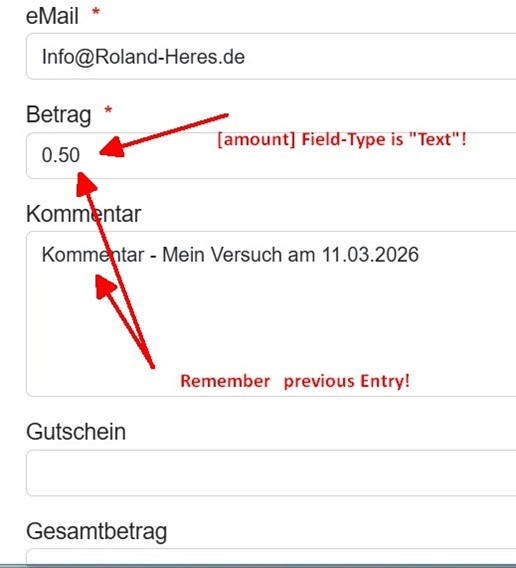
The [amount] Field-Type ist "Text"! (see attached Picture)
This confuses our customers because the amount is displayed as, for example, 1000.0 instead of 1.000,00, as is customary in Germany.
I tested “Number” as the Field-Type, but it is not accepted.--> Is there a way to enter the type “Currency” here?
The [amount] Field-Type ist "Text"! (see attached Picture)
This confuses our customers because the amount is displayed as, for example, 1000.0 instead of 1.000,00, as is customary in Germany.
I tested “Number” as the Field-Type, but it is not accepted.--> Is there a way to enter the type “Currency” here?
Please Log in or Create an account to join the conversation.
- Tuan Pham Ngoc
- Offline
- Administrator
-

6 months 2 days ago #177454
by Tuan Pham Ngoc
Replied by Tuan Pham Ngoc on topic Custom Fields - [amount] is a of type "Text"
Hi
You should be able to change field type to Number. Exactly what's the problem with you change field type to Number?
Tuan
You should be able to change field type to Number. Exactly what's the problem with you change field type to Number?
Tuan
Please Log in or Create an account to join the conversation.
- Roland
- Topic Author
- Offline
- Junior Member
-
Less
More
- Posts: 20
- Thank you received: 0
6 months 2 days ago #177462
by Roland
Replied by Roland on topic Custom Fields - [amount] is a of type "Text"
Hi Tuan,
yes, I can set field type to Number.
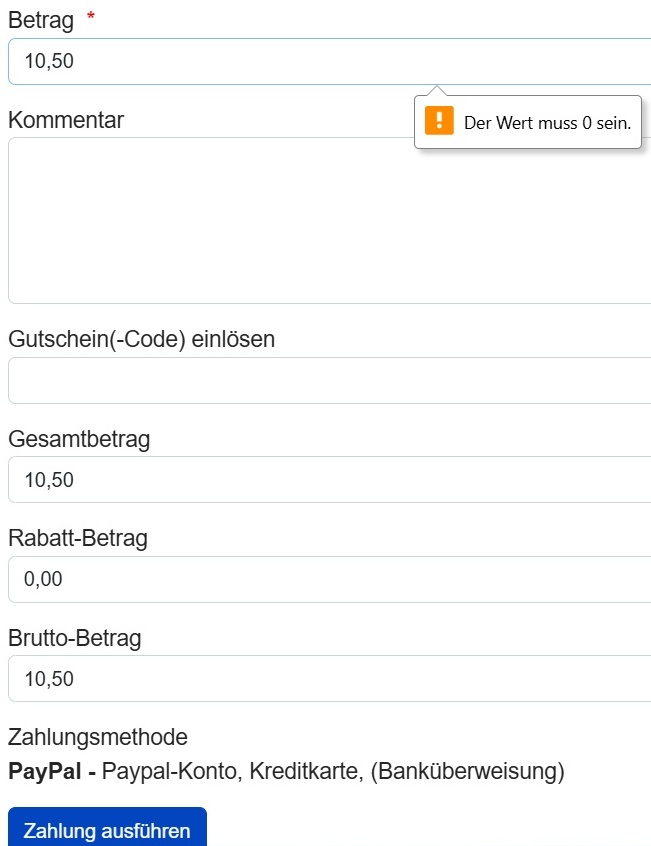
The entered amount is also displayed correctly and carried over to the gross and total amounts.
But when I click “Pay,” I get the error message “The value must be 0.” (see attached Picture: "Der Wert muss 0 sein.")
yes, I can set field type to Number.
The entered amount is also displayed correctly and carried over to the gross and total amounts.
But when I click “Pay,” I get the error message “The value must be 0.” (see attached Picture: "Der Wert muss 0 sein.")
Please Log in or Create an account to join the conversation.
- Tuan Pham Ngoc
- Offline
- Administrator
-
6 months 2 days ago #177470
by Tuan Pham Ngoc
Replied by Tuan Pham Ngoc on topic Custom Fields - [amount] is a of type "Text"
The error is expected. When you set the field to Number, the data is validated by web browser and users need to enter data in valid number format. Nothing is wrong here
Regards,
Tuan
Regards,
Tuan
Please Log in or Create an account to join the conversation.
- Roland
- Topic Author
- Offline
- Junior Member
-
Less
More
- Posts: 20
- Thank you received: 0
6 months 2 days ago #177475
by Roland
Replied by Roland on topic Custom Fields - [amount] is a of type "Text"
Hi Tuan,
I don't understand your answer.
I set the [amount] field type to “Number.”
I entered the number 10,50, which corresponds to the German standard.
The amount (10,50) is correctly carried over to the gross and total amounts.
And yet I still get this error message.
So this does not work for me.
Thanks,
Roland
I don't understand your answer.
I set the [amount] field type to “Number.”
I entered the number 10,50, which corresponds to the German standard.
The amount (10,50) is correctly carried over to the gross and total amounts.
And yet I still get this error message.
So this does not work for me.
Thanks,
Roland
Please Log in or Create an account to join the conversation.
- Tuan Pham Ngoc
- Offline
- Administrator
-
6 months 1 day ago #177479
by Tuan Pham Ngoc
Replied by Tuan Pham Ngoc on topic Custom Fields - [amount] is a of type "Text"
Hi Roland
As I said, it's validated automatically by your web browser. In short, you will have to enter 10.50, not 10,50 and it will work
Regards,
Tuan
As I said, it's validated automatically by your web browser. In short, you will have to enter 10.50, not 10,50 and it will work
Regards,
Tuan
Please Log in or Create an account to join the conversation.
- Roland
- Topic Author
- Offline
- Junior Member
-
Less
More
- Posts: 20
- Thank you received: 0
6 months 8 hours ago #177499
by Roland
Replied by Roland on topic Custom Fields - [amount] is a of type "Text"
Hallo Tuan,
I can see why you think the browser checks the validity of an input and displays the following error message:
“The value must be 0.”/"Der Wert muss 0 sein."
However, I have never received such an error message from the browsers I use when I enter a number or amount.
I'm getting various error messages that I don't understand:
* [amount] with field type “Number”: Input 1000,50 --> Message: “The value must be 0.”
* [amount] with field type “Number”: Input 1000.50 --> Message: “The value must be 0.”
* [amount] with field type “Text”: Input 1000,50 --> Message: “Invalid floating-point number”
* [amount] with field type “Text”: Input 1000.50 --> Online Input, that works!
I thought one possible solution might be to define [amount] as a text field and provide an input mask.
The input form could validate the number format as x.xxx,xx.
What do you think?
But I would probably just get another error message about an invalid number format (see error descrptions above).
Nevertheless, could you tell me what I need to enter in the input field so that I get the following result:
* An integer of any length
* Thousands separator “.” (period)
* Decimal separator “,” (comma)
In any case, I'm really unhappy with the way [amount] is entered right now.
The only way to enter a value for [amount] that works correctly is to use the “Text” field type and enter a value such as 1000.50, which does not follow German numbering conventions.
Do ypu have any other idea?
Regards, Roland
I can see why you think the browser checks the validity of an input and displays the following error message:
“The value must be 0.”/"Der Wert muss 0 sein."
However, I have never received such an error message from the browsers I use when I enter a number or amount.
I'm getting various error messages that I don't understand:
* [amount] with field type “Number”: Input 1000,50 --> Message: “The value must be 0.”
* [amount] with field type “Number”: Input 1000.50 --> Message: “The value must be 0.”
* [amount] with field type “Text”: Input 1000,50 --> Message: “Invalid floating-point number”
* [amount] with field type “Text”: Input 1000.50 --> Online Input, that works!
I thought one possible solution might be to define [amount] as a text field and provide an input mask.
The input form could validate the number format as x.xxx,xx.
What do you think?
But I would probably just get another error message about an invalid number format (see error descrptions above).
Nevertheless, could you tell me what I need to enter in the input field so that I get the following result:
* An integer of any length
* Thousands separator “.” (period)
* Decimal separator “,” (comma)
In any case, I'm really unhappy with the way [amount] is entered right now.
The only way to enter a value for [amount] that works correctly is to use the “Text” field type and enter a value such as 1000.50, which does not follow German numbering conventions.
Do ypu have any other idea?
Regards, Roland
Please Log in or Create an account to join the conversation.
- Tuan Pham Ngoc
- Offline
- Administrator
-
6 months 4 hours ago #177503
by Tuan Pham Ngoc
Replied by Tuan Pham Ngoc on topic Custom Fields - [amount] is a of type "Text"
If you say so, that's strange to me. Could you please submit a support ticket sending me link to the form and super user account of your site so that I can check to see why there is that strange behavior ?
Regards,
Tuan
Regards,
Tuan
Please Log in or Create an account to join the conversation.
Moderators: Tuan Pham Ngoc
Support
Documentation
Information
Copyright © 2026 Joomla Extensions by Joomdonation. All Rights Reserved.
joomdonation.com is not affiliated with or endorsed by the Joomla! Project or Open Source Matters.
The Joomla! name and logo is used under a limited license granted by Open Source Matters the trademark holder in the United States and other countries.
The Joomla! name and logo is used under a limited license granted by Open Source Matters the trademark holder in the United States and other countries.