- Posts: 106
- Thank you received: 2

Need help with Joomla? We are available for hire to help with Joomla customization, upgrades, maintenance, and custom development.
Explore our services
OS Property support center
Category Image Size
- Jim
- Topic Author
- Offline
- Premium Member
-

Less
More
11 years 11 months ago #52944
by Jim
Category Image Size was created by Jim
Hi,
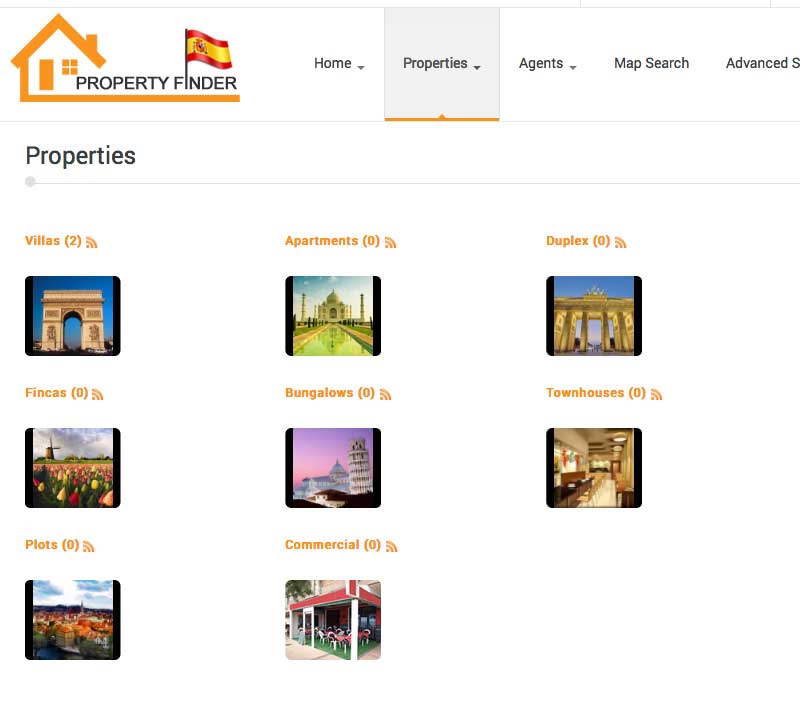
How do I increase the Category Image thumbnail size?
How do I increase the Category Image thumbnail size?
Please Log in or Create an account to join the conversation.
- Mr. Dam
- Offline
- Administrator
-

Less
More
- Posts: 13804
- Thank you received: 1816
11 years 11 months ago #52971
by Mr. Dam
Replied by Mr. Dam on topic Category Image Size
Hi,
Please send me the screenshot? Because the Category layouts are responsive, so we must adjust the css instead increase the image thumbnail size
Thanks
Dam
Please send me the screenshot? Because the Category layouts are responsive, so we must adjust the css instead increase the image thumbnail size
Thanks
Dam
Please Log in or Create an account to join the conversation.
- Jim
- Topic Author
- Offline
- Premium Member
-
Less
More
- Posts: 106
- Thank you received: 2
11 years 11 months ago #52980
by Jim
Replied by Jim on topic Category Image Size
Hi Dam,
I have attached a screenshot, I would like the images to be larger, without affecting or changing images sizes anywhere else on the site.
Please can you show me where abouts i need to make changes and which css file it is i need to change?
many thanks
I have attached a screenshot, I would like the images to be larger, without affecting or changing images sizes anywhere else on the site.
Please can you show me where abouts i need to make changes and which css file it is i need to change?
many thanks
Please Log in or Create an account to join the conversation.
- Mr. Dam
- Offline
- Administrator
-
Less
More
- Posts: 13804
- Thank you received: 1816
11 years 11 months ago #52984
by Mr. Dam
Replied by Mr. Dam on topic Category Image Size
Hi,
In the Back-end > OS Property > Configuration > Tab Category, you can adjust the number columns to 2, the size of thumbnail pictures will be wider
Thanks
Dam
In the Back-end > OS Property > Configuration > Tab Category, you can adjust the number columns to 2, the size of thumbnail pictures will be wider
Thanks
Dam
Please Log in or Create an account to join the conversation.
- Jim
- Topic Author
- Offline
- Premium Member
-
Less
More
- Posts: 106
- Thank you received: 2
11 years 11 months ago #52985
by Jim
Replied by Jim on topic Category Image Size
thanks Dam,
I have tried that, however the images are the same size, just in 2 columns instead of 3, i am wanting larger image sizes
I have tried that, however the images are the same size, just in 2 columns instead of 3, i am wanting larger image sizes
Please Log in or Create an account to join the conversation.
- Mr. Dam
- Offline
- Administrator
-
Less
More
- Posts: 13804
- Thank you received: 1816
11 years 10 months ago #53052
by Mr. Dam
Replied by Mr. Dam on topic Category Image Size
Hi Jim,
Please open file:
components > com_osproperty > helpers > layouts > listcategories.php
find
style="height:80px;"
and you can increase value of height size, for example
style="height:180px;"
Thanks
Dam
Please open file:
components > com_osproperty > helpers > layouts > listcategories.php
find
style="height:80px;"
and you can increase value of height size, for example
style="height:180px;"
Thanks
Dam
Please Log in or Create an account to join the conversation.
- Jim
- Topic Author
- Offline
- Premium Member
-
Less
More
- Posts: 106
- Thank you received: 2
11 years 10 months ago #53063
by Jim
Replied by Jim on topic Category Image Size
Works perfectly Dam, many thanks 
Please Log in or Create an account to join the conversation.
Moderators: Mr. Dam, Nguyen Phu Quan
Support
Documentation
Information
Copyright © 2026 Joomla Extensions by Joomdonation. All Rights Reserved.
joomdonation.com is not affiliated with or endorsed by the Joomla! Project or Open Source Matters.
The Joomla! name and logo is used under a limited license granted by Open Source Matters the trademark holder in the United States and other countries.
The Joomla! name and logo is used under a limited license granted by Open Source Matters the trademark holder in the United States and other countries.