- Posts: 12
- Thank you received: 0

Need help with Joomla? We are available for hire to help with Joomla customization, upgrades, maintenance, and custom development.
Explore our services Where can I change the colors/CSS on PLANS front end presentation?
- Laurie Stevens
- Topic Author
- Offline
- New Member
-

Less
More
4 weeks 15 hours ago #179549
by Laurie Stevens
Where can I change the colors on PLANS front end presentation? was created by Laurie Stevens
I've used the search function for "change color" and "CSS" and can't find what I'm looking for:
I need to change the awful colors that show as standard on the front end of LIST DEFAULT LAYOUT. Where can I do this?
TIA!
I need to change the awful colors that show as standard on the front end of LIST DEFAULT LAYOUT. Where can I do this?
TIA!
Please Log in or Create an account to join the conversation.
- Tuan Pham Ngoc
- Away
- Administrator
-

4 weeks 15 hours ago #179550
by Tuan Pham Ngoc
Replied by Tuan Pham Ngoc on topic Where can I change the colors on PLANS front end presentation?
Hi Laurie
Could you please send me link to the page and explain how you want to change it? We will then look at it and guide you
Regards,
Tuan
Could you please send me link to the page and explain how you want to change it? We will then look at it and guide you
Regards,
Tuan
Please Log in or Create an account to join the conversation.
- Laurie Stevens
- Topic Author
- Offline
- New Member
-
Less
More
- Posts: 12
- Thank you received: 0
3 weeks 6 days ago - 3 weeks 6 days ago #179561
by Laurie Stevens
Replied by Laurie Stevens on topic Where can I change the colors/CSS on PLANS front end presentation?
Hi Tuan and thank you for responding so quickly.
Actually, I followed your directions posted here: docs.joomdonation.com/membershippro/adva...splay-view-in-module
By creating the module, assigning it a position, making that position within my template, etc., I was able to create the page I want, more or less. The page from my existing site now looks very close to the page I am creating in my newly-redesigned site. There are still some things I'd like to change, though, so I am trying to 'inspect' to see where I would style the buttons, for example. I'd be grateful if you could point me in the right direction.
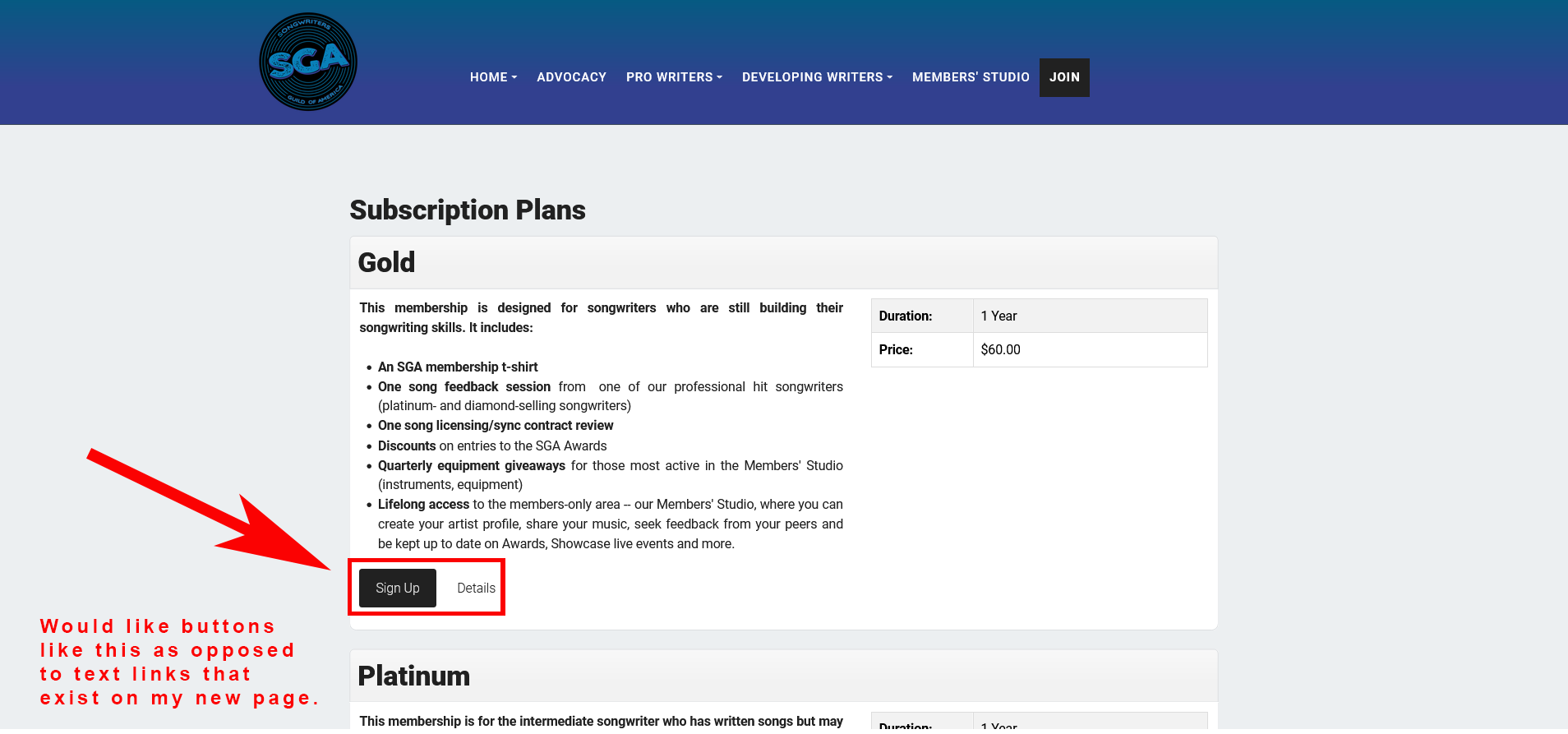
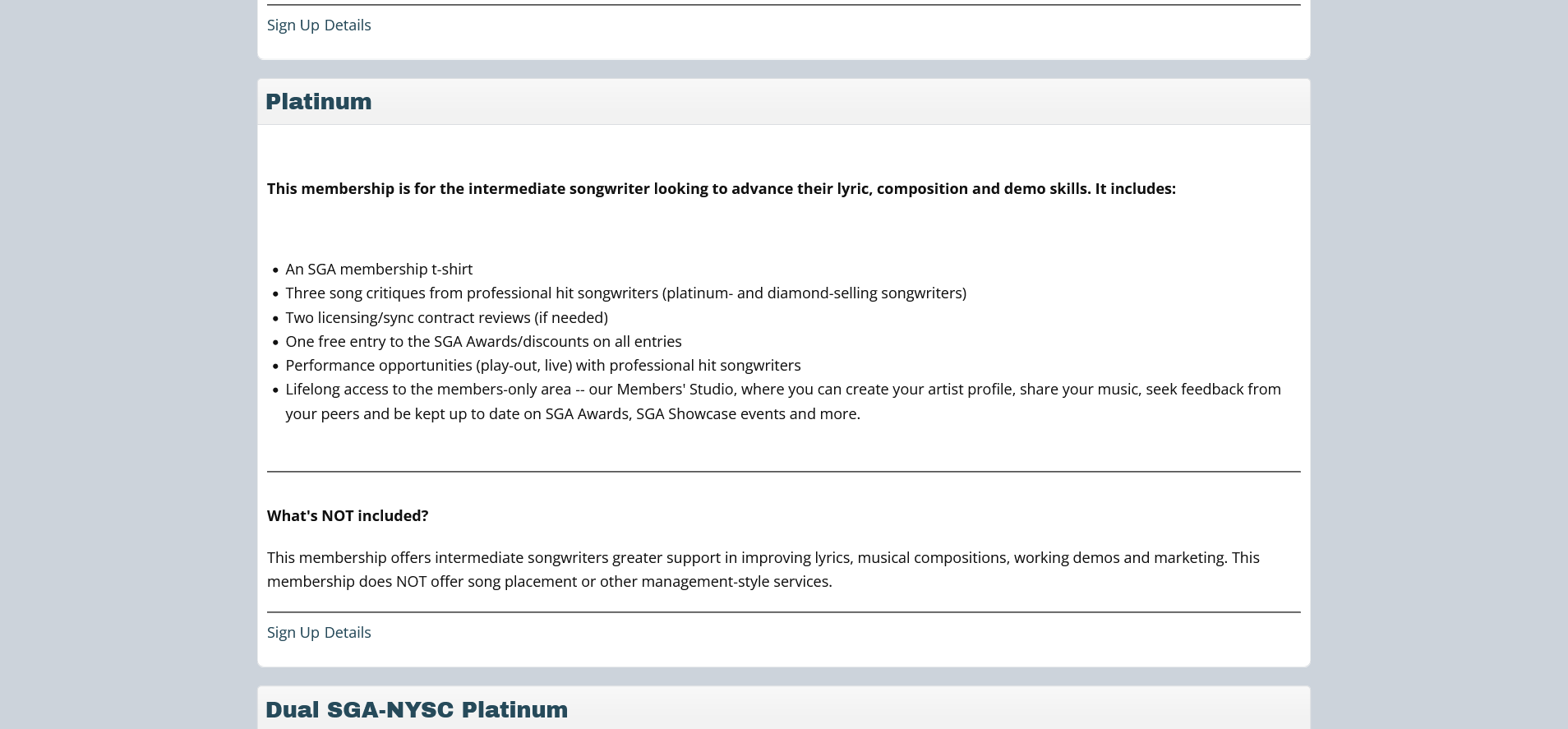
Here are some screen shots. One is the membership plan listing on my current site. It has buttons for SIGN UP and DETAILS. The second image shows my new page that I am including in my redesign. It has text links. I'd prefer buttons to text links.
PS - I just saw that there is a custom CSS option in Membership Pro configuration. Is that where I would try to style the text links into buttons? I suspect it's not because then it will apply for the whole Membership Pro extension, right?
Thanks!
Actually, I followed your directions posted here: docs.joomdonation.com/membershippro/adva...splay-view-in-module
By creating the module, assigning it a position, making that position within my template, etc., I was able to create the page I want, more or less. The page from my existing site now looks very close to the page I am creating in my newly-redesigned site. There are still some things I'd like to change, though, so I am trying to 'inspect' to see where I would style the buttons, for example. I'd be grateful if you could point me in the right direction.
Here are some screen shots. One is the membership plan listing on my current site. It has buttons for SIGN UP and DETAILS. The second image shows my new page that I am including in my redesign. It has text links. I'd prefer buttons to text links.
PS - I just saw that there is a custom CSS option in Membership Pro configuration. Is that where I would try to style the text links into buttons? I suspect it's not because then it will apply for the whole Membership Pro extension, right?
Thanks!
Last edit: 3 weeks 6 days ago by Laurie Stevens. Reason: Ask clarifying question.
Please Log in or Create an account to join the conversation.
- Tuan Pham Ngoc
- Away
- Administrator
-
3 weeks 6 days ago #179564
by Tuan Pham Ngoc
Replied by Tuan Pham Ngoc on topic Where can I change the colors/CSS on PLANS front end presentation?
Hi Laurie
The buttons from Membership Pro should inherit button styles of your site template, so it should not look like a simple link like in the screenshot you posted. So before adding any custom css (Yes, css you add to Custom CSS will only affect Membership Pro, that's the right place to add css to customize style of Membership Pro), can you submit a support ticket sending us link to the page and if possible, super user account of your site so that I can take a quick look at your setup to see why it is not looking good ?
Regards,
Tuan
The buttons from Membership Pro should inherit button styles of your site template, so it should not look like a simple link like in the screenshot you posted. So before adding any custom css (Yes, css you add to Custom CSS will only affect Membership Pro, that's the right place to add css to customize style of Membership Pro), can you submit a support ticket sending us link to the page and if possible, super user account of your site so that I can take a quick look at your setup to see why it is not looking good ?
Regards,
Tuan
Please Log in or Create an account to join the conversation.
- Laurie Stevens
- Topic Author
- Offline
- New Member
-
Less
More
- Posts: 12
- Thank you received: 0
3 weeks 4 days ago #179576
by Laurie Stevens
Replied by Laurie Stevens on topic Where can I change the colors/CSS on PLANS front end presentation?
This message contains secure information
Please Log in or Create an account to join the conversation.
- Tuan Pham Ngoc
- Away
- Administrator
-
3 weeks 4 days ago #179577
by Tuan Pham Ngoc
Replied by Tuan Pham Ngoc on topic Where can I change the colors/CSS on PLANS front end presentation?
Hi Laurie
Better go to joomdonation.com/support-tickets.html , submit a support ticket and we will work together from there
And if you want to use Page Builder, maybe you should use Yootheme Page Builder than the page builder you are using, it is more reliable and widely used by Joomla community
Regards,
Tuan
Better go to joomdonation.com/support-tickets.html , submit a support ticket and we will work together from there
And if you want to use Page Builder, maybe you should use Yootheme Page Builder than the page builder you are using, it is more reliable and widely used by Joomla community
Regards,
Tuan
Please Log in or Create an account to join the conversation.
- Laurie Stevens
- Topic Author
- Offline
- New Member
-
Less
More
- Posts: 12
- Thank you received: 0
3 weeks 3 days ago #179588
by Laurie Stevens
Replied by Laurie Stevens on topic Where can I change the colors/CSS on PLANS front end presentation?
I can open a ticket but... I am taking a new job across country. There is no more time to remake this entire site again. We have what we have for now. It's nice but new. I don't know if it is causing an issue. I pointed out as a possibility. And I disliked YooTheme when I tried it as a test leading up to my choice. I see that it is very secure and their technical SEO is outstanding. However, I don't know how it's called a drag-and-drop based page builder. It isn't.
Please Log in or Create an account to join the conversation.
- Tuan Pham Ngoc
- Away
- Administrator
-
3 weeks 3 days ago #179592
by Tuan Pham Ngoc
Replied by Tuan Pham Ngoc on topic Where can I change the colors/CSS on PLANS front end presentation?
Hi Laurie
I configured Membership Pro to load Bootstrap Css and it looks better now. Please check to see if it is OK for you
If you need the button to have same style with the buttons of the layout you build by nice page, I will ask my template developer to look at it further and adjust it for you
Regards,
Tuan
I configured Membership Pro to load Bootstrap Css and it looks better now. Please check to see if it is OK for you
If you need the button to have same style with the buttons of the layout you build by nice page, I will ask my template developer to look at it further and adjust it for you
Regards,
Tuan
Please Log in or Create an account to join the conversation.
- Tuan Pham Ngoc
- Away
- Administrator
-
3 weeks 3 days ago #179593
by Tuan Pham Ngoc
Replied by Tuan Pham Ngoc on topic Where can I change the colors/CSS on PLANS front end presentation?
The problem with Nice Page is that it seems does not load Bootstrap CSS which is needed by most (if not all) Joomla extensions. So you would get style issues with any third party Joomla extensions you are using on the site
Regards,
Tuan
Regards,
Tuan
The following user(s) said Thank You: Laurie Stevens
Please Log in or Create an account to join the conversation.
- Laurie Stevens
- Topic Author
- Offline
- New Member
-
Less
More
- Posts: 12
- Thank you received: 0
3 weeks 2 days ago #179609
by Laurie Stevens
Replied by Laurie Stevens on topic Where can I change the colors/CSS on PLANS front end presentation?
Interesting. Thank you for doing this for me. I was going to open a ticket and planned to offer to pay for any help I needed. But, I appreciate you doing this for me. I am contacting NicePage to let them know about the Bootstrap loading issues. I assume you found some way to force the load. The buttons and page look perfect now. I don't need anything else. It's good to know about the Bootstrap CSS issue.
Someone else will be handling this site soon and I have told him that two developers have now suggested YooTheme. I do like their technical SEO and their security reputation. NicePage was chosen for this redesign because the person taking the job already knows it. But, not in connection to Joomla sites. So, YooTheme is still on my mind as something I may help them move to - once I learn it myself. I wish I could go back to building pages with nothing but HTML/CSS and JS. Page builders all seem to have their limitations.
Someone else will be handling this site soon and I have told him that two developers have now suggested YooTheme. I do like their technical SEO and their security reputation. NicePage was chosen for this redesign because the person taking the job already knows it. But, not in connection to Joomla sites. So, YooTheme is still on my mind as something I may help them move to - once I learn it myself. I wish I could go back to building pages with nothing but HTML/CSS and JS. Page builders all seem to have their limitations.
Please Log in or Create an account to join the conversation.
Support
Documentation
Information
Copyright © 2026 Joomla Extensions by Joomdonation. All Rights Reserved.
joomdonation.com is not affiliated with or endorsed by the Joomla! Project or Open Source Matters.
The Joomla! name and logo is used under a limited license granted by Open Source Matters the trademark holder in the United States and other countries.
The Joomla! name and logo is used under a limited license granted by Open Source Matters the trademark holder in the United States and other countries.