- Posts: 3
- Thank you received: 0

Need help with Joomla? We are available for hire to help with Joomla customization, upgrades, maintenance, and custom development.
Explore our services Sign Up button only available when Subscribe Access is guest
- Pawel Meister
- Topic Author
- Offline
- New Member
-

Less
More
6 months 2 weeks ago #177484
by Pawel Meister
Sign Up button only available when Subscribe Access is guest was created by Pawel Meister
Hello everyone,
I hope I can find someone who might already have solved the following problem:
The “Sign In” button is missing from all my plans. It only appears when “guest” is selected as the subscriber access option. That seems counterintuitive to me. I only want to allow logged-in users to book plans.
When I’m logged in, my status is “registered.” In other words, the opposite of “Guest.” But as a registered user, I shouldn’t see anything that has set the Subscriber Access to “Guest.” Yet the Sign In button is only visible in that exact scenario. The result is that clicking the Sign In button leads to an “Access denied” error because I’m not a ‘Guest’ but “registered.”
I just wanted to try my luck here. Maybe there’s someone here who can correct me on what I’m doing wrong.
Thanks for your time.
Best Regards
Pawel
I hope I can find someone who might already have solved the following problem:
The “Sign In” button is missing from all my plans. It only appears when “guest” is selected as the subscriber access option. That seems counterintuitive to me. I only want to allow logged-in users to book plans.
When I’m logged in, my status is “registered.” In other words, the opposite of “Guest.” But as a registered user, I shouldn’t see anything that has set the Subscriber Access to “Guest.” Yet the Sign In button is only visible in that exact scenario. The result is that clicking the Sign In button leads to an “Access denied” error because I’m not a ‘Guest’ but “registered.”
I just wanted to try my luck here. Maybe there’s someone here who can correct me on what I’m doing wrong.
Thanks for your time.
Best Regards
Pawel
Please Log in or Create an account to join the conversation.
- Tuan Pham Ngoc
- Offline
- Administrator
-

6 months 2 weeks ago #177488
by Tuan Pham Ngoc
Replied by Tuan Pham Ngoc on topic Sign Up button only available when Subscribe Access is guest
Hi Pawel
Normally, you would set Subscribe Access to Public. If you only want logged in users to be able to Subscribe for your plan, please set Subscribe Access to Registered and it should work as expected
Regards,
Tuan
Normally, you would set Subscribe Access to Public. If you only want logged in users to be able to Subscribe for your plan, please set Subscribe Access to Registered and it should work as expected
Regards,
Tuan
Please Log in or Create an account to join the conversation.
- Pawel Meister
- Topic Author
- Offline
- New Member
-
Less
More
- Posts: 3
- Thank you received: 0
6 months 2 weeks ago #177501
by Pawel Meister
Replied by Pawel Meister on topic Sign Up button only available when Subscribe Access is guest
Hi Tuan,
Thank you for taking the time to reply. I appreciate that.
I followed your suggestion and have now set all the plans to “Public.” I don't use categories. The “Membership Status” module is set to “Public,” and the link in main menu to the plan details is also set to “Public". Joomla has 5 access levels, and the “Sign In” button is visible only for ‘Guest’—without exception. For “Public” and all other levels, the button is hidden immediately.
I thought I could figure out this “problem,” but I really need some help. I know it must be my fault; otherwise, everyone would be having these problems.
Should I create a ticket for this? I'm really at a loss—I'm seeing the same behavior on a second test installation. I really don't know what else to do.
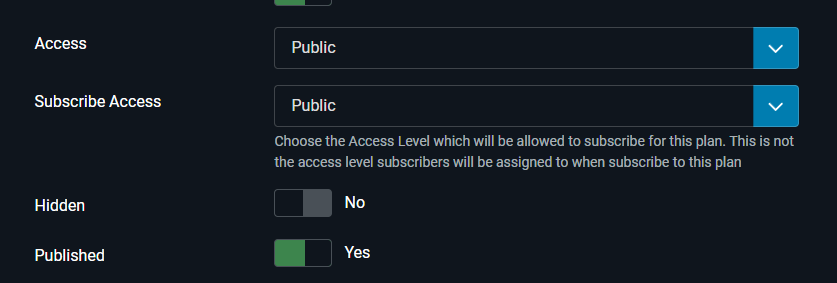
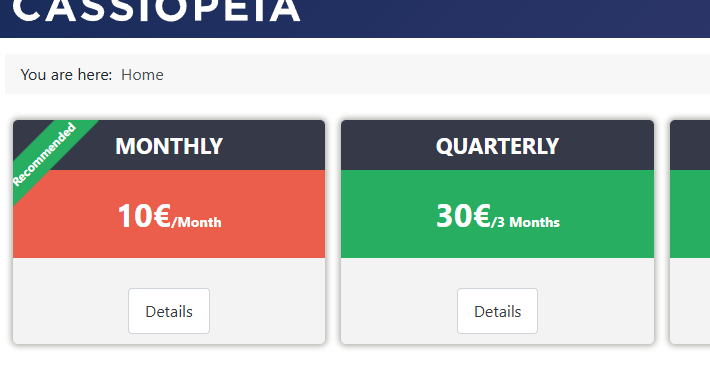
In case it helps, I've included two screenshots where you can see the access level, but the “Sign in” button is still missing.
Best regards,
Pawel
Thank you for taking the time to reply. I appreciate that.
I followed your suggestion and have now set all the plans to “Public.” I don't use categories. The “Membership Status” module is set to “Public,” and the link in main menu to the plan details is also set to “Public". Joomla has 5 access levels, and the “Sign In” button is visible only for ‘Guest’—without exception. For “Public” and all other levels, the button is hidden immediately.
I thought I could figure out this “problem,” but I really need some help.
I know it must be my fault; otherwise, everyone would be having these problems.Should I create a ticket for this? I'm really at a loss—I'm seeing the same behavior on a second test installation. I really don't know what else to do.
In case it helps, I've included two screenshots where you can see the access level, but the “Sign in” button is still missing.
Best regards,
Pawel
Please Log in or Create an account to join the conversation.
- Tuan Pham Ngoc
- Offline
- Administrator
-
6 months 2 weeks ago #177502
by Tuan Pham Ngoc
Replied by Tuan Pham Ngoc on topic Sign Up button only available when Subscribe Access is guest
Hi Pawel
Yes. Please submit a support ticket sending us super user account of your site and link to the plan from frontend of your site. I will check to see why it is not working and get it sorted
Regards,
Tuan
Yes. Please submit a support ticket sending us super user account of your site and link to the plan from frontend of your site. I will check to see why it is not working and get it sorted
Regards,
Tuan
The following user(s) said Thank You: Pawel Meister
Please Log in or Create an account to join the conversation.
- Pawel Meister
- Topic Author
- Offline
- New Member
-
Less
More
- Posts: 3
- Thank you received: 0
6 months 2 weeks ago #177528
by Pawel Meister
Replied by Pawel Meister on topic Sign Up button only available when Subscribe Access is guest
Hi Tuan,
A big thank you for proactively resolving my issue with the 4.5.1 update—it’s now working and displaying as it should. The Sign In button is there now. Please let me know if I should still open a ticket for documentation purposes. Thanks again.
There should be more developers like you—the world would be a better place
Best Regards
Pawel
A big thank you for proactively resolving my issue with the 4.5.1 update—it’s now working and displaying as it should. The Sign In button is there now. Please let me know if I should still open a ticket for documentation purposes. Thanks again.
There should be more developers like you—the world would be a better place
Best Regards
Pawel
Please Log in or Create an account to join the conversation.
- Tuan Pham Ngoc
- Offline
- Administrator
-
6 months 2 weeks ago #177529
by Tuan Pham Ngoc
Replied by Tuan Pham Ngoc on topic Sign Up button only available when Subscribe Access is guest
Hi Pawel
Yes. I figured out my mistake this morning and fixed it. As it is working well for you, no need to open a support ticket
Sorry for the inconvenience
Regards,
Tuan
Yes. I figured out my mistake this morning and fixed it. As it is working well for you, no need to open a support ticket
Sorry for the inconvenience
Regards,
Tuan
The following user(s) said Thank You: Pawel Meister
Please Log in or Create an account to join the conversation.
Support
Documentation
Information
Copyright © 2026 Joomla Extensions by Joomdonation. All Rights Reserved.
joomdonation.com is not affiliated with or endorsed by the Joomla! Project or Open Source Matters.
The Joomla! name and logo is used under a limited license granted by Open Source Matters the trademark holder in the United States and other countries.
The Joomla! name and logo is used under a limited license granted by Open Source Matters the trademark holder in the United States and other countries.