- Posts: 24
- Thank you received: 0

Need help with Joomla? We are available for hire to help with Joomla customization, upgrades, maintenance, and custom development.
Explore our services PDF Ticket formatting
- Seán Ó Séaghdha
- Topic Author
- Offline
- Junior Member
-

Less
More
5 hours 37 minutes ago - 5 hours 25 minutes ago #180132
by Seán Ó Séaghdha
PDF Ticket formatting was created by Seán Ó Séaghdha
I’m trying to set up PDF tickets and having a few problems.
When I change the font in Configuration | PDF Settings it changes for the next e-mail, but then goes back to Times New Roman. I’m generating a lot of test e-mails at the moment so I noticed this doesn’t stick.
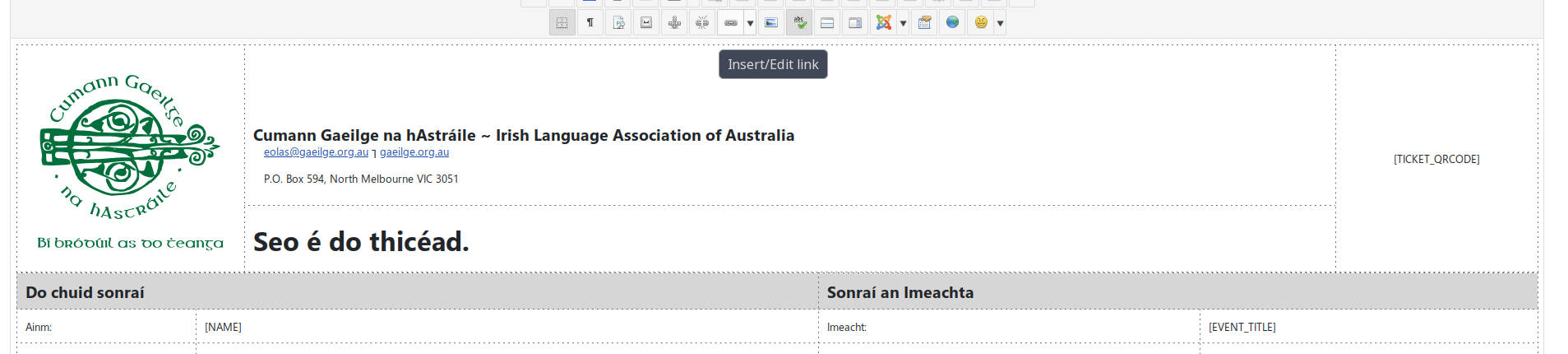
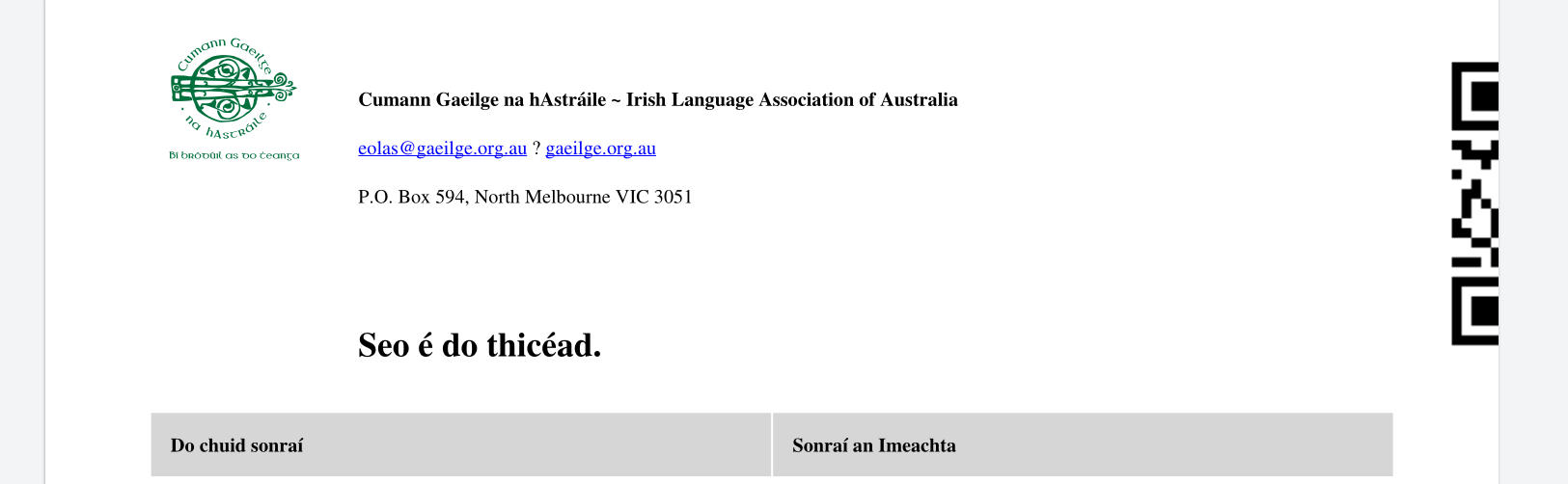
I can’t figure out how to get our logo to appear at a predictable size in the PDF either. I can get it looking right in the editor and the HTML/CSS is all correct, but in the PDF it either appears very, very small or so large that it pushes the QRCode off the page.
I started off using standard CSS ways of sizing it proportionally, using the PNG that we normally use in e-mail, but that produced a very tiny image in the PDF. Then I tried SVG which produced an image too large in the PDF (it’s nominal size, for what that’s worth in an SVG, is 90x90). Then I tried exporting a new PNG explicity 300x300 pixels and tried specifying a width of 3 cm, but the image in the PDF is ~1.8 cm.
I can’t find any logical relationship between how the image appears in the editor or how it’s sized and how it ends up in the PDF. Do you have any recommendations?
Example in Editor:
Result in PDF:
When I change the font in Configuration | PDF Settings it changes for the next e-mail, but then goes back to Times New Roman. I’m generating a lot of test e-mails at the moment so I noticed this doesn’t stick.
I can’t figure out how to get our logo to appear at a predictable size in the PDF either. I can get it looking right in the editor and the HTML/CSS is all correct, but in the PDF it either appears very, very small or so large that it pushes the QRCode off the page.
I started off using standard CSS ways of sizing it proportionally, using the PNG that we normally use in e-mail, but that produced a very tiny image in the PDF. Then I tried SVG which produced an image too large in the PDF (it’s nominal size, for what that’s worth in an SVG, is 90x90). Then I tried exporting a new PNG explicity 300x300 pixels and tried specifying a width of 3 cm, but the image in the PDF is ~1.8 cm.
I can’t find any logical relationship between how the image appears in the editor or how it’s sized and how it ends up in the PDF. Do you have any recommendations?
Example in Editor:
Result in PDF:
Last edit: 5 hours 25 minutes ago by Seán Ó Séaghdha.
Please Log in or Create an account to join the conversation.
- Tuan Pham Ngoc
- Offline
- Administrator
-

4 hours 24 minutes ago #180133
by Tuan Pham Ngoc
Replied by Tuan Pham Ngoc on topic PDF Ticket formatting
Hi Seán
Sadly, working with PDF layout is much harder compare to HTML and honestly, I also do not have much experience with it
By default, Events Booking uses TCPDF for generating PDF and it does not have good support for HTML and css (only basic support). I would suggest you to try to use MPDF plugin, it uses MPDF library, and that has much better support for css. See docs.joomdonation.com/eventsbooking/plugins/mpdf
Regards,
Tuan
Sadly, working with PDF layout is much harder compare to HTML and honestly, I also do not have much experience with it
By default, Events Booking uses TCPDF for generating PDF and it does not have good support for HTML and css (only basic support). I would suggest you to try to use MPDF plugin, it uses MPDF library, and that has much better support for css. See docs.joomdonation.com/eventsbooking/plugins/mpdf
Regards,
Tuan
Please Log in or Create an account to join the conversation.
Moderators: Tuan Pham Ngoc
Support
Documentation
Information
Copyright © 2026 Joomla Extensions by Joomdonation. All Rights Reserved.
joomdonation.com is not affiliated with or endorsed by the Joomla! Project or Open Source Matters.
The Joomla! name and logo is used under a limited license granted by Open Source Matters the trademark holder in the United States and other countries.
The Joomla! name and logo is used under a limited license granted by Open Source Matters the trademark holder in the United States and other countries.