- Posts: 44
- Thank you received: 1

Need help with Joomla? We are available for hire to help with Joomla customization, upgrades, maintenance, and custom development.
Explore our services Category background colors do not show in the calendar
- Toolie Merchant
- Topic Author
- Offline
- Senior Member
-

Less
More
1 month 3 weeks ago #179385
by Toolie Merchant
Category background colors do not show in the calendar was created by Toolie Merchant
Hi there, this issue has been evident to me since version 5.4. I have set background colors in my installation but they do not show up at all in the Monthly Calendar (which I use as default) nor in the Weekly or Daily version clickable from the Monthly calendar.
remotescrumstudy.com/calendar
I have added a lot of CSS instructions to get the course titles and scheduled-hour spacing to look right in the Monthly calendar. But I did not set a default color for the courses; the Category background color should take precedence. Can you tell me where to look to find what might be blocking those Category colors from coming through?
remotescrumstudy.com/calendar
I have added a lot of CSS instructions to get the course titles and scheduled-hour spacing to look right in the Monthly calendar. But I did not set a default color for the courses; the Category background color should take precedence. Can you tell me where to look to find what might be blocking those Category colors from coming through?
Please Log in or Create an account to join the conversation.
- Tuan Pham Ngoc
- Away
- Administrator
-

1 month 3 weeks ago #179386
by Tuan Pham Ngoc
Replied by Tuan Pham Ngoc on topic Category background colors do not show in the calendar
Hi Toolie
For this, we will have to check it directly on your site. Could you please submit a support ticket sending me super user account of your site, link to this calendar page and tell me the category which you configure color but not works in the calendar
I will check to see why it is not working and get it sorted
Regards,
Tuan
For this, we will have to check it directly on your site. Could you please submit a support ticket sending me super user account of your site, link to this calendar page and tell me the category which you configure color but not works in the calendar
I will check to see why it is not working and get it sorted
Regards,
Tuan
Please Log in or Create an account to join the conversation.
- Toolie Merchant
- Topic Author
- Offline
- Senior Member
-
Less
More
- Posts: 44
- Thank you received: 1
1 month 3 weeks ago #179387
by Toolie Merchant
Replied by Toolie Merchant on topic Category background colors do not show in the calendar
Ticket created. Thank you Tuan!
Please Log in or Create an account to join the conversation.
- Tuan Pham Ngoc
- Away
- Administrator
-
1 month 3 weeks ago #179388
by Tuan Pham Ngoc
Replied by Tuan Pham Ngoc on topic Category background colors do not show in the calendar
Thanks Toolie. Received ticket but the super user account is incorrect. Please check and reply me via support ticket and we will continue from there
Regards,
Tuan
Regards,
Tuan
Please Log in or Create an account to join the conversation.
- Tuan Pham Ngoc
- Away
- Administrator
-
1 month 3 weeks ago #179389
by Tuan Pham Ngoc
Replied by Tuan Pham Ngoc on topic Category background colors do not show in the calendar
Just want to update that there is no bug here. The extension use background color and text color from it's main category, not additional categories for displaying on the calendar
So you need to set the Main Category of the event to the right category and it will work well
Regards,
Tuan
So you need to set the Main Category of the event to the right category and it will work well
Regards,
Tuan
Please Log in or Create an account to join the conversation.
- Toolie Merchant
- Topic Author
- Offline
- Senior Member
-
Less
More
- Posts: 44
- Thank you received: 1
1 month 3 weeks ago #179398
by Toolie Merchant
Replied by Toolie Merchant on topic Category background colors do not show in the calendar
OK, um, I don't actually have a defined color in my top category; I use it for grouping. The subcategories shown below have their own colors, and that's what I'd like to have visible on the monthly calendar.
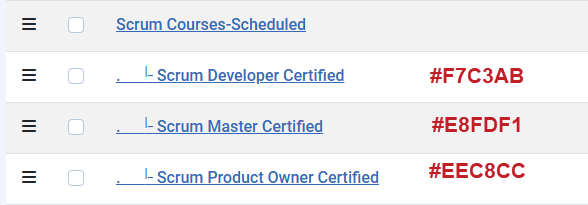
Can you think of a way I can accomplish that?
Toolie
Can you think of a way I can accomplish that?
Toolie
Please Log in or Create an account to join the conversation.
- Tuan Pham Ngoc
- Away
- Administrator
-
1 month 3 weeks ago #179399
by Tuan Pham Ngoc
Replied by Tuan Pham Ngoc on topic Category background colors do not show in the calendar
Hi Toolie
The only way is set the sub-category to be Main Category of your event. Then the top level category could be additional categories of the event
Regards,
Tuan
The only way is set the sub-category to be Main Category of your event. Then the top level category could be additional categories of the event
Regards,
Tuan
Please Log in or Create an account to join the conversation.
- Toolie Merchant
- Topic Author
- Offline
- Senior Member
-
Less
More
- Posts: 44
- Thank you received: 1
1 month 3 weeks ago #179400
by Toolie Merchant
Replied by Toolie Merchant on topic Category background colors do not show in the calendar
OK Tuan, I'll have to experiment with that to see whether it will impact my other uses of the category in my website.
Thanks for explaining, and have a good rest of your week.
Toolie
Thanks for explaining, and have a good rest of your week.
Toolie
Please Log in or Create an account to join the conversation.
- Tuan Pham Ngoc
- Away
- Administrator
-
1 month 3 weeks ago #179401
by Tuan Pham Ngoc
Replied by Tuan Pham Ngoc on topic Category background colors do not show in the calendar
The other option is customize the code to use color from the additional categories. But that would require customization and will cost you some fee. Maybe not worth to do that
Tuan
Tuan
Please Log in or Create an account to join the conversation.
- Toolie Merchant
- Topic Author
- Offline
- Senior Member
-
Less
More
- Posts: 44
- Thank you received: 1
1 month 3 weeks ago - 1 month 3 weeks ago #179402
by Toolie Merchant
Replied by Toolie Merchant on topic Category background colors do not show in the calendar
Hi Tuan, it looks like swapping the categories in the individual events works as specified, and it appears that doing so doesn't interfere with the other ways I use the categories. I had made an assumption that the primary category had to be the Top-level category in the individual events, and that's not the case. I don't know whether it's worthwhile to add that information in the documentation, but I'd appreciate it if you did, and hopefully other customers would also.
Thanks so much,
Toolie

Thanks so much,
Toolie
Last edit: 1 month 3 weeks ago by Toolie Merchant. Reason: Added missing image.
Please Log in or Create an account to join the conversation.
Moderators: Tuan Pham Ngoc
Support
Documentation
Information
Copyright © 2026 Joomla Extensions by Joomdonation. All Rights Reserved.
joomdonation.com is not affiliated with or endorsed by the Joomla! Project or Open Source Matters.
The Joomla! name and logo is used under a limited license granted by Open Source Matters the trademark holder in the United States and other countries.
The Joomla! name and logo is used under a limited license granted by Open Source Matters the trademark holder in the United States and other countries.