- Posts: 79
- Thank you received: 1

Need help with Joomla? We are available for hire to help with Joomla customization, upgrades, maintenance, and custom development.
Explore our services Member 1 Information - change language file not working
- Claire Haas
- Topic Author
- Offline
- Senior Member
-

Less
More
5 months 1 week ago #178200
by Claire Haas
Member 1 Information - change language file not working was created by Claire Haas
Hi,
I am trying to change the text: Member 1 Information, Member 2 Information etc.
In the Translation section I have changed EB_MEMBER_REGISTRATION accordingly - it did not work.
I have also tried using Joomla Language Overrides.
I have tried clearing Joomla and server cache and turned NGINX Caching off.
Nothing I have done has worked, it still says: Member 1 Information, Member 2 Information etc.
How can I achieve this please?
Kind regards
Claire
I am trying to change the text: Member 1 Information, Member 2 Information etc.
In the Translation section I have changed EB_MEMBER_REGISTRATION accordingly - it did not work.
I have also tried using Joomla Language Overrides.
I have tried clearing Joomla and server cache and turned NGINX Caching off.
Nothing I have done has worked, it still says: Member 1 Information, Member 2 Information etc.
How can I achieve this please?
Kind regards
Claire
Please Log in or Create an account to join the conversation.
- Tuan Pham Ngoc
- Away
- Administrator
-

5 months 1 week ago #178203
by Tuan Pham Ngoc
Replied by Tuan Pham Ngoc on topic Member 1 Information - change language file not working
Hi Claire
Is it group registration or ticket types with collecting members? You do not need to use Joomla language overrides, just change the language item directly in in Events Booking -> Translation
- If it is standard group registration, the language item to change is EB_MEMBER_REGISTRATION
- If it is ticket types with collect members information, the language item to change is EB_MEMBER_INFORMATION
Could you please check that again?
Tuan
Is it group registration or ticket types with collecting members? You do not need to use Joomla language overrides, just change the language item directly in in Events Booking -> Translation
- If it is standard group registration, the language item to change is EB_MEMBER_REGISTRATION
- If it is ticket types with collect members information, the language item to change is EB_MEMBER_INFORMATION
Could you please check that again?
Tuan
Please Log in or Create an account to join the conversation.
- Claire Haas
- Topic Author
- Offline
- Senior Member
-
Less
More
- Posts: 79
- Thank you received: 1
5 months 1 week ago #178207
by Claire Haas
Replied by Claire Haas on topic Member 1 Information - change language file not working
Hi Tuan,
It is ticket types, but...
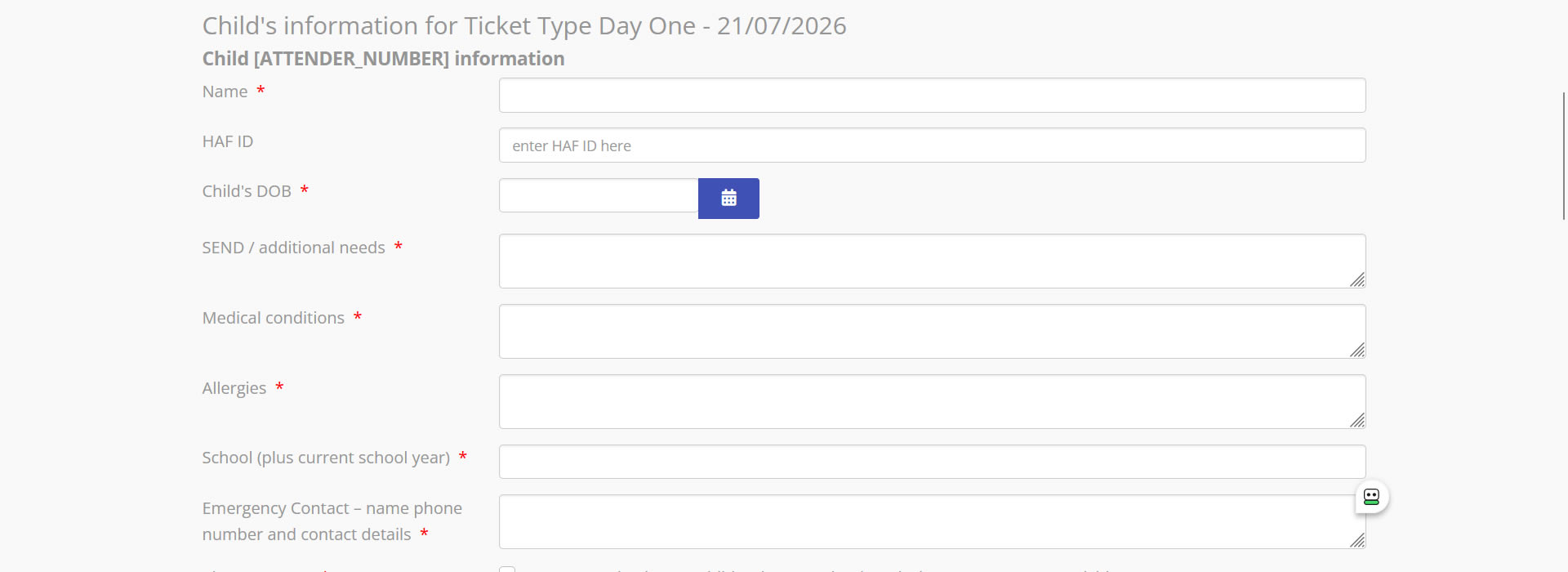
EB_MEMBER_INFORMATION did not exist in Events Booking -> Translation. I added it with the same translation as EB_MEMBER_REGISTRATION, so: Child [ATTENDER_NUMBER] information.
Now instead of showing Child 1 information, Child 2 information etc it shows: Child [ATTENDER_NUMBER] information. It does not show the member number. Screenshot attached.
How can I fix this please?
Kind regards
It is ticket types, but...
EB_MEMBER_INFORMATION did not exist in Events Booking -> Translation. I added it with the same translation as EB_MEMBER_REGISTRATION, so: Child [ATTENDER_NUMBER] information.
Now instead of showing Child 1 information, Child 2 information etc it shows: Child [ATTENDER_NUMBER] information. It does not show the member number. Screenshot attached.
How can I fix this please?
Kind regards
Please Log in or Create an account to join the conversation.
- Tuan Pham Ngoc
- Away
- Administrator
-
5 months 1 week ago #178209
by Tuan Pham Ngoc
Replied by Tuan Pham Ngoc on topic Member 1 Information - change language file not working
Hi
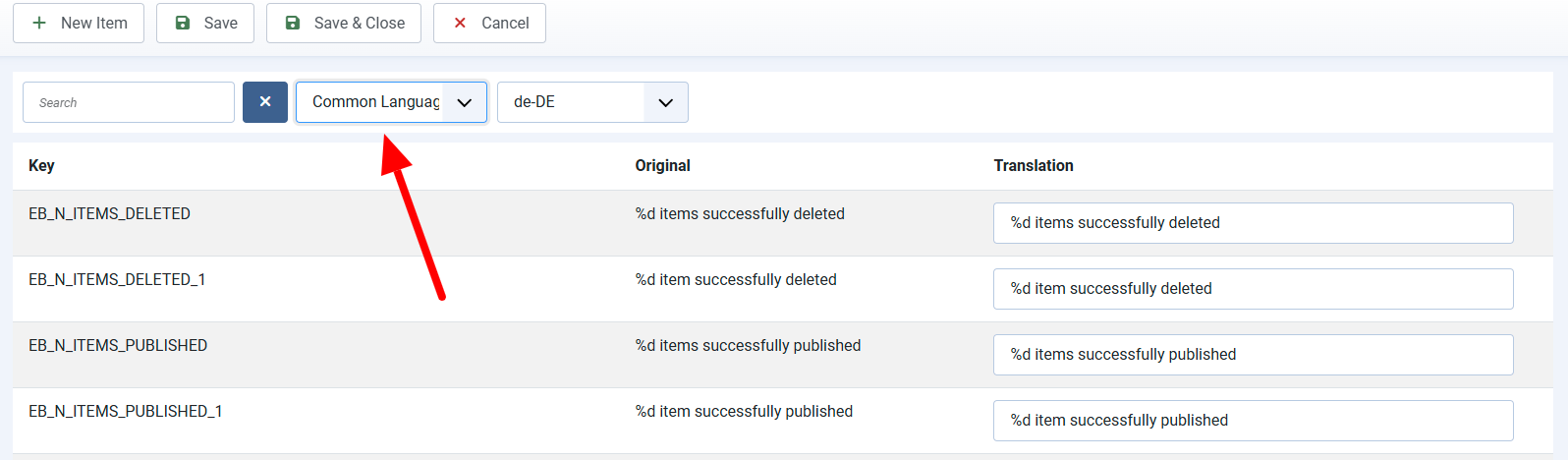
You do not need to add new language item. I guess you try to find it in frontend language file. Just try to find it in Common Language File and it should exist
Regards,
Tuan
You do not need to add new language item. I guess you try to find it in frontend language file. Just try to find it in Common Language File and it should exist
Regards,
Tuan
Please Log in or Create an account to join the conversation.
- Claire Haas
- Topic Author
- Offline
- Senior Member
-
Less
More
- Posts: 79
- Thank you received: 1
5 months 1 week ago - 5 months 1 week ago #178213
by Claire Haas
Replied by Claire Haas on topic Member 1 Information - change language file not working
Hi Tuan,
I am not sure what you mean by Common Language File. I did it all in eBooking - Translation (I have now removed it from en-GB.com_eventbooking.ini file as it doesn't work as expected). I could not find it in any language files.
I also need to change the word Coupon but can't find that either.
I am not sure what you mean by Common Language File. I did it all in eBooking - Translation (I have now removed it from en-GB.com_eventbooking.ini file as it doesn't work as expected). I could not find it in any language files.
I also need to change the word Coupon but can't find that either.
Last edit: 5 months 1 week ago by Claire Haas.
Please Log in or Create an account to join the conversation.
- Tuan Pham Ngoc
- Away
- Administrator
-
5 months 1 week ago #178214
by Tuan Pham Ngoc
Replied by Tuan Pham Ngoc on topic Member 1 Information - change language file not working
Please see this attached screenshot, you will see where to find Common Language to find and change the language items we discussed so far. Not all language items are in Frontend Language. Some used in both frontend and backend, and can be found in Common Language
Tuan
Tuan
The following user(s) said Thank You: Claire Haas
Please Log in or Create an account to join the conversation.
Moderators: Tuan Pham Ngoc
Support
Documentation
Information
Copyright © 2026 Joomla Extensions by Joomdonation. All Rights Reserved.
joomdonation.com is not affiliated with or endorsed by the Joomla! Project or Open Source Matters.
The Joomla! name and logo is used under a limited license granted by Open Source Matters the trademark holder in the United States and other countries.
The Joomla! name and logo is used under a limited license granted by Open Source Matters the trademark holder in the United States and other countries.