- Posts: 41
- Thank you received: 0

Need help with Joomla? We are available for hire to help with Joomla customization, upgrades, maintenance, and custom development.
Explore our services Guest checkIn - for employees
- Guenter Kleisch
- Topic Author
- Offline
- Senior Member
-

Less
More
8 months 3 weeks ago #176719
by Guenter Kleisch
Guest checkIn - for employees was created by Guenter Kleisch
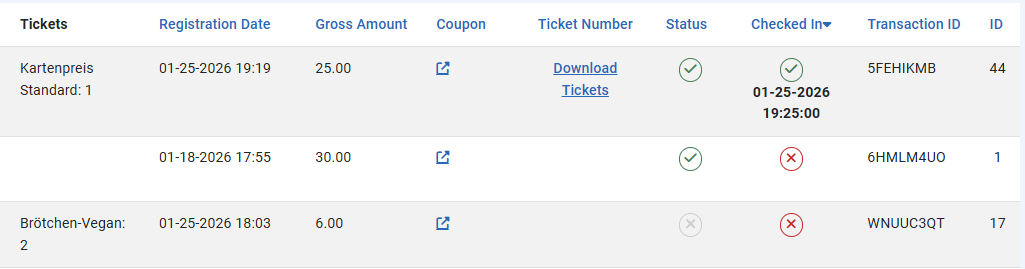
I see that you can manage guests and check them in via the backend.
What settings/permissions are necessary for the Joomla user "Manager" so that they can only check in guests and not make any other changes to the website in the backend? Or changes to event booking?
Or is there an admin check-in in the frontend?
Thanks
What settings/permissions are necessary for the Joomla user "Manager" so that they can only check in guests and not make any other changes to the website in the backend? Or changes to event booking?
Or is there an admin check-in in the frontend?
Thanks
Please Log in or Create an account to join the conversation.
- Tuan Pham Ngoc
- Offline
- Administrator
-

8 months 3 weeks ago #176721
by Tuan Pham Ngoc
Replied by Tuan Pham Ngoc on topic Guest checkIn - for employees
Hi
There are different ways to checkin registrants from frontend of your site:
- Checkin manually via Registrants Management docs.joomdonation.com/eventsbooking/fron...t/manage-registrants
- Or checkin using QRCODE docs.joomdonation.com/eventsbooking/adva...check-in-registrants , recommend uses one of the two methods:
docs.joomdonation.com/eventsbooking/adva...lt-in-qrcode-scanner
docs.joomdonation.com/eventsbooking/adva...nts-handheld-scanner
But it will require users to have Registrants Management permission, so they will be able to update registration record data if they want. There is not just checkin permission at the moment
Regards,
Tuan
There are different ways to checkin registrants from frontend of your site:
- Checkin manually via Registrants Management docs.joomdonation.com/eventsbooking/fron...t/manage-registrants
- Or checkin using QRCODE docs.joomdonation.com/eventsbooking/adva...check-in-registrants , recommend uses one of the two methods:
docs.joomdonation.com/eventsbooking/adva...lt-in-qrcode-scanner
docs.joomdonation.com/eventsbooking/adva...nts-handheld-scanner
But it will require users to have Registrants Management permission, so they will be able to update registration record data if they want. There is not just checkin permission at the moment
Regards,
Tuan
Please Log in or Create an account to join the conversation.
- Guenter Kleisch
- Topic Author
- Offline
- Senior Member
-
Less
More
- Posts: 41
- Thank you received: 0
8 months 6 days ago #177025
by Guenter Kleisch
Replied by Guenter Kleisch on topic Guest checkIn - for employees
Do you have a product recommendation for the best scanner?
Or, to put it another way, what features should the scanner have?
Is barcode scanning sufficient, or should the product description also mention QR code reading?
Thank you
Or, to put it another way, what features should the scanner have?
Is barcode scanning sufficient, or should the product description also mention QR code reading?
Thank you
Please Log in or Create an account to join the conversation.
- Tuan Pham Ngoc
- Offline
- Administrator
-
8 months 6 days ago #177029
by Tuan Pham Ngoc
Replied by Tuan Pham Ngoc on topic Guest checkIn - for employees
Honestly, I haven't used a scanner myself, so I do not know which one to recommend. If you do not need something special, you can just use your mobile to check it, it will just work
Regards,
Tuan
Regards,
Tuan
The following user(s) said Thank You: Guenter Kleisch
Please Log in or Create an account to join the conversation.
Moderators: Tuan Pham Ngoc
Support
Documentation
Information
Copyright © 2026 Joomla Extensions by Joomdonation. All Rights Reserved.
joomdonation.com is not affiliated with or endorsed by the Joomla! Project or Open Source Matters.
The Joomla! name and logo is used under a limited license granted by Open Source Matters the trademark holder in the United States and other countries.
The Joomla! name and logo is used under a limited license granted by Open Source Matters the trademark holder in the United States and other countries.