- Posts: 6
- Thank you received: 0

Need help with Joomla? We are available for hire to help with Joomla customization, upgrades, maintenance, and custom development.
Explore our services Max. 50 Tickets - no matter if adults or children. Don't know how...
- Markus Meißner
- Topic Author
- Offline
- New Member
-

Less
More
6 years 3 weeks ago #138192
by Markus Meißner
Max. 50 Tickets - no matter if adults or children. Don't know how... was created by Markus Meißner
Hello,
due to Corona, only 50 persons are allowed to view a handball game. We want to sell tickets for these games on our Website. Adults should pay EUR 5, children only EUR 3. It is important that a maximum of 50 people can book - regardless of whether 40 adults and 10 children or 5 adults and 45 children: The max. number of 50 must not be exceeded. With the "multiple ticket types" function, however, I can only specify a single maximum amount for each group (adults / children). How can I reach the above target?
due to Corona, only 50 persons are allowed to view a handball game. We want to sell tickets for these games on our Website. Adults should pay EUR 5, children only EUR 3. It is important that a maximum of 50 people can book - regardless of whether 40 adults and 10 children or 5 adults and 45 children: The max. number of 50 must not be exceeded. With the "multiple ticket types" function, however, I can only specify a single maximum amount for each group (adults / children). How can I reach the above target?
Please Log in or Create an account to join the conversation.
- Tuan Pham Ngoc
- Away
- Administrator
-

6 years 3 weeks ago #138195
by Tuan Pham Ngoc
Replied by Tuan Pham Ngoc on topic Max. 50 Tickets - no matter if adults or children. Don't know how...
Hi Markus
Just set Event Capacity of that event to 50 and it should be fine
Tuan
Just set Event Capacity of that event to 50 and it should be fine
Tuan
Please Log in or Create an account to join the conversation.
- Markus Meißner
- Topic Author
- Offline
- New Member
-
Less
More
- Posts: 6
- Thank you received: 0
6 years 3 weeks ago - 6 years 3 weeks ago #138204
by Markus Meißner
Replied by Markus Meißner on topic Max. 50 Tickets - no matter if adults or children. Don't know how...
Hi Tuan,
thanks for your very fast response.
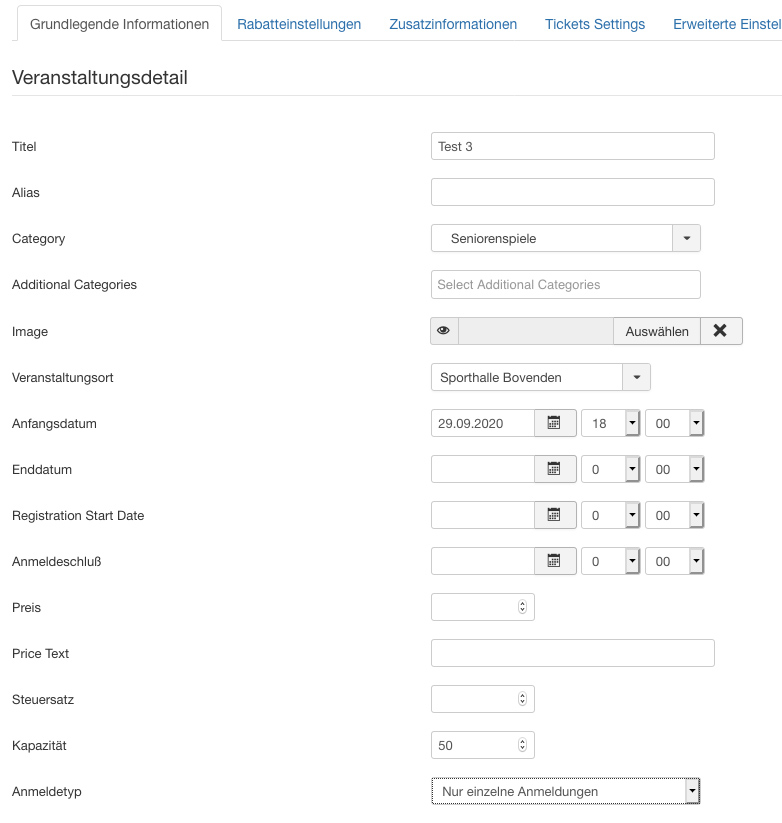
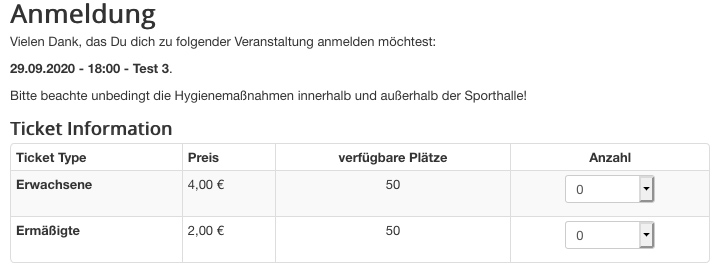
I set a capacity of 50 in "basic settings" and ticket types are now listed in the overview: each with 50 seats available - but that's not true.
Even if i do not select availability for the ticket types, the number is taken from the "basic information" page.

It is counted correctly (i.e. no more tickets are issued than are still available), but the user does not find out until he has filled in all the data and clicks on order:
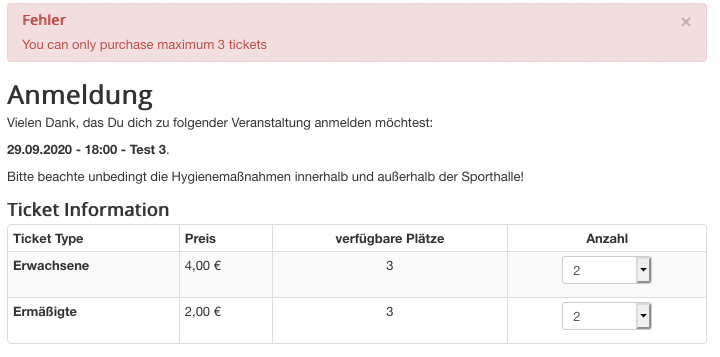
the user would think that there are still 6 tickets (3 + 3) available.
Markus
thanks for your very fast response.
I set a capacity of 50 in "basic settings" and ticket types are now listed in the overview: each with 50 seats available - but that's not true.
Even if i do not select availability for the ticket types, the number is taken from the "basic information" page.
It is counted correctly (i.e. no more tickets are issued than are still available), but the user does not find out until he has filled in all the data and clicks on order:
the user would think that there are still 6 tickets (3 + 3) available.
Markus
Last edit: 6 years 3 weeks ago by Markus Meißner.
Please Log in or Create an account to join the conversation.
- Markus Meißner
- Topic Author
- Offline
- New Member
-
Less
More
- Posts: 6
- Thank you received: 0
6 years 3 weeks ago #138208
by Markus Meißner
Replied by Markus Meißner on topic Max. 50 Tickets - no matter if adults or children. Don't know how...
In addition, I just noticed an error - the calculation for the price is incorrect:
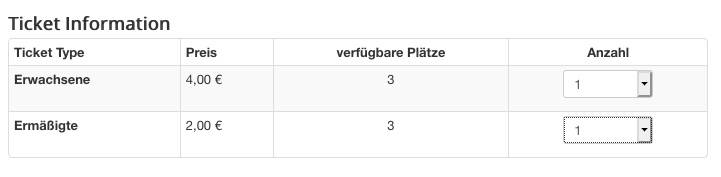
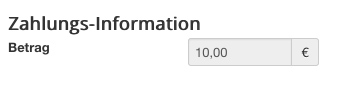
He adds the prices on this page with the price on the start page of the event.
A price must be entered there, otherwise it says "free", which is not true.
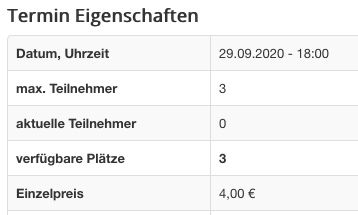
He adds the prices on this page with the price on the start page of the event.
A price must be entered there, otherwise it says "free", which is not true.
Please Log in or Create an account to join the conversation.
- Tuan Pham Ngoc
- Away
- Administrator
-
6 years 3 weeks ago #138211
by Tuan Pham Ngoc
Replied by Tuan Pham Ngoc on topic Max. 50 Tickets - no matter if adults or children. Don't know how...
Hello
1. For Price calculation issue, you need to set:
- Price for the event to 0.
- To prevent the system shows it as Free, you can enter the text you want to show like Adults Ticket 30$, Children Ticket: 20$, or something like that into Price Text setting of the event and that text will be shown
2. For the available seats, I think that's the best thing the system could do. There are two options here:
- Hide that column
- Or change the heading (go to Events Booking -> Translation, select your language, find the text and change it to meet your need) to something like Maximum Seats Available
Or do you have a better idea?
Tuan
1. For Price calculation issue, you need to set:
- Price for the event to 0.
- To prevent the system shows it as Free, you can enter the text you want to show like Adults Ticket 30$, Children Ticket: 20$, or something like that into Price Text setting of the event and that text will be shown
2. For the available seats, I think that's the best thing the system could do. There are two options here:
- Hide that column
- Or change the heading (go to Events Booking -> Translation, select your language, find the text and change it to meet your need) to something like Maximum Seats Available
Or do you have a better idea?
Tuan
Please Log in or Create an account to join the conversation.
- Markus Meißner
- Topic Author
- Offline
- New Member
-
Less
More
- Posts: 6
- Thank you received: 0
6 years 3 weeks ago #138228
by Markus Meißner
Replied by Markus Meißner on topic Max. 50 Tickets - no matter if adults or children. Don't know how...
Hi Tuan,
thanks for your response.
Point 1 - works!
Point 2 - can you tell me, how i can hide the column? Becomes that column only hidden on the booking-site or on the event-overview-site too?
Markus
thanks for your response.
Point 1 - works!
Point 2 - can you tell me, how i can hide the column? Becomes that column only hidden on the booking-site or on the event-overview-site too?
Markus
Please Log in or Create an account to join the conversation.
- Tuan Pham Ngoc
- Away
- Administrator
-
6 years 3 weeks ago #138234
by Tuan Pham Ngoc
Replied by Tuan Pham Ngoc on topic Max. 50 Tickets - no matter if adults or children. Don't know how...
That would require some modification to the code. You can submit a support ticket sending us:
- Super admin account
- Link to the pages which you want to hide the columns
I will check to see what's wrong and get it sorted
Regards,
Tuan
- Super admin account
- Link to the pages which you want to hide the columns
I will check to see what's wrong and get it sorted
Regards,
Tuan
Please Log in or Create an account to join the conversation.
Moderators: Tuan Pham Ngoc
Support
Documentation
Information
Copyright © 2026 Joomla Extensions by Joomdonation. All Rights Reserved.
joomdonation.com is not affiliated with or endorsed by the Joomla! Project or Open Source Matters.
The Joomla! name and logo is used under a limited license granted by Open Source Matters the trademark holder in the United States and other countries.
The Joomla! name and logo is used under a limited license granted by Open Source Matters the trademark holder in the United States and other countries.