- Posts: 42
- Thank you received: 0

Need help with Joomla? We are available for hire to help with Joomla customization, upgrades, maintenance, and custom development.
Explore our services Limit available slots
- Gerrit Deschuyteneer
- Topic Author
- Offline
- Senior Member
-

Less
More
6 years 2 months ago #136716
by Gerrit Deschuyteneer
Limit available slots was created by Gerrit Deschuyteneer
Hello,
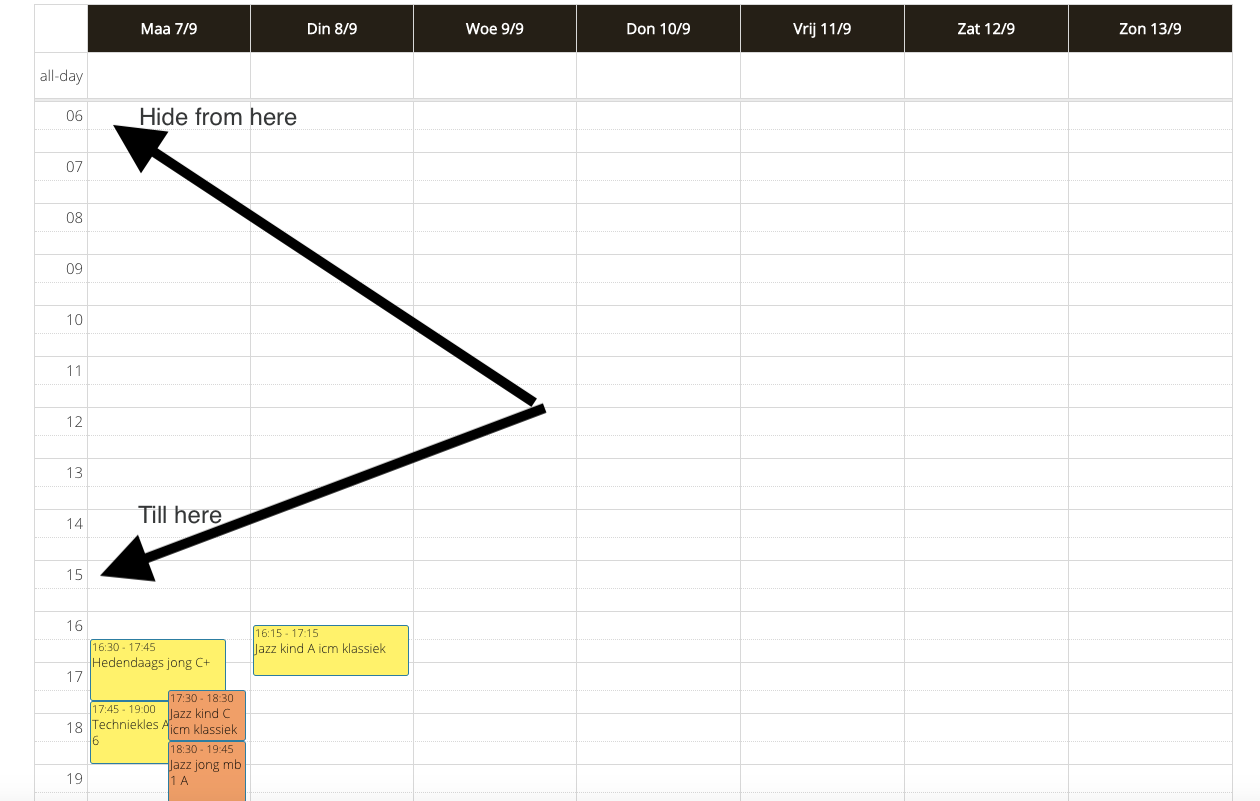
is it possible to limit the available time slots? So that in the weekly and daily view I can only see, for example, time slots from 12 o'clock till 20 o'clock?
So that all the time slots from 0:00 till 11:59 are hidden and all time slots from 20:01 till midnight are hidden?
Because know when all my events start in in the afternoon I still see empty time slots from 06:00...
Thank you,
Gerrit
is it possible to limit the available time slots? So that in the weekly and daily view I can only see, for example, time slots from 12 o'clock till 20 o'clock?
So that all the time slots from 0:00 till 11:59 are hidden and all time slots from 20:01 till midnight are hidden?
Because know when all my events start in in the afternoon I still see empty time slots from 06:00...
Thank you,
Gerrit
Please Log in or Create an account to join the conversation.
- Tuan Pham Ngoc
- Offline
- Administrator
-

6 years 2 months ago #136718
by Tuan Pham Ngoc
Replied by Tuan Pham Ngoc on topic Limit available slots
Hi Gerrit
Currently, it's not possible yet. However, we will check the library we are using fullcalendar.io/
If they support that option, we will try to support it in the future
Tuan
Currently, it's not possible yet. However, we will check the library we are using fullcalendar.io/
If they support that option, we will try to support it in the future
Tuan
Please Log in or Create an account to join the conversation.
- Gerrit Deschuyteneer
- Topic Author
- Offline
- Senior Member
-
Less
More
- Posts: 42
- Thank you received: 0
6 years 2 months ago #136721
by Gerrit Deschuyteneer
Replied by Gerrit Deschuyteneer on topic Limit available slots
Hello Tuan,
thank you for your quick reply. I looked at the function of fullcalendar.io and I think with these settings I should be able to implement it somehow:
mintime: fullcalendar.io/docs/slotMinTime
maxtime: fullcalendar.io/docs/slotMaxTime
I will try to find out how
Thanks,
Gerrit
thank you for your quick reply. I looked at the function of fullcalendar.io and I think with these settings I should be able to implement it somehow:
mintime: fullcalendar.io/docs/slotMinTime
maxtime: fullcalendar.io/docs/slotMaxTime
I will try to find out how
Thanks,
Gerrit
Please Log in or Create an account to join the conversation.
- Tuan Pham Ngoc
- Offline
- Administrator
-
6 years 2 months ago #136722
by Tuan Pham Ngoc
Replied by Tuan Pham Ngoc on topic Limit available slots
We still use version 3 of the script, so the parameter is minTime and maxTime
fullcalendar.io/docs/v3/minTime
fullcalendar.io/docs/v3/maxTime
I made quick modification. You can get this file, unzip it, upload to components/com_eventbooking/view/fullcalendar folder, then adjust the parameters to meet your own need
Tuan
I made quick modification. You can get this file, unzip it, upload to components/com_eventbooking/view/fullcalendar folder, then adjust the parameters to meet your own need
Tuan
Please Log in or Create an account to join the conversation.
- Gerrit Deschuyteneer
- Topic Author
- Offline
- Senior Member
-
Less
More
- Posts: 42
- Thank you received: 0
6 years 2 months ago #136723
by Gerrit Deschuyteneer
Replied by Gerrit Deschuyteneer on topic Limit available slots
Waow Tuan!!
Thank you very much, that's exactly what I needed! You're the best!
Greetings,
Gerrit
Thank you very much, that's exactly what I needed! You're the best!
Greetings,
Gerrit
Please Log in or Create an account to join the conversation.
- Tuan Pham Ngoc
- Offline
- Administrator
-
6 years 2 months ago #136730
by Tuan Pham Ngoc
Replied by Tuan Pham Ngoc on topic Limit available slots
Hello
The change should be implemented using override, so:
1. Create a folder called override under components/com_eventbooking/view/override folder
2. Inside that folder, create fullcalendar folder
3. Get this file, unzip it, modify the minTime and maxTime value to meet your need, and upload it to components/com_eventbooking/view/override/fullcalendar which you created above
Then you won't have to worry about loosing the change when you update to future releases of the extension
Tuan
The change should be implemented using override, so:
1. Create a folder called override under components/com_eventbooking/view/override folder
2. Inside that folder, create fullcalendar folder
3. Get this file, unzip it, modify the minTime and maxTime value to meet your need, and upload it to components/com_eventbooking/view/override/fullcalendar which you created above
Then you won't have to worry about loosing the change when you update to future releases of the extension
Tuan
Please Log in or Create an account to join the conversation.
Moderators: Tuan Pham Ngoc
Support
Documentation
Information
Copyright © 2026 Joomla Extensions by Joomdonation. All Rights Reserved.
joomdonation.com is not affiliated with or endorsed by the Joomla! Project or Open Source Matters.
The Joomla! name and logo is used under a limited license granted by Open Source Matters the trademark holder in the United States and other countries.
The Joomla! name and logo is used under a limited license granted by Open Source Matters the trademark holder in the United States and other countries.