- Posts: 115
- Thank you received: 3

Need help with Joomla? We are available for hire to help with Joomla customization, upgrades, maintenance, and custom development.
Explore our services copying registrants to new event
- Graham S. Jarvis
- Topic Author
- Offline
- Premium Member
-

Less
More
6 years 5 months ago #134144
by Graham S. Jarvis
copying registrants to new event was created by Graham S. Jarvis
Hello,
I'm using EB for registration on educational courses run by an association.
Is there a way of copying all the registrants of one event (i.e. the course in Semester 1) to a new event (i.e. the same course in Semester 2)?
The course members don't re-register each semester
Thanks,
-Graham-
I'm using EB for registration on educational courses run by an association.
Is there a way of copying all the registrants of one event (i.e. the course in Semester 1) to a new event (i.e. the same course in Semester 2)?
The course members don't re-register each semester
Thanks,
-Graham-
Please Log in or Create an account to join the conversation.
- Justin
- Offline
- Junior Member
-

Less
More
- Posts: 33
- Thank you received: 1
6 years 5 months ago #134146
by Justin
Replied by Justin on topic copying registrants to new event
To my understanding, yes there is simply from the "registrants" menu click import template, this will download a csv with all your registrants, you can the delete the registrants out of this csv that you don't want to import and the simply change the event id to the one you want to import to.
I have not personally tried it but I can't see why this would not work
I have not personally tried it but I can't see why this would not work
The following user(s) said Thank You: Graham S. Jarvis
Please Log in or Create an account to join the conversation.
- Tuan Pham Ngoc
- Away
- Administrator
-

6 years 5 months ago #134195
by Tuan Pham Ngoc
Replied by Tuan Pham Ngoc on topic copying registrants to new event
Thanks Justin. Exactly what I would suggest.
- Export Registrants of existing events
- Change data of event_id column to ID of new event
- Remove id column from that exported file
Import it back to the system to create registrants for new event
Tuan
- Export Registrants of existing events
- Change data of event_id column to ID of new event
- Remove id column from that exported file
Import it back to the system to create registrants for new event
Tuan
The following user(s) said Thank You: Graham S. Jarvis
Please Log in or Create an account to join the conversation.
- Graham S. Jarvis
- Topic Author
- Offline
- Premium Member
-
Less
More
- Posts: 115
- Thank you received: 3
6 years 5 months ago #134201
by Graham S. Jarvis
Replied by Graham S. Jarvis on topic copying registrants to new event
Thanks Tuan,
Thanks Justin,
just to be clear - for anyone else wanting to do this - we are talking about exporting the "Import template" under Registrants, from the dashboard and not the file created by the "Export Registrants" button higher up the screen.
(It could be confusing).
Thanks,
-Graham-
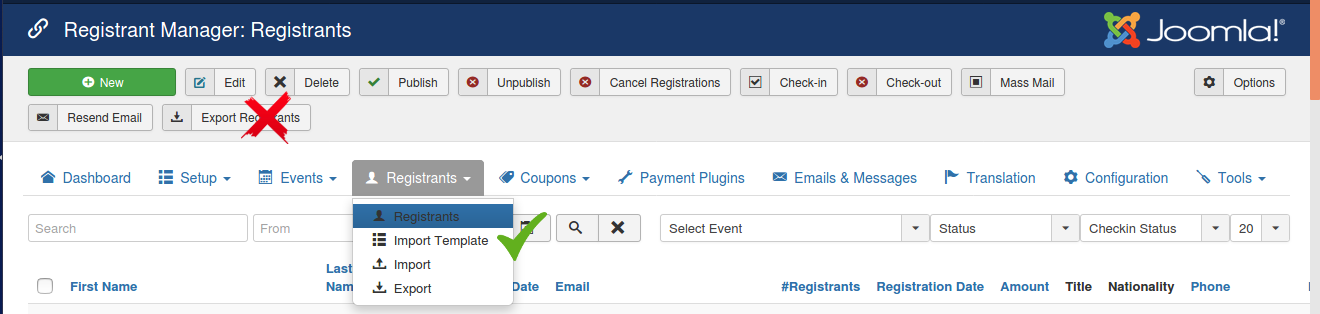
Thanks Justin,
just to be clear - for anyone else wanting to do this - we are talking about exporting the "Import template" under Registrants, from the dashboard and not the file created by the "Export Registrants" button higher up the screen.
(It could be confusing).
Thanks,
-Graham-
Please Log in or Create an account to join the conversation.
Moderators: Tuan Pham Ngoc
Support
Documentation
Information
Copyright © 2026 Joomla Extensions by Joomdonation. All Rights Reserved.
joomdonation.com is not affiliated with or endorsed by the Joomla! Project or Open Source Matters.
The Joomla! name and logo is used under a limited license granted by Open Source Matters the trademark holder in the United States and other countries.
The Joomla! name and logo is used under a limited license granted by Open Source Matters the trademark holder in the United States and other countries.