- Posts: 12
- Thank you received: 0

Speaker Plugin - Delete Existing Speakers?
- Susan Goss
- Topic Author
- Offline
- New Member
-
Less
More
6 years 3 weeks ago #132787
by Susan Goss
Speaker Plugin - Delete Existing Speakers? was created by Susan Goss
Hi,
I am using the Speakers Plugin for my event.
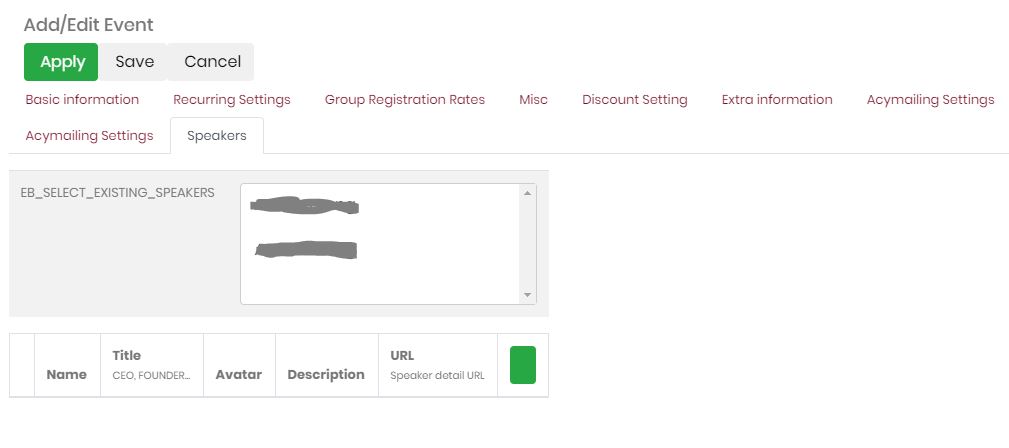
- During testing I created 2 entries for speakers which I would like to delete now. How can I delete existing speakers and if they are located at: EB_SELECT_EXISTING_SPEAKERS - how do I get to that file?
- Additionally, the display seems to be off in the frontend submission, it only uses half of the screen...
Thank you in advance,
Andrea
I am using the Speakers Plugin for my event.
- During testing I created 2 entries for speakers which I would like to delete now. How can I delete existing speakers and if they are located at: EB_SELECT_EXISTING_SPEAKERS - how do I get to that file?
- Additionally, the display seems to be off in the frontend submission, it only uses half of the screen...
Thank you in advance,
Andrea
Please Log in or Create an account to join the conversation.
- Tuan Pham Ngoc
- Away
- Administrator
-
6 years 3 weeks ago #132793
by Tuan Pham Ngoc
Replied by Tuan Pham Ngoc on topic Speaker Plugin - Delete Existing Speakers?
Hi Andrea
1. You need to edit the event which you original added the speakers to, see list of speakers which you added and then remove the speaker you want
2. For the display of speakers, maybe it causes by some css conflict with your site template css. Please submit a support ticket sending us super admin account of your site and link to the page so that we can help checking and correcting it
Regards,
Tuan
1. You need to edit the event which you original added the speakers to, see list of speakers which you added and then remove the speaker you want
2. For the display of speakers, maybe it causes by some css conflict with your site template css. Please submit a support ticket sending us super admin account of your site and link to the page so that we can help checking and correcting it
Regards,
Tuan
Please Log in or Create an account to join the conversation.
Moderators: Tuan Pham Ngoc
Support
Documentation
Information
Copyright © 2026 Joomla Extensions by Joomdonation. All Rights Reserved.
joomdonation.com is not affiliated with or endorsed by the Joomla! Project or Open Source Matters.
The Joomla! name and logo is used under a limited license granted by Open Source Matters the trademark holder in the United States and other countries.