- Posts: 7
- Thank you received: 0

Need help with Joomla? We are available for hire to help with Joomla customization, upgrades, maintenance, and custom development.
Explore our services Additional Dates
- ChessNYC
- Topic Author
- Offline
- New Member
-

Less
More
6 years 7 months ago #132337
by ChessNYC
Additional Dates was created by ChessNYC
Hi there,
I had a couple of questions regarding the Additional Dates plugin (on the backend):
1. Am I simply overlooking something, or is there something that explicitly denotes a parent event? Since in our org different people create events, it is sometimes difficult to know which event is in fact the parent event, especially if dates have been changed.
2. We are having an issue with what I believe to be the parent event in a particular category not displaying the "additional dates" tab at all, precluding us from adding more events. Why would this be/how do we fix it?
3. I have found that if I take an event with additional dates in one category and 'Save As Copy' in order to then transfer it to another category where it should have the same dates, it transfers all of the additional dates to the new category, leaving only the parent event in the category that I had copied it from. Any way to duplicate events with additional dates without having to recreate all of the additional dates manually?
Please let me know!
Thanks
I had a couple of questions regarding the Additional Dates plugin (on the backend):
1. Am I simply overlooking something, or is there something that explicitly denotes a parent event? Since in our org different people create events, it is sometimes difficult to know which event is in fact the parent event, especially if dates have been changed.
2. We are having an issue with what I believe to be the parent event in a particular category not displaying the "additional dates" tab at all, precluding us from adding more events. Why would this be/how do we fix it?
3. I have found that if I take an event with additional dates in one category and 'Save As Copy' in order to then transfer it to another category where it should have the same dates, it transfers all of the additional dates to the new category, leaving only the parent event in the category that I had copied it from. Any way to duplicate events with additional dates without having to recreate all of the additional dates manually?
Please let me know!
Thanks
Please Log in or Create an account to join the conversation.
- Tuan Pham Ngoc
- Offline
- Administrator
-

6 years 7 months ago #132355
by Tuan Pham Ngoc
Replied by Tuan Pham Ngoc on topic Additional Dates
Hello
1. Go to Events Booking -> Configuration, set Activate Recurring Events config option to Yes. Now, when you go to Events Management screen, there should be a column called Event Type to show Parent/Child event
2. The tab will only be displayed for parent event. If it's child event, it won't be displayed (child event, in your case, is one of the event added in the additional date tag)
3. It's not possible for now. I will try to look at it and solves it in next release of the extension
Tuan
1. Go to Events Booking -> Configuration, set Activate Recurring Events config option to Yes. Now, when you go to Events Management screen, there should be a column called Event Type to show Parent/Child event
2. The tab will only be displayed for parent event. If it's child event, it won't be displayed (child event, in your case, is one of the event added in the additional date tag)
3. It's not possible for now. I will try to look at it and solves it in next release of the extension
Tuan
Please Log in or Create an account to join the conversation.
- ChessNYC
- Topic Author
- Offline
- New Member
-
Less
More
- Posts: 7
- Thank you received: 0
6 years 7 months ago #132377
by ChessNYC
Replied by ChessNYC on topic Additional Dates
Thanks for your reply! That helps. Being able to copy parent with events with their children into another category would be extremely helpful - for example we have about 60 dates for a particular event that is split into AM and PM options and it would be great to either be bale to copy that event and simply change the time, or to make it possible to choose with radio buttons between AM and PM (this is possible already, but it doesn't populate registrants).
Thanks again!
Thanks again!
Please Log in or Create an account to join the conversation.
- Tuan Pham Ngoc
- Offline
- Administrator
-
6 years 7 months ago #132388
by Tuan Pham Ngoc
Replied by Tuan Pham Ngoc on topic Additional Dates
Agree. Will improve the extension to have it works like that. Give me some time
Tuan
Tuan
Please Log in or Create an account to join the conversation.
- ChessNYC
- Topic Author
- Offline
- New Member
-
Less
More
- Posts: 7
- Thank you received: 0
6 years 7 months ago #132431
by ChessNYC
Replied by ChessNYC on topic Additional Dates
An additional question regarding additional dates: when applying custom fields to particular events, is there a way to automatically apply the fields to all child events? Or if that's not possible, to assign the custom field to a whole category? - Again, this is to counter having to do something many times when we need to apply a custom field to some 200-300 events.
Thanks
Thanks
Please Log in or Create an account to join the conversation.
- Tuan Pham Ngoc
- Offline
- Administrator
-
6 years 7 months ago #132434
by Tuan Pham Ngoc
Replied by Tuan Pham Ngoc on topic Additional Dates
Hello
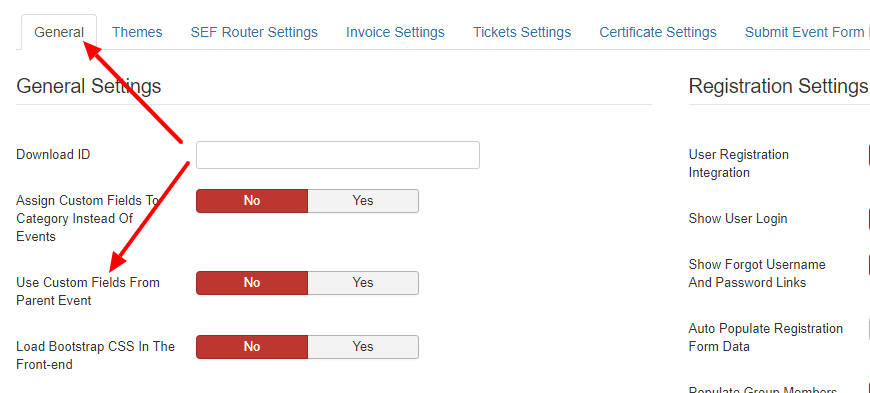
By default, it does not. However, you can go to Events Booking -> Configuration, set Use Custom Fields From Parent Event config option to Yes
Now, you just need to assign custom fields to parent events and all children events will use same set of custom fields
Tuan
By default, it does not. However, you can go to Events Booking -> Configuration, set Use Custom Fields From Parent Event config option to Yes
Now, you just need to assign custom fields to parent events and all children events will use same set of custom fields
Tuan
Please Log in or Create an account to join the conversation.
- ChessNYC
- Topic Author
- Offline
- New Member
-
Less
More
- Posts: 7
- Thank you received: 0
6 years 7 months ago #132576
by ChessNYC
Replied by ChessNYC on topic Additional Dates
Hi Tuan, I'm not seeing the "Use Custom Fields From Parent Event" option in my config settings - please let me know why I'm not finding it. Thanks.
Please Log in or Create an account to join the conversation.
- Tuan Pham Ngoc
- Offline
- Administrator
-
6 years 7 months ago #132583
by Tuan Pham Ngoc
Replied by Tuan Pham Ngoc on topic Additional Dates
See the attached screenshot. If you cannot see it, maybe you should check and make sure you are using latest version 3.11.1 of Events Booking first
Tuan
Tuan
Please Log in or Create an account to join the conversation.
Moderators: Tuan Pham Ngoc
Support
Documentation
Information
Copyright © 2026 Joomla Extensions by Joomdonation. All Rights Reserved.
joomdonation.com is not affiliated with or endorsed by the Joomla! Project or Open Source Matters.
The Joomla! name and logo is used under a limited license granted by Open Source Matters the trademark holder in the United States and other countries.
The Joomla! name and logo is used under a limited license granted by Open Source Matters the trademark holder in the United States and other countries.