- Posts: 4
- Thank you received: 0

Need help with Joomla? We are available for hire to help with Joomla customization, upgrades, maintenance, and custom development.
Explore our services Amend [REGISTRATION_DETAIL] tag data source
- JoomlaSchool
- Topic Author
- Offline
- New Member
-

Less
More
6 years 8 months ago #132036
by JoomlaSchool
Amend [REGISTRATION_DETAIL] tag data source was created by JoomlaSchool
Hi,
By default I would like to amend the [REGISTRATION_DETAIL] tag so that it includes additional field data, such as [EVENT_DATE] and [EVENT_END_DATE].
I know I can add the fields manually but would like to include in the standard output, without adding each field one by one.
Can this be done please and if so how?
Many thanks.
By default I would like to amend the [REGISTRATION_DETAIL] tag so that it includes additional field data, such as [EVENT_DATE] and [EVENT_END_DATE].
I know I can add the fields manually but would like to include in the standard output, without adding each field one by one.
Can this be done please and if so how?
Many thanks.
Please Log in or Create an account to join the conversation.
- Tuan Pham Ngoc
- Offline
- Administrator
-

6 years 8 months ago #132046
by Tuan Pham Ngoc
Replied by Tuan Pham Ngoc on topic Amend [REGISTRATION_DETAIL] tag data source
Hello
Not sure how you want to change it. However, depends on registration type you are using, you would have to edit the following files:
- Individual Registration: components/com_eventbooking/themes/default/emailtemplates/email_individual_detail.php, components/com_eventbooking/themes/default/emailtemplates/components/com_eventbooking/themes/default/emailtemplates/individual_detail.php
- Group Registration Registration:
components/com_eventbooking/themes/default/emailtemplates/email_group_detail.php
components/com_eventbooking/themes/default/emailtemplates/group_detail.php
- Shopping cart:
components/com_eventbooking/themes/default/emailtemplates/email_cart.php
components/com_eventbooking/themes/default/emailtemplates/cart.php
Once the change is done, you should move the modified files to PATH_TO_TEMPLATE/html/com_eventbooking/emailtemplates folder so that the change won't be lost when you update to future releases of the extension
Regards,
Tuan
Not sure how you want to change it. However, depends on registration type you are using, you would have to edit the following files:
- Individual Registration: components/com_eventbooking/themes/default/emailtemplates/email_individual_detail.php, components/com_eventbooking/themes/default/emailtemplates/components/com_eventbooking/themes/default/emailtemplates/individual_detail.php
- Group Registration Registration:
components/com_eventbooking/themes/default/emailtemplates/email_group_detail.php
components/com_eventbooking/themes/default/emailtemplates/group_detail.php
- Shopping cart:
components/com_eventbooking/themes/default/emailtemplates/email_cart.php
components/com_eventbooking/themes/default/emailtemplates/cart.php
Once the change is done, you should move the modified files to PATH_TO_TEMPLATE/html/com_eventbooking/emailtemplates folder so that the change won't be lost when you update to future releases of the extension
Regards,
Tuan
Please Log in or Create an account to join the conversation.
- JoomlaSchool
- Topic Author
- Offline
- New Member
-
Less
More
- Posts: 4
- Thank you received: 0
6 years 8 months ago #132048
by JoomlaSchool
Replied by JoomlaSchool on topic Amend [REGISTRATION_DETAIL] tag data source
Hi Tuan,
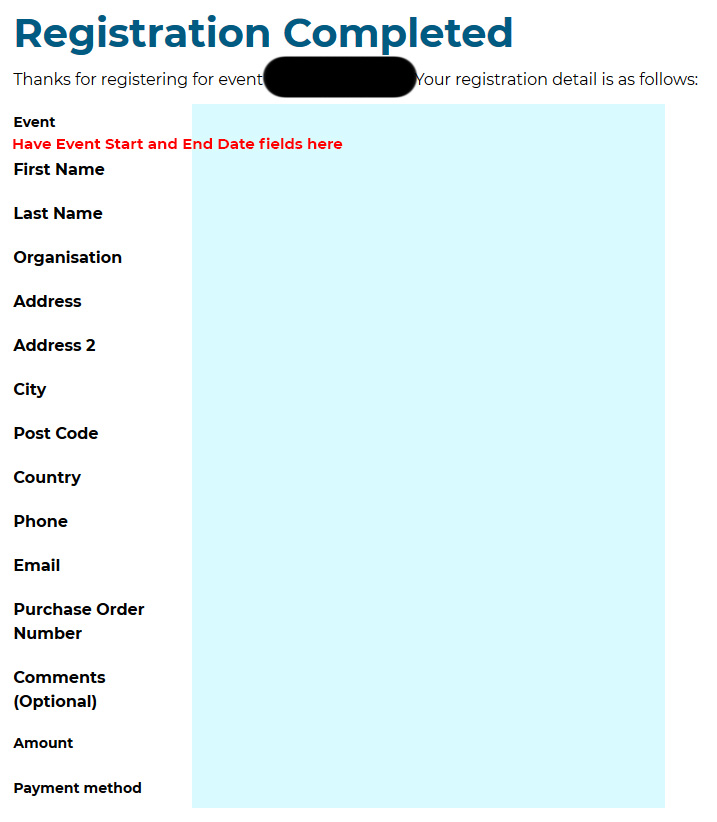
I have attached an image to clarify.
For example: Having the Event Start Date and End Date under the Event Name on the Registration Completed screen the end user sees.
Does this help?
Many thanks.
I have attached an image to clarify.
For example: Having the Event Start Date and End Date under the Event Name on the Registration Completed screen the end user sees.
Does this help?
Many thanks.
Please Log in or Create an account to join the conversation.
- Tuan Pham Ngoc
- Offline
- Administrator
-
6 years 8 months ago #132049
by Tuan Pham Ngoc
Replied by Tuan Pham Ngoc on topic Amend [REGISTRATION_DETAIL] tag data source
1. Go to Events Booking -> Configuration, set Show Event Date config option to Yes and event date should be shown
2. For Event End Date, make sure the event you are registering for have event end date entered and it should be shown
Tuan
2. For Event End Date, make sure the event you are registering for have event end date entered and it should be shown
Tuan
Please Log in or Create an account to join the conversation.
Moderators: Tuan Pham Ngoc
Support
Documentation
Information
Copyright © 2026 Joomla Extensions by Joomdonation. All Rights Reserved.
joomdonation.com is not affiliated with or endorsed by the Joomla! Project or Open Source Matters.
The Joomla! name and logo is used under a limited license granted by Open Source Matters the trademark holder in the United States and other countries.
The Joomla! name and logo is used under a limited license granted by Open Source Matters the trademark holder in the United States and other countries.