- Posts: 42
- Thank you received: 3

Need help with Joomla? We are available for hire to help with Joomla customization, upgrades, maintenance, and custom development.
Explore our services Rendering Problem with currency code using UIKit3 Konfiguration
- Carsten Bock
- Topic Author
- Offline
- Senior Member
-

Less
More
6 years 8 months ago #131465
by Carsten Bock
Rendering Problem with currency code using UIKit3 Konfiguration was created by Carsten Bock
Hi folks,
i use a yootheme Pro that is based on the UIKIT rendering specification wich is available in event booking 3.10.6. But unfortunately there is a render issue as you can see in the screenshot attached
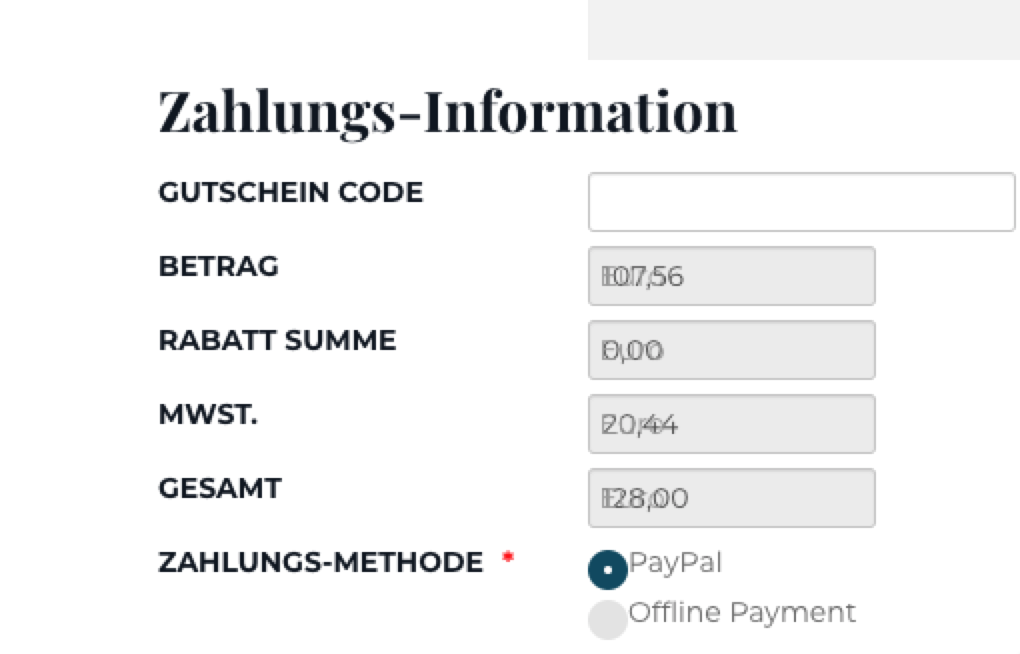 . When registering to an event the currency symbol is rendered not behind the amount but under it within the registration form.
Any solution available to get this fixed to be correctly positioned for different amount length?
Thanks in advance
Regards
Carsten
i use a yootheme Pro that is based on the UIKIT rendering specification wich is available in event booking 3.10.6. But unfortunately there is a render issue as you can see in the screenshot attached
Any solution available to get this fixed to be correctly positioned for different amount length?
Thanks in advance
Regards
Carsten
Please Log in or Create an account to join the conversation.
- Tuan Pham Ngoc
- Offline
- Administrator
-

6 years 8 months ago #131482
by Tuan Pham Ngoc
Replied by Tuan Pham Ngoc on topic Rendering Problem with currency code using UIKit3 Konfiguration
Hello Carsten
Please submit a support ticket sending us:
- Super admin account of the site
- Link to this page (which is having this issue)
We are going to check to see why the issue happens and get it sorted
Tuan
Please submit a support ticket sending us:
- Super admin account of the site
- Link to this page (which is having this issue)
We are going to check to see why the issue happens and get it sorted
Tuan
Please Log in or Create an account to join the conversation.
- Sascha Genennig
- Offline
- New Member
-

Less
More
- Posts: 11
- Thank you received: 0
6 years 6 months ago #133568
by Sascha Genennig
Replied by Sascha Genennig on topic Rendering Problem with currency code using UIKit3 Konfiguration
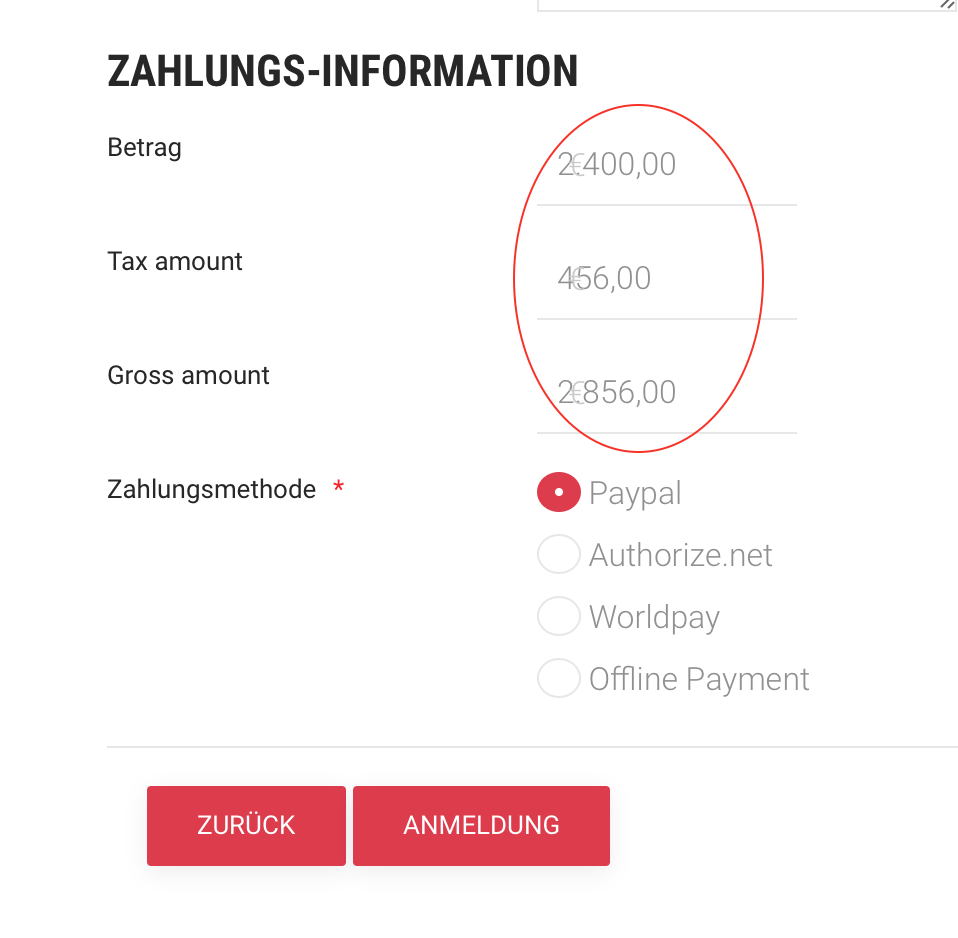
Any solution for this? I also use a YOOtheme Pro Template and get the same issue.
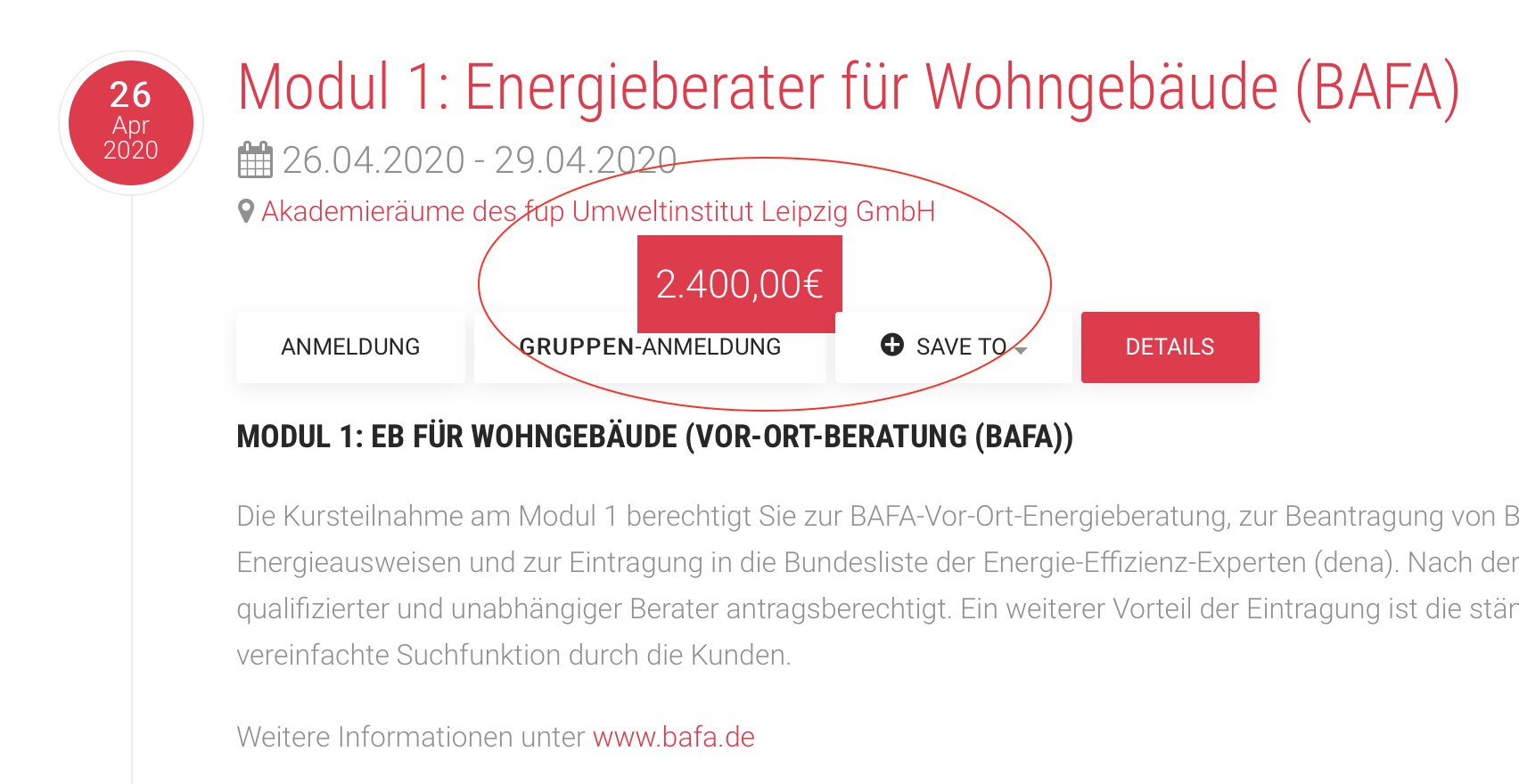
Unfortunately many other views are also buggy. Please have a look at the screenshots
Unfortunately many other views are also buggy. Please have a look at the screenshots
Please Log in or Create an account to join the conversation.
- James Riley
-

- Offline
- Platinum Member
-

6 years 6 months ago - 6 years 6 months ago #133569
by James Riley
James Riley .: EventBooking user since 2014 ::: JoomDonation user since 2016 :.
.: grfx & web design / IT / AV @ St. Therese Institute of Faith and Mission, Bruno, SK, Canada :.
Replied by James Riley on topic Rendering Problem with currency code using UIKit3 Konfiguration
It's ultimately a CSS issue. @Sascha or @Carsten: If @Tuan hasn't already patched the CSS in the release version of EB, post a link to an live example and and I can give you the one or two lines of override CSS that you'd need to fix it.
James Riley .: EventBooking user since 2014 ::: JoomDonation user since 2016 :.
.: grfx & web design / IT / AV @ St. Therese Institute of Faith and Mission, Bruno, SK, Canada :.
Last edit: 6 years 6 months ago by James Riley.
Please Log in or Create an account to join the conversation.
- Tuan Pham Ngoc
- Offline
- Administrator
-
6 years 6 months ago #133577
by Tuan Pham Ngoc
Replied by Tuan Pham Ngoc on topic Rendering Problem with currency code using UIKit3 Konfiguration
Hello Sascha
Usually, we would need to add some custom css to solve this issue (depends on the template)
So please help submitting a support ticket sending us:
- Super admin account
- Link to the pages which are having the issue
We can help checking and solving the issue quickly. Or you can post the links here , I'm sure @James Riley could provide some custom css, too
Also, in Configuration of Events Booking, please make sure you set Load Twitter Bootstrap config option to No and set Twitter Bootstrap version config option to UIKIT3
Tuan
Usually, we would need to add some custom css to solve this issue (depends on the template)
So please help submitting a support ticket sending us:
- Super admin account
- Link to the pages which are having the issue
We can help checking and solving the issue quickly. Or you can post the links here , I'm sure @James Riley could provide some custom css, too
Also, in Configuration of Events Booking, please make sure you set Load Twitter Bootstrap config option to No and set Twitter Bootstrap version config option to UIKIT3
Tuan
Please Log in or Create an account to join the conversation.
- Carsten Bock
- Topic Author
- Offline
- Senior Member
-
Less
More
- Posts: 42
- Thank you received: 3
6 years 6 months ago #133586
by Carsten Bock
Replied by Carsten Bock on topic Rendering Problem with currency code using UIKit3 Konfiguration
Thanks James,
my problem was already solved by @Tuan and his team!
Greatful that you offered your help!
Thanks
Have a sunny day!
Carsten
my problem was already solved by @Tuan and his team!
Greatful that you offered your help!
Thanks
Have a sunny day!
Carsten
Please Log in or Create an account to join the conversation.
- Tuan Pham Ngoc
- Offline
- Administrator
-
6 years 6 months ago #133587
by Tuan Pham Ngoc
Replied by Tuan Pham Ngoc on topic Rendering Problem with currency code using UIKit3 Konfiguration
Thanks for the update Carsten. Sascha also submitted support ticket and we will solve it, too. Thanks James (as always) for offering to help
Tuan
Tuan
Please Log in or Create an account to join the conversation.
Moderators: Tuan Pham Ngoc
Support
Documentation
Information
Copyright © 2026 Joomla Extensions by Joomdonation. All Rights Reserved.
joomdonation.com is not affiliated with or endorsed by the Joomla! Project or Open Source Matters.
The Joomla! name and logo is used under a limited license granted by Open Source Matters the trademark holder in the United States and other countries.
The Joomla! name and logo is used under a limited license granted by Open Source Matters the trademark holder in the United States and other countries.