
How to hide empty input-sum-field from the individual registration form?
- Kotisivutohtori
-
 Topic Author
- Offline
- Junior Member
-

I don't quite understand the Offline payment method and why is there an empty input box in the individual registration form. We are trying to set up the invoice payment and thers is no other payment methods. Since there is only one payment method, the whole sum needs to be invoiced. Having an empty input field is confusing. How can we hide it? What is the idea of it anyway? Please explain! Thanks!
- Anne
Greetings,
Anne
www.kotisivutohtori.fi
Please Log in or Create an account to join the conversation.
- Tuan Pham Ngoc
- Offline
- Administrator
-

What's empty input field? Could you please send me the link to the page and tell me the label of that field so that I can check it?
Tuan
Please Log in or Create an account to join the conversation.
- Kotisivutohtori
-
Topic Author
- Offline
- Junior Member
-
it is the empty SUM field in the Payment information in the registration form. You will see it here:
www.kuudesaisti.net/henkiset-riennot/enk...ividual-registration
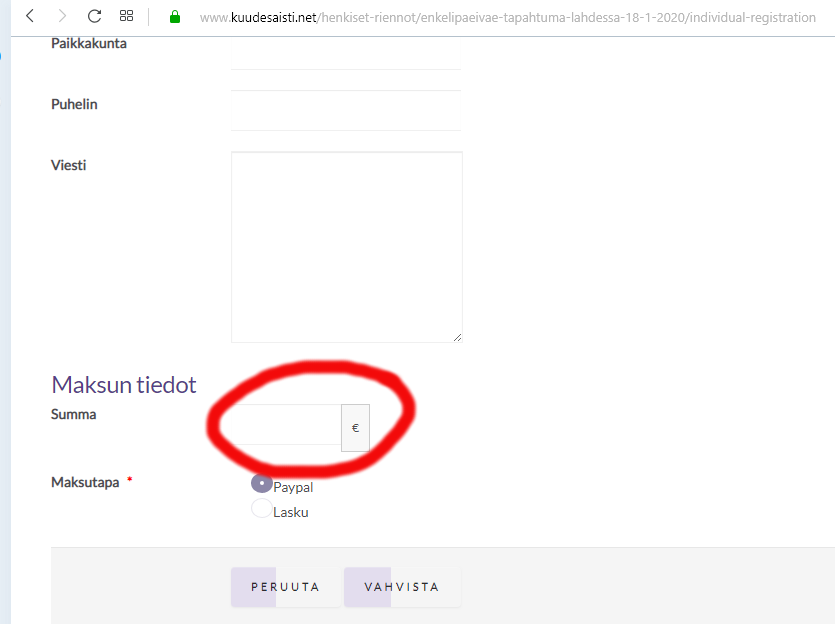
See the image where you see the empty sum-field. This is confusing! There should be visible the sum that the person must pay, not an empty field.
Also the fields are not clear. Is it possible to add background color to the input-fields? Also the lines are missing from the left/right sides, the lines are visible only on top and bottom of the input field. How can we fix this?
- Anne
Greetings,
Anne
www.kotisivutohtori.fi
Please Log in or Create an account to join the conversation.
- Tuan Pham Ngoc
- Offline
- Administrator
-
Our template developer will check and solve the issue
Tuan
Please Log in or Create an account to join the conversation.
- Kotisivutohtori
-
Topic Author
- Offline
- Junior Member
-
Greetings,
Anne
www.kotisivutohtori.fi
Please Log in or Create an account to join the conversation.
- Tuan Pham Ngoc
- Offline
- Administrator
-
Tuan
Please Log in or Create an account to join the conversation.
- Kotisivutohtori
-
Topic Author
- Offline
- Junior Member
-
we noticed one change has happened after the changed done by you for the form. The dates are missing from the balloon on this page:
www.kuudesaisti.net/henkiset-riennot
There was a day, month and year inside each balloon. Now those are empty. I have tried to check if it is a setting, but cannot find such setting. Is it cause by the edits made to the checkout-form?
- Anne
Greetings,
Anne
www.kotisivutohtori.fi
Please Log in or Create an account to join the conversation.
- Tuan Pham Ngoc
- Offline
- Administrator
-
For some reasons, I could not access the link above. Maybe your server has something which block access from certain countries?
I'm from Vietnam. Please contact your hosting provider, ask them to unblock our country so that we can look at the page to see what's the actual issue and guide you to check it
Regards,
Tuan
Please Log in or Create an account to join the conversation.
- Kotisivutohtori
-
Topic Author
- Offline
- Junior Member
-
- Anne
Greetings,
Anne
www.kotisivutohtori.fi
Please Log in or Create an account to join the conversation.
- Tuan Pham Ngoc
- Offline
- Administrator
-
I don't have a fixed IP, sorry
Also, I don't think it's admin tools. If it's admin tools, there should be an error message by admin tools displayed
I just received an error message below:
This site can’t be reachedwww.kuudesaisti.net took too long to respond.
Try:
Checking the connection
Checking the proxy and the firewall
Running Windows Network Diagnostics
ERR_CONNECTION_TIMED_OUT
I think it's the hosting provider blocks the access
Tuan
Please Log in or Create an account to join the conversation.
Support
Documentation
Information
The Joomla! name and logo is used under a limited license granted by Open Source Matters the trademark holder in the United States and other countries.