- Posts: 125
- Thank you received: 4

Need help with Joomla? We are available for hire to help with Joomla customization, upgrades, maintenance, and custom development.
Explore our services 403 Error (Testing QRCODE checkin)
- Alex
- Topic Author
- Offline
- Premium Member
-

Less
More
7 years 2 months ago #127603
by Alex
403 Error (Testing QRCODE checkin) was created by Alex
I am testing the QR code check feature with a printed copy of a PDF ticket and logged in as superuser in my mobile phone browser (Safari / iPhone).
I keep getting a "403 You do no have permission to checkin registrant" message.
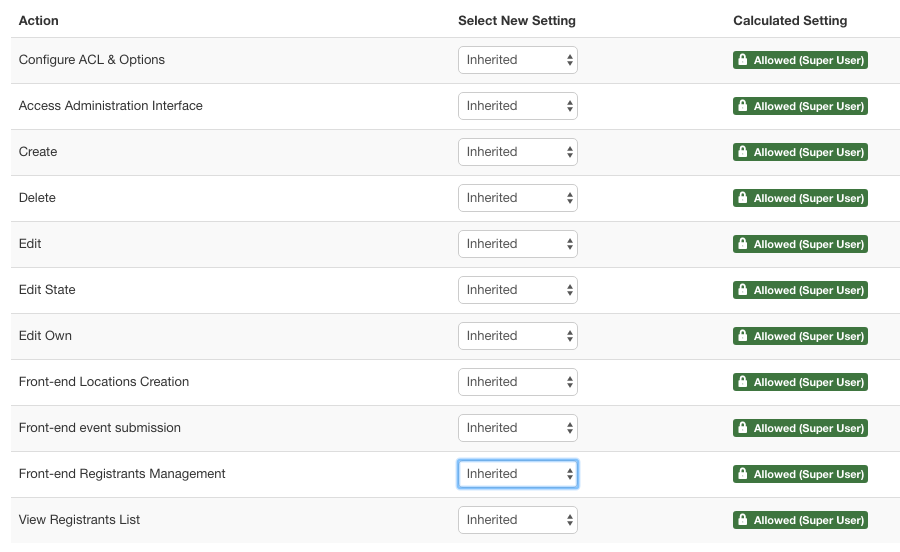
I checked the options tab to make sure the ACL setting allowed superuser to be able to have full access - Am I missing a seting somewhere that is preventing this function?
Also, the docs indicate 2 short codes and not sure what the differences are:
[TICKET_QRCODE]
[QRCODE]
I keep getting a "403 You do no have permission to checkin registrant" message.
I checked the options tab to make sure the ACL setting allowed superuser to be able to have full access - Am I missing a seting somewhere that is preventing this function?
Also, the docs indicate 2 short codes and not sure what the differences are:
[TICKET_QRCODE]
[QRCODE]
Please Log in or Create an account to join the conversation.
- Tuan Pham Ngoc
- Offline
- Administrator
-

7 years 2 months ago #127609
by Tuan Pham Ngoc
Replied by Tuan Pham Ngoc on topic 403 Error (Testing QRCODE checkin)
Hello
1. For ticket PDF, better use [TICKET_QRCODE] tag
2. For the 403 error, usually, it happens because you logged in using an url with www but the scanned qr code return a none www url (or via versa). To make sure it works:
- Please make sure both logged in url and the scanned URL is the same format (with or without www)
- Please also make sure you created a menu item to link to Registrants Management menu option of Events Booking, too.
Then check it again and let us know if it works
Regards,
Tuan
1. For ticket PDF, better use [TICKET_QRCODE] tag
2. For the 403 error, usually, it happens because you logged in using an url with www but the scanned qr code return a none www url (or via versa). To make sure it works:
- Please make sure both logged in url and the scanned URL is the same format (with or without www)
- Please also make sure you created a menu item to link to Registrants Management menu option of Events Booking, too.
Then check it again and let us know if it works
Regards,
Tuan
Please Log in or Create an account to join the conversation.
- Alex
- Topic Author
- Offline
- Premium Member
-
Less
More
- Posts: 125
- Thank you received: 4
7 years 2 months ago #127615
by Alex
Replied by Alex on topic 403 Error (Testing QRCODE checkin)
Hi Tuan,
I checked both links and they were the same (no www). But I learned it may be a browser issue with Safari. When I logged into the Chrome browser on my iPhone and them used the QRCode link it worked. Trouble is the camera that scans the QR Code launches Safari by default. This is a problem if were trying to use Apple devices to check people in.
I was looking at the app but learned its only Android, which I understand uses an API to check people in so I would not need to be logged into the website.
I checked both links and they were the same (no www). But I learned it may be a browser issue with Safari. When I logged into the Chrome browser on my iPhone and them used the QRCode link it worked. Trouble is the camera that scans the QR Code launches Safari by default. This is a problem if were trying to use Apple devices to check people in.
I was looking at the app but learned its only Android, which I understand uses an API to check people in so I would not need to be logged into the website.
Please Log in or Create an account to join the conversation.
- Tuan Pham Ngoc
- Offline
- Administrator
-
7 years 2 months ago #127619
by Tuan Pham Ngoc
Replied by Tuan Pham Ngoc on topic 403 Error (Testing QRCODE checkin)
Hello Alex
1. Yes, the Android APP does not require people to login before checking in registrants.
2. About Safari, I don't user it myself. However, I remember a customer mentioned that there is a setting to allow control this behavoor (maybe something related to private or safe mode....). Basically, the issue here is that:
- You logged in
- Then when you scan the QRCODE, the QRCODE scanner opens the scanned URL. But at that time, I think the browser treats it as a new session, you are not logged in and it causes the 403.
Could you please check to see if there is a setting like that? Otherwise, maybe you can help using Google Chrome for now
Regards,
Tuan
1. Yes, the Android APP does not require people to login before checking in registrants.
2. About Safari, I don't user it myself. However, I remember a customer mentioned that there is a setting to allow control this behavoor (maybe something related to private or safe mode....). Basically, the issue here is that:
- You logged in
- Then when you scan the QRCODE, the QRCODE scanner opens the scanned URL. But at that time, I think the browser treats it as a new session, you are not logged in and it causes the 403.
Could you please check to see if there is a setting like that? Otherwise, maybe you can help using Google Chrome for now
Regards,
Tuan
Please Log in or Create an account to join the conversation.
Moderators: Tuan Pham Ngoc
Support
Documentation
Information
Copyright © 2026 Joomla Extensions by Joomdonation. All Rights Reserved.
joomdonation.com is not affiliated with or endorsed by the Joomla! Project or Open Source Matters.
The Joomla! name and logo is used under a limited license granted by Open Source Matters the trademark holder in the United States and other countries.
The Joomla! name and logo is used under a limited license granted by Open Source Matters the trademark holder in the United States and other countries.