- Posts: 27
- Thank you received: 0

Need help with Joomla? We are available for hire to help with Joomla customization, upgrades, maintenance, and custom development.
Explore our services Default to Monthly Calendar View
- Pat Evans
- Topic Author
- Offline
- Junior Member
-

Less
More
7 years 2 months ago #126977
by Pat Evans
Default to Monthly Calendar View was created by Pat Evans
Currently the calendar's default seems to be weekly. This is puzzling, since the two slider options are "Activate Weekly View" and "Activate Daily View", leading one to reason that the default would be monthly.
So my issues are this:
1) I ONLY want the monthly view. The weekly and daily are of no use to me. Is there a way to set this?
2) My calendar's monthly view right now is glitchy! When you switch manually to it from the weekly view it is fine, but if you then try and switch months via the drop down, it will switch back to the weekly view. Obviously this is no good.
What can be done about these problems?
Thanks!
So my issues are this:
1) I ONLY want the monthly view. The weekly and daily are of no use to me. Is there a way to set this?
2) My calendar's monthly view right now is glitchy! When you switch manually to it from the weekly view it is fine, but if you then try and switch months via the drop down, it will switch back to the weekly view. Obviously this is no good.
What can be done about these problems?
Thanks!
Please Log in or Create an account to join the conversation.
- Tuan Pham Ngoc
- Away
- Administrator
-

7 years 2 months ago #126983
by Tuan Pham Ngoc
Replied by Tuan Pham Ngoc on topic Default to Monthly Calendar View
Hello Pat
Just change the menu item to link to Calendar - Monthly Layout menu option and it should be fine. Also, go to Events Booking -> Configuration, look at Themes tab, set the two config options below to No:
- Activate Weekly View
- Activate Daily View
Then it should work fine
Regards,
Tuan
Just change the menu item to link to Calendar - Monthly Layout menu option and it should be fine. Also, go to Events Booking -> Configuration, look at Themes tab, set the two config options below to No:
- Activate Weekly View
- Activate Daily View
Then it should work fine
Regards,
Tuan
Please Log in or Create an account to join the conversation.
- Pat Evans
- Topic Author
- Offline
- Junior Member
-
Less
More
- Posts: 27
- Thank you received: 0
7 years 2 months ago #126986
by Pat Evans
Replied by Pat Evans on topic Default to Monthly Calendar View
That is precisely what I attempted, unfortunately:
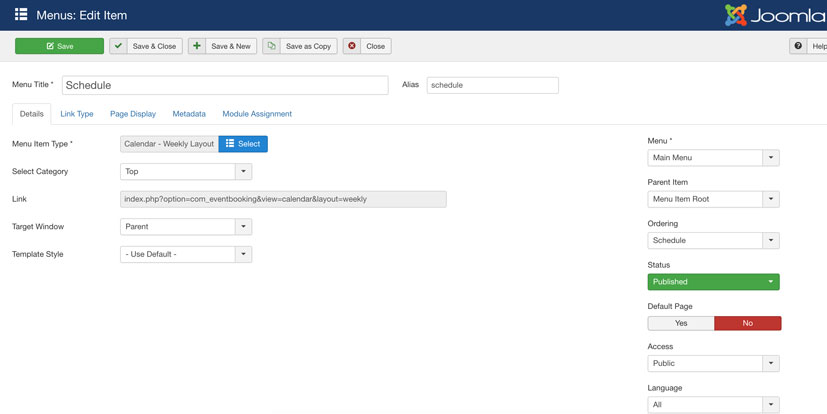
Both fields are greyed out and when I hover over it, my cursor turns into this:

Any ideas? I'm logged in as a Super User.
Both fields are greyed out and when I hover over it, my cursor turns into this:
Any ideas? I'm logged in as a Super User.
Please Log in or Create an account to join the conversation.
- Tuan Pham Ngoc
- Away
- Administrator
-
7 years 2 months ago #126987
by Tuan Pham Ngoc
Replied by Tuan Pham Ngoc on topic Default to Monthly Calendar View
Just click on Select button and you will be able to change it to Monthly Calendar layout
Tuan
Tuan
Please Log in or Create an account to join the conversation.
- Pat Evans
- Topic Author
- Offline
- Junior Member
-
Less
More
- Posts: 27
- Thank you received: 0
7 years 2 months ago #126990
by Pat Evans
Replied by Pat Evans on topic Default to Monthly Calendar View
Awesome. That did it.
One more question regarding the calendar: is it possible to shrink the thumbnail size down by half?
THANKS!
One more question regarding the calendar: is it possible to shrink the thumbnail size down by half?
THANKS!
Please Log in or Create an account to join the conversation.
- Tuan Pham Ngoc
- Away
- Administrator
-
7 years 2 months ago #127002
by Tuan Pham Ngoc
Replied by Tuan Pham Ngoc on topic Default to Monthly Calendar View
Hello
That will require few steps:
1.Go to Events Booking -> Configuration, set the size you want for:
- Event thumbnail width
- Event thumb height
2. Then edit the event, save it so that the thumbnail will be re-generated with new size
After that, it should work as expected
Tuan
That will require few steps:
1.Go to Events Booking -> Configuration, set the size you want for:
- Event thumbnail width
- Event thumb height
2. Then edit the event, save it so that the thumbnail will be re-generated with new size
After that, it should work as expected
Tuan
Please Log in or Create an account to join the conversation.
- Pat Evans
- Topic Author
- Offline
- Junior Member
-
Less
More
- Posts: 27
- Thank you received: 0
7 years 2 months ago #127008
by Pat Evans
Replied by Pat Evans on topic Default to Monthly Calendar View
Yes but that will make ALL thumbnails on my site a different size. I am trying to change them only on the calendar.
Please Log in or Create an account to join the conversation.
- Tuan Pham Ngoc
- Away
- Administrator
-
7 years 2 months ago #127010
by Tuan Pham Ngoc
Replied by Tuan Pham Ngoc on topic Default to Monthly Calendar View
Hmm
If so, the only solution is using css to make the thumbnail looks smaller (the but the quality of the image will be reduced)
You can send us the link to the page so that we can give it a try. We can guide you to add some custom css to reduce the size of the image
Regards,
Tuan
If so, the only solution is using css to make the thumbnail looks smaller (the but the quality of the image will be reduced)
You can send us the link to the page so that we can give it a try. We can guide you to add some custom css to reduce the size of the image
Regards,
Tuan
Please Log in or Create an account to join the conversation.
- Pat Evans
- Topic Author
- Offline
- Junior Member
-
Less
More
- Posts: 27
- Thank you received: 0
7 years 2 months ago #127011
by Pat Evans
Replied by Pat Evans on topic Default to Monthly Calendar View
Hi Tuan-
Here's the page. FYI, changing the thumbnail size per your suggestion had no effect.
bit.ly/2SGBRzB
Here's the page. FYI, changing the thumbnail size per your suggestion had no effect.
bit.ly/2SGBRzB
Please Log in or Create an account to join the conversation.
Moderators: Tuan Pham Ngoc
Support
Documentation
Information
Copyright © 2026 Joomla Extensions by Joomdonation. All Rights Reserved.
joomdonation.com is not affiliated with or endorsed by the Joomla! Project or Open Source Matters.
The Joomla! name and logo is used under a limited license granted by Open Source Matters the trademark holder in the United States and other countries.
The Joomla! name and logo is used under a limited license granted by Open Source Matters the trademark holder in the United States and other countries.