- Posts: 15
- Thank you received: 0

Need help with Joomla? We are available for hire to help with Joomla customization, upgrades, maintenance, and custom development.
Explore our services Get rid of payment information in individual event registration?
- Edwin
- Topic Author
- Offline
- New Member
-

Less
More
7 years 3 months ago #126795
by Edwin
Get rid of payment information in individual event registration? was created by Edwin
Hello there,
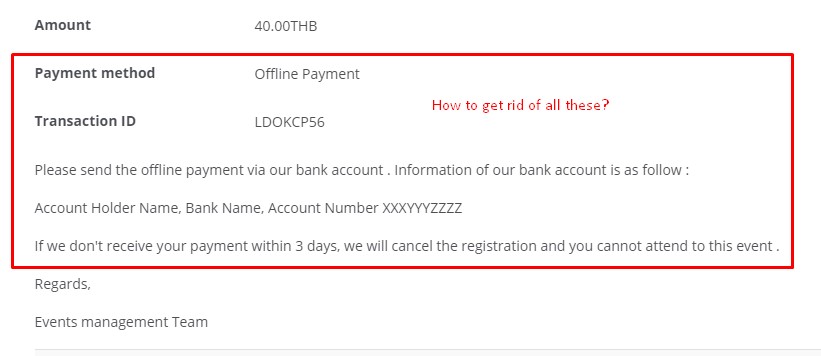
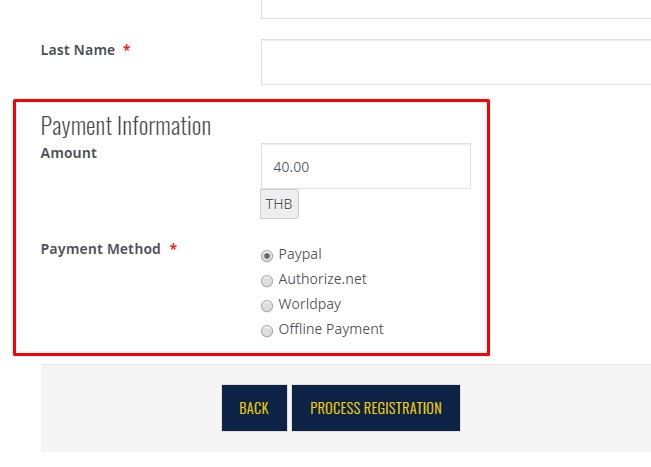
I have an event that is not free, but I do not want to collect payment online, so people will have to pay via the counter at some time in the future. Is there a way to get rid of payment information from being displayed during the individual's registration (see attached screenshot). Also, is there a way to get rid of the payment method, transaction ID and other messages from being displayed once the "Process Registration" button is pressed (see attached screenshot 2). Which files should I change to implement this facility? [ I am using Event Booking version 3.8.3 ]
I look forward to hearing from you soon. Thank you in advance.
I have an event that is not free, but I do not want to collect payment online, so people will have to pay via the counter at some time in the future. Is there a way to get rid of payment information from being displayed during the individual's registration (see attached screenshot). Also, is there a way to get rid of the payment method, transaction ID and other messages from being displayed once the "Process Registration" button is pressed (see attached screenshot 2). Which files should I change to implement this facility? [ I am using Event Booking version 3.8.3 ]
I look forward to hearing from you soon. Thank you in advance.
Please Log in or Create an account to join the conversation.
- Tuan Pham Ngoc
- Away
- Administrator
-

7 years 3 months ago #126798
by Tuan Pham Ngoc
Replied by Tuan Pham Ngoc on topic Get rid of payment information in individual event registration?
Hi Edwin
There will be customization in different files needed:
1. For removing payment information on the first image:
- You need to edit code in this file components/com_eventbooking/themes/default/emailtemplates/email_individual_detail.php and components/com_eventbooking/themes/default/emailtemplates/individual_detail.php
- You need to go to Events Booking -> Emails & Messages, find the message which is being displayed (Thank you message (offline payment) and User email body (offline payment)), change these messages and remove payment information
2. For removing payment information in second images:
- Go to Events Booking -> Payment Plugins, unpublish all payment plugins except os_offline
- Then maybe modify code components/com_eventbooking/themes/default/register/default.php if needed in case payment information still being displayed
Hope it helps
Tuan
There will be customization in different files needed:
1. For removing payment information on the first image:
- You need to edit code in this file components/com_eventbooking/themes/default/emailtemplates/email_individual_detail.php and components/com_eventbooking/themes/default/emailtemplates/individual_detail.php
- You need to go to Events Booking -> Emails & Messages, find the message which is being displayed (Thank you message (offline payment) and User email body (offline payment)), change these messages and remove payment information
2. For removing payment information in second images:
- Go to Events Booking -> Payment Plugins, unpublish all payment plugins except os_offline
- Then maybe modify code components/com_eventbooking/themes/default/register/default.php if needed in case payment information still being displayed
Hope it helps
Tuan
Please Log in or Create an account to join the conversation.
- Edwin
- Topic Author
- Offline
- New Member
-
Less
More
- Posts: 15
- Thank you received: 0
7 years 3 months ago #126802
by Edwin
Replied by Edwin on topic Get rid of payment information in individual event registration?
Hi Tuan Pham Ngoc,
My question requires changing some core files so I did not bother; thanks for your help anyway. I found a way to remedy the problem via the front-end so I do not have to change the said files.
I notice that you wrote those php codes and also doing tech support. Wow, you are superman!
-Edwin
My question requires changing some core files so I did not bother; thanks for your help anyway. I found a way to remedy the problem via the front-end so I do not have to change the said files.
I notice that you wrote those php codes and also doing tech support. Wow, you are superman!
-Edwin
Please Log in or Create an account to join the conversation.
- Edwin
- Topic Author
- Offline
- New Member
-
Less
More
- Posts: 15
- Thank you received: 0
7 years 3 months ago #126803
by Edwin
Replied by Edwin on topic Get rid of payment information in individual event registration?
Hi again Tuan Pham Ngoc,
I have a follow-up question regarding texts/messages displayed after registration. After an individual has registered for an event, the message, "You are already registered for this event" is displayed. I would like to customise this message to "You are already registered for this ECA". Where can I customise this text - I could not find it in 'Translation'?
Also, after a successful registration the message:
"Regards,
Events management Team"
is displayed. I would also like to customise this message. Where can I customise it - again I could not find it in Translation?
I look forward to hearing from you and thank you in advance.
-Edwin
I have a follow-up question regarding texts/messages displayed after registration. After an individual has registered for an event, the message, "You are already registered for this event" is displayed. I would like to customise this message to "You are already registered for this ECA". Where can I customise this text - I could not find it in 'Translation'?
Also, after a successful registration the message:
"Regards,
Events management Team"
is displayed. I would also like to customise this message. Where can I customise it - again I could not find it in Translation?
I look forward to hearing from you and thank you in advance.
-Edwin
Please Log in or Create an account to join the conversation.
- Tuan Pham Ngoc
- Away
- Administrator
-
7 years 3 months ago #126809
by Tuan Pham Ngoc
Replied by Tuan Pham Ngoc on topic Get rid of payment information in individual event registration?
Hello Edwin
1. For the first text, you can go to Events Booking -> Translation, find the language item EB_YOU_REGISTERED_ALREADY and change it to meet your need
2. For second text, you just need to go to Events Booking -> Email & Messages, find that message and change it to meet your need
Regards,
Tuan
1. For the first text, you can go to Events Booking -> Translation, find the language item EB_YOU_REGISTERED_ALREADY and change it to meet your need
2. For second text, you just need to go to Events Booking -> Email & Messages, find that message and change it to meet your need
Regards,
Tuan
Please Log in or Create an account to join the conversation.
- Edwin
- Topic Author
- Offline
- New Member
-
Less
More
- Posts: 15
- Thank you received: 0
7 years 3 months ago #126815
by Edwin
Replied by Edwin on topic Get rid of payment information in individual event registration?
Hi again Tuan,
That worked for me! Thank you.
Would it be possible to create a custom field, assign it a default value and display it as a filed in the table layout? I need this sort of feature in my project.
I look forward to hearing from you.
Regards,
Edwin
That worked for me! Thank you.
Would it be possible to create a custom field, assign it a default value and display it as a filed in the table layout? I need this sort of feature in my project.
I look forward to hearing from you.
Regards,
Edwin
Please Log in or Create an account to join the conversation.
- Tuan Pham Ngoc
- Away
- Administrator
-
7 years 3 months ago #126828
by Tuan Pham Ngoc
Replied by Tuan Pham Ngoc on topic Get rid of payment information in individual event registration?
Hi Edwin
You can use this feature eventbookingdoc.joomservices.com/basic-s.../event-custom-fields to create custom fields and enter it for event
However, to have it displayed in the table, you will need to customize the layout file at components/com_eventbooking/themes/default/common/events_table.php
Regards,
Tuan
You can use this feature eventbookingdoc.joomservices.com/basic-s.../event-custom-fields to create custom fields and enter it for event
However, to have it displayed in the table, you will need to customize the layout file at components/com_eventbooking/themes/default/common/events_table.php
Regards,
Tuan
Please Log in or Create an account to join the conversation.
Moderators: Tuan Pham Ngoc
Support
Documentation
Information
Copyright © 2026 Joomla Extensions by Joomdonation. All Rights Reserved.
joomdonation.com is not affiliated with or endorsed by the Joomla! Project or Open Source Matters.
The Joomla! name and logo is used under a limited license granted by Open Source Matters the trademark holder in the United States and other countries.
The Joomla! name and logo is used under a limited license granted by Open Source Matters the trademark holder in the United States and other countries.