- Posts: 17
- Thank you received: 0

Need help with Joomla? We are available for hire to help with Joomla customization, upgrades, maintenance, and custom development.
Explore our services Trouble with submitting locations using Google API
- Richard Chick
- Topic Author
- Offline
- New Member
-

Less
More
7 years 4 months ago #125586
by Richard Chick
Trouble with submitting locations using Google API was created by Richard Chick
I am having issues related to the use of the Google-based locations feature.
I have secured a certificate from Google and opened an account as required by Google.
If I submit a location on the front end using the Event Booking "Submit Location" menu item;
I am able to enter the location name and address.
Then when I try to derive the GPS coordinates from the address, I see the addressed location on the little Google map but no GPS coordinates are produced and none will be listed in the locations list on the back end.
If I ignore the missing coordinates and save the location, it will save without the GPS coordinates and I can then go on to submit an event for that location.
however,
If I try to do the same process on a page containing the "Submit Event" menu item I will encounter an error "* this field is required" referring to the missing GPS coordinates. If I manually submit coordinates the process will continue apparently normally but this is of course not practical for general users.
I have also had this error erupt for some reason during my entry of additional dates before they had been saved, which resulted in my losing the data in the submittal form.
I have secured a certificate from Google and opened an account as required by Google.
If I submit a location on the front end using the Event Booking "Submit Location" menu item;
I am able to enter the location name and address.
Then when I try to derive the GPS coordinates from the address, I see the addressed location on the little Google map but no GPS coordinates are produced and none will be listed in the locations list on the back end.
If I ignore the missing coordinates and save the location, it will save without the GPS coordinates and I can then go on to submit an event for that location.
however,
If I try to do the same process on a page containing the "Submit Event" menu item I will encounter an error "* this field is required" referring to the missing GPS coordinates. If I manually submit coordinates the process will continue apparently normally but this is of course not practical for general users.
I have also had this error erupt for some reason during my entry of additional dates before they had been saved, which resulted in my losing the data in the submittal form.
Please Log in or Create an account to join the conversation.
- Tuan Pham Ngoc
- Offline
- Administrator
-

7 years 4 months ago #125615
by Tuan Pham Ngoc
Replied by Tuan Pham Ngoc on topic Trouble with submitting locations using Google API
Hello Richard
From my experience, the error happens because you don't have a valid Google Map API Key.
Could you please check the key setting and make sure you enable Geocoding API for that case?
Tuan
From my experience, the error happens because you don't have a valid Google Map API Key.
Could you please check the key setting and make sure you enable Geocoding API for that case?
Tuan
Please Log in or Create an account to join the conversation.
- Richard Chick
- Topic Author
- Offline
- New Member
-
Less
More
- Posts: 17
- Thank you received: 0
7 years 4 months ago #125860
by Richard Chick
Replied by Richard Chick on topic Trouble with submitting locations using Google API
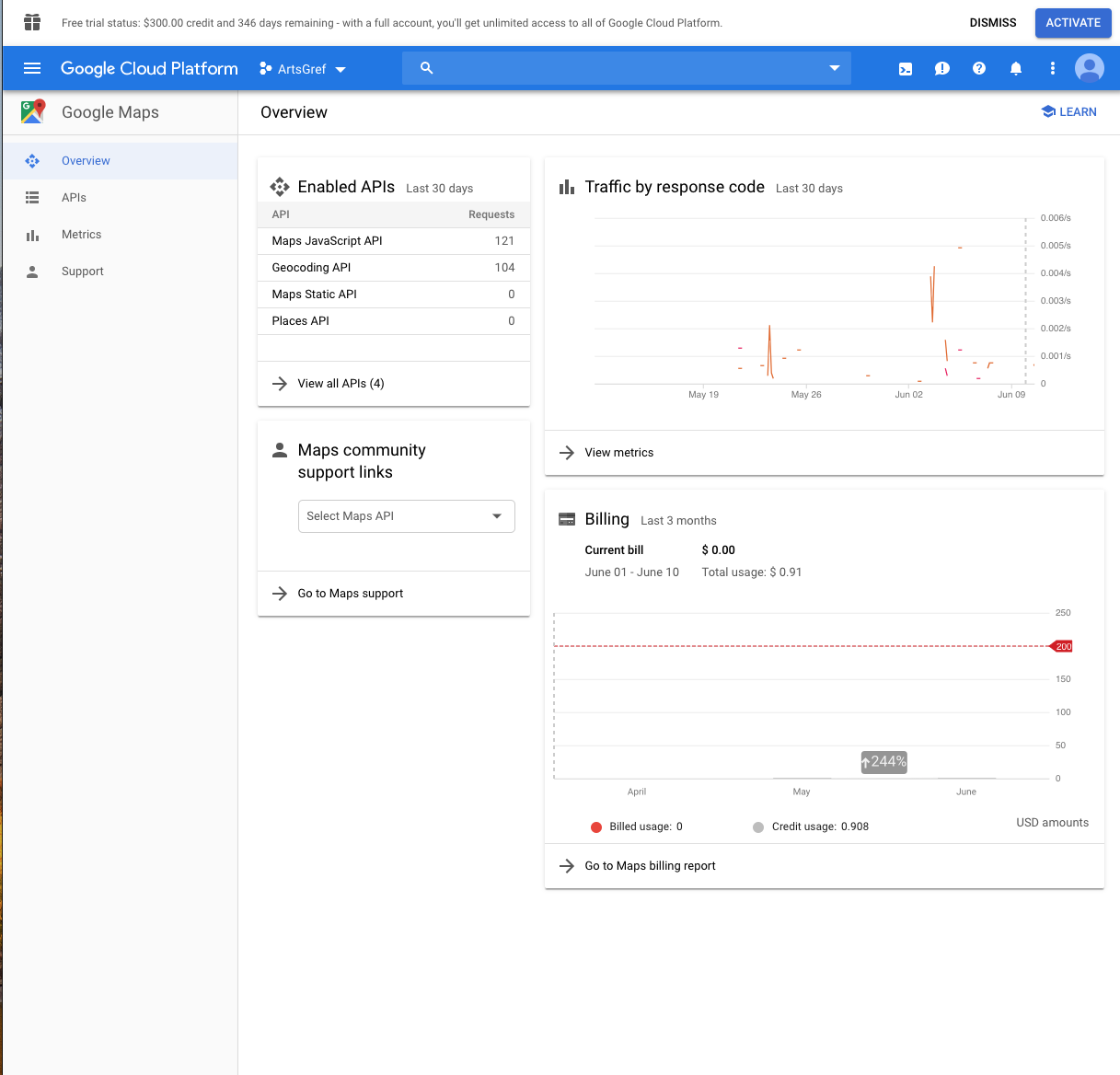
I am still unable to obtain Geolocation coordinates when submitting a location form or when editing a location within an event submission form.
After my previous post I reviewed the status of my certificate and made sure that everything on the Google end was properly completed. I finished a thorough recheck and a couple of omissions last Wed but Google advises a 72 hr wait period before expecting results. I have made sure that I have;
1. Secured the site with a TLS certificate
2. Enabled the Geocoding API
2. Activated a billing account for Google
3. Gone through the Google process for registering my URL as a valid site for Google to serve
4. Obtained 2 API certificates (one created during the process of validating my URL)
After waiting the necessary time for full implementation I still am not receiving any geolocation data so I contacted Google support. A copy of the support incident with Google is attached. The conclusion of Google tech support is that "the requests are being sent to you without error. Meaning that the Joomla script is not picking up those variables from the requests."
I also notice that when an event is chosen for editing, the address field is not repopulated with the full address, only the street address appears. This is something which bothers me about the coalescing of all address info into a single input field. It seems like it is being parsed out into individual Mysql fields and not being fully returned to edit. If the individual text input boxes were available, the editor could click on each to return the inputted values. As it is he/she has to go recover the additional info.
After my previous post I reviewed the status of my certificate and made sure that everything on the Google end was properly completed. I finished a thorough recheck and a couple of omissions last Wed but Google advises a 72 hr wait period before expecting results. I have made sure that I have;
1. Secured the site with a TLS certificate
2. Enabled the Geocoding API
2. Activated a billing account for Google
3. Gone through the Google process for registering my URL as a valid site for Google to serve
4. Obtained 2 API certificates (one created during the process of validating my URL)
After waiting the necessary time for full implementation I still am not receiving any geolocation data so I contacted Google support. A copy of the support incident with Google is attached. The conclusion of Google tech support is that "the requests are being sent to you without error. Meaning that the Joomla script is not picking up those variables from the requests."
I also notice that when an event is chosen for editing, the address field is not repopulated with the full address, only the street address appears. This is something which bothers me about the coalescing of all address info into a single input field. It seems like it is being parsed out into individual Mysql fields and not being fully returned to edit. If the individual text input boxes were available, the editor could click on each to return the inputted values. As it is he/she has to go recover the additional info.
Attachment not found
Attachment not found
Please Log in or Create an account to join the conversation.
- Tuan Pham Ngoc
- Offline
- Administrator
-
7 years 4 months ago #125873
by Tuan Pham Ngoc
Replied by Tuan Pham Ngoc on topic Trouble with submitting locations using Google API
Hello Richard
In this case, I would suggest you to submit a support ticket sending us super admin account and tell us what we need to do to see the error
We are going to check to see why the issue happens and get it sorted
Regards,
Tuan
In this case, I would suggest you to submit a support ticket sending us super admin account and tell us what we need to do to see the error
We are going to check to see why the issue happens and get it sorted
Regards,
Tuan
Please Log in or Create an account to join the conversation.
Moderators: Tuan Pham Ngoc
Support
Documentation
Information
Copyright © 2026 Joomla Extensions by Joomdonation. All Rights Reserved.
joomdonation.com is not affiliated with or endorsed by the Joomla! Project or Open Source Matters.
The Joomla! name and logo is used under a limited license granted by Open Source Matters the trademark holder in the United States and other countries.
The Joomla! name and logo is used under a limited license granted by Open Source Matters the trademark holder in the United States and other countries.