- Posts: 4
- Thank you received: 0

Need help with Joomla? We are available for hire to help with Joomla customization, upgrades, maintenance, and custom development.
Explore our services Hide Event Date & Location when using "Additional Dates"
- Marcus
- Topic Author
- Offline
- New Member
-

Less
More
7 years 5 months ago - 7 years 5 months ago #124522
by Marcus
Hide Event Date & Location when using "Additional Dates" was created by Marcus
I'm using the "Additional Dates" plugin for multiple events at the same day but different times. I realized however, that in the category list view the location and date (including time) of the first event are shown.
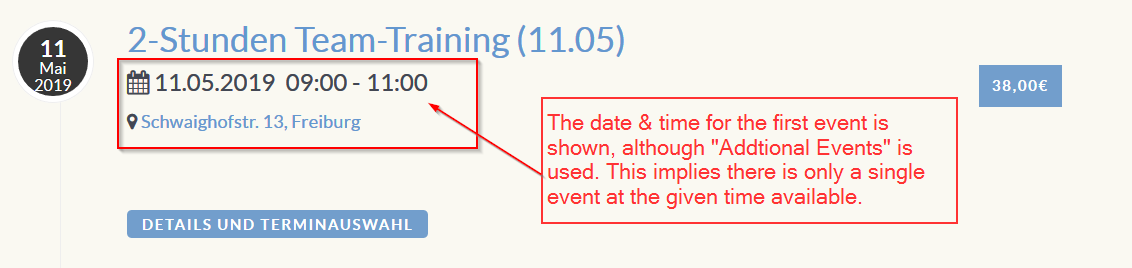
This display is quite confusing for the visitor, as it implies, that there is only a single event at a single time slot. Only when clicking the "details and location" button, the visitor will realize that there are actually multiple events at various dates.
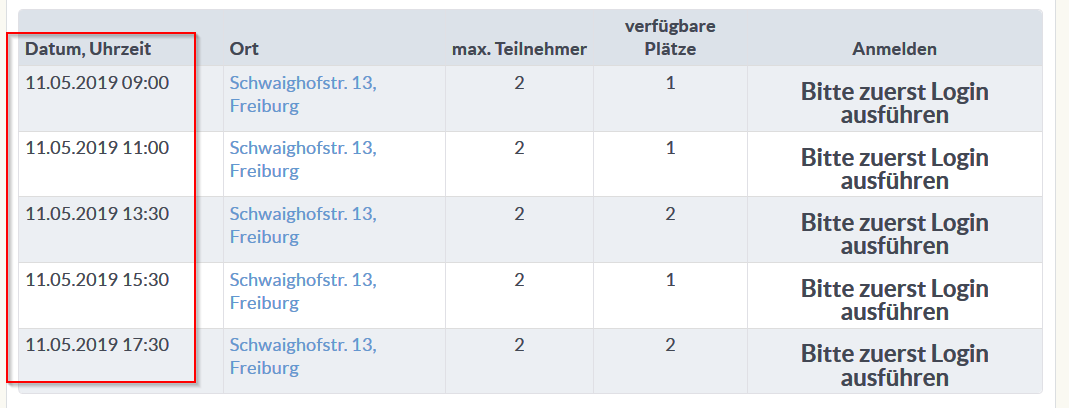
Question: Is there a way to hide the event date (and location) from the event list views, when using "Additional Dates". Actually it would be even better to have a text indicating that there are multiple times/dates and locations associated with this event.
Cheers,
Marcus
This display is quite confusing for the visitor, as it implies, that there is only a single event at a single time slot. Only when clicking the "details and location" button, the visitor will realize that there are actually multiple events at various dates.
Question: Is there a way to hide the event date (and location) from the event list views, when using "Additional Dates". Actually it would be even better to have a text indicating that there are multiple times/dates and locations associated with this event.
Cheers,
Marcus
Last edit: 7 years 5 months ago by Marcus.
Please Log in or Create an account to join the conversation.
- Tuan Pham Ngoc
- Offline
- Administrator
-

7 years 5 months ago #124525
by Tuan Pham Ngoc
Replied by Tuan Pham Ngoc on topic Hide Event Date & Location when using "Additional Dates"
Hi Marcus
For this, I think you need to make small modification to the code. The file you need to modify is components/com_eventbooking/themes/default/common/events_timeline.php to hide date and location
To know if an event has additional date or not, you can use the command
if ($event->is_multiple_date)
{
// This event has multiple dates
}
Hope this gives you abit help
Tuan
For this, I think you need to make small modification to the code. The file you need to modify is components/com_eventbooking/themes/default/common/events_timeline.php to hide date and location
To know if an event has additional date or not, you can use the command
if ($event->is_multiple_date)
{
// This event has multiple dates
}
Hope this gives you abit help
Tuan
Please Log in or Create an account to join the conversation.
Moderators: Tuan Pham Ngoc
Support
Documentation
Information
Copyright © 2026 Joomla Extensions by Joomdonation. All Rights Reserved.
joomdonation.com is not affiliated with or endorsed by the Joomla! Project or Open Source Matters.
The Joomla! name and logo is used under a limited license granted by Open Source Matters the trademark holder in the United States and other countries.
The Joomla! name and logo is used under a limited license granted by Open Source Matters the trademark holder in the United States and other countries.