- Posts: 16
- Thank you received: 1

Need help with Joomla? We are available for hire to help with Joomla customization, upgrades, maintenance, and custom development.
Explore our services [FIELD_VALUE] does not work for Select custom fields
- panchroma
- Topic Author
- Offline
- New Member
-

Less
More
7 years 7 months ago #122769
by panchroma
[FIELD_VALUE] does not work for Select custom fields was created by panchroma
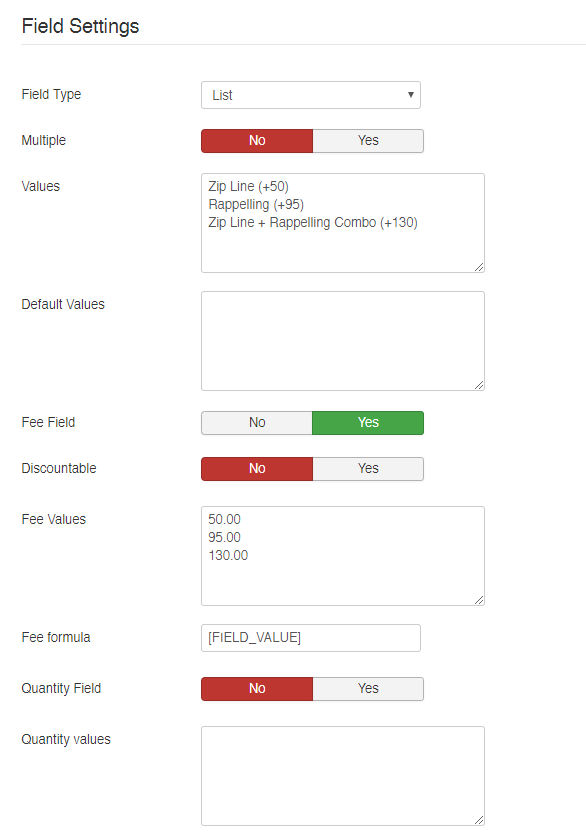
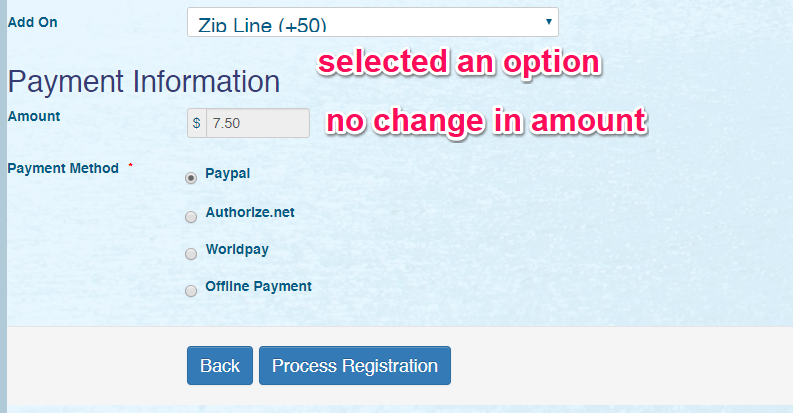
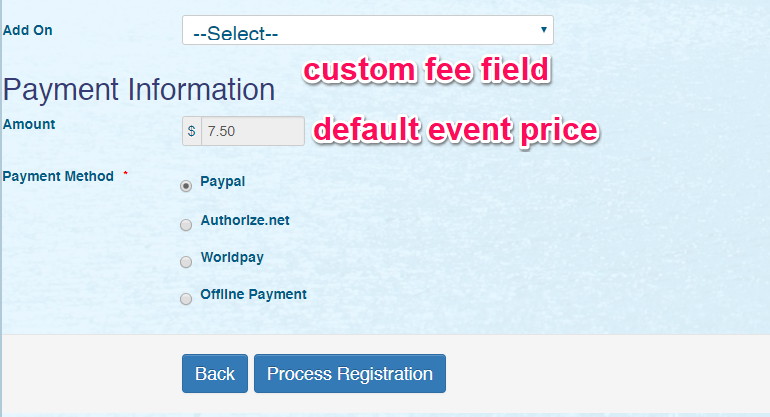
I created an event with a set registration fee (7.50). I also created a single select (list) custom field for add-on services, and used the field as a fee field. There are 3 options for the field, and I added the corresponding values for each option in the Fee Values field, one value in each line; a total of 3 different values (50, 95 and 130). I then added the [FIELD_VALUE] tag in the Fee Formula field. During the registration step, I see the custom add-on field as expected, then selected one of the options. I see the spinning wheel appear at the bottom, but the amount to be paid did not change. The value that corresponds to the option I have selected was not added to the amount to be paid.
I changed the field type to radio, and got the same result. The value for the selected option does not get added to the amount to be paid.
I then changed the field type to checkbox. The result is even weirder. When the page registration page loads, and no option was selected from the custom field, the default registration fee for the event was increased by 1.00, so instead of 7.50, it is showing 8.50. When I selected one option from the custom field, the value did not change.
As a way of troubleshooting, I created another custom field, this time a text field. I also added the [FIELD_VALUE] tag in the Formula field, then tested it in the front end. The amount I entered into the field got added to the total amount, which is what is expected.
Can you please check the issue and fix it? Thanks.

I changed the field type to radio, and got the same result. The value for the selected option does not get added to the amount to be paid.
I then changed the field type to checkbox. The result is even weirder. When the page registration page loads, and no option was selected from the custom field, the default registration fee for the event was increased by 1.00, so instead of 7.50, it is showing 8.50. When I selected one option from the custom field, the value did not change.
As a way of troubleshooting, I created another custom field, this time a text field. I also added the [FIELD_VALUE] tag in the Formula field, then tested it in the front end. The amount I entered into the field got added to the total amount, which is what is expected.
Can you please check the issue and fix it? Thanks.
Please Log in or Create an account to join the conversation.
- Tuan Pham Ngoc
- Offline
- Administrator
-

7 years 7 months ago #122772
by Tuan Pham Ngoc
Replied by Tuan Pham Ngoc on topic [FIELD_VALUE] does not work for Select custom fields
You don't need to setup Fee Formula for this case. Just empty it and fee will be calculated properly
Tuan
Tuan
Please Log in or Create an account to join the conversation.
- panchroma
- Topic Author
- Offline
- New Member
-
Less
More
- Posts: 16
- Thank you received: 1
7 years 7 months ago #122773
by panchroma
Replied by panchroma on topic [FIELD_VALUE] does not work for Select custom fields
Ok. That did it. I think the manual should be updated.
Please Log in or Create an account to join the conversation.
- Tuan Pham Ngoc
- Offline
- Administrator
-
7 years 7 months ago #122774
by Tuan Pham Ngoc
Replied by Tuan Pham Ngoc on topic [FIELD_VALUE] does not work for Select custom fields
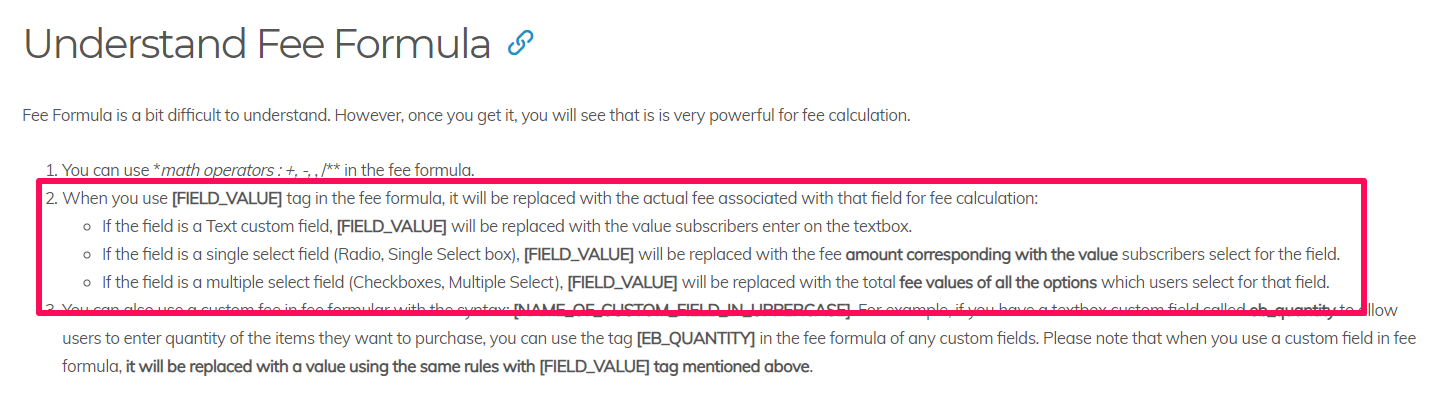
Fee Fee formula usually used for Textbox custom fee field only. If you look at
eventbookingdoc.joomservices.com/basic-s...wn-custom-field-type
, there is no where we mention that you have to use Fee Formula for radio custom fee field
Tuan
Tuan
Please Log in or Create an account to join the conversation.
- panchroma
- Topic Author
- Offline
- New Member
-
Less
More
- Posts: 16
- Thank you received: 1
7 years 7 months ago #122777
by panchroma
Replied by panchroma on topic [FIELD_VALUE] does not work for Select custom fields
Thanks 
Please Log in or Create an account to join the conversation.
Moderators: Tuan Pham Ngoc
Support
Documentation
Information
Copyright © 2026 Joomla Extensions by Joomdonation. All Rights Reserved.
joomdonation.com is not affiliated with or endorsed by the Joomla! Project or Open Source Matters.
The Joomla! name and logo is used under a limited license granted by Open Source Matters the trademark holder in the United States and other countries.
The Joomla! name and logo is used under a limited license granted by Open Source Matters the trademark holder in the United States and other countries.