- Posts: 25
- Thank you received: 0

Need help with Joomla? We are available for hire to help with Joomla customization, upgrades, maintenance, and custom development.
Explore our services How to remove Gross amount
- Matt Baxter
- Topic Author
- Offline
- Junior Member
-

Less
More
7 years 10 months ago #120411
by Matt Baxter
How to remove Gross amount was created by Matt Baxter
Hi guys,
Is there a way to remove the gross amount. It can confuse people and result in them paying the incorrect amount.
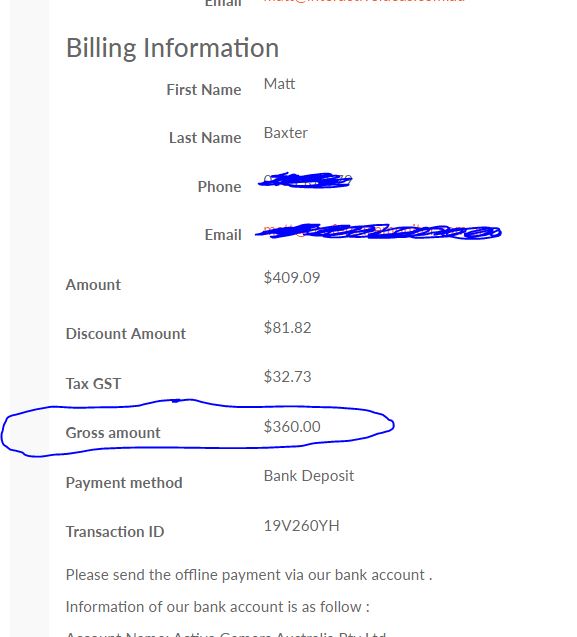
Is there a way to remove the gross amount. It can confuse people and result in them paying the incorrect amount.
Please Log in or Create an account to join the conversation.
- Tuan Pham Ngoc
- Away
- Administrator
-

7 years 10 months ago #120412
by Tuan Pham Ngoc
Replied by Tuan Pham Ngoc on topic How to remove Gross amount
Hello
If you would like to remove that line, you will have to edit code in several files:
-components/com_eventbooking/themes/default/emailtemplates/individual_detail.php
- components/com_eventbooking/themes/default/emailtemplates/email_individual_detail.php
- components/com_eventbooking/themes/default/emailtemplates/group_detail.php
- components/com_eventbooking/themes/default/emailtemplates/email_group_detail.php
(The first two files are for individual registration, for the later two files are for group registration)
Once the modification is done, you should move the modified file to PATH_TO_TEMPLATE/html/com_eventbooking/emailtemplates folder so that the change won't be lost when you update to future releases of the extension
Regards,
Tuan
If you would like to remove that line, you will have to edit code in several files:
-components/com_eventbooking/themes/default/emailtemplates/individual_detail.php
- components/com_eventbooking/themes/default/emailtemplates/email_individual_detail.php
- components/com_eventbooking/themes/default/emailtemplates/group_detail.php
- components/com_eventbooking/themes/default/emailtemplates/email_group_detail.php
(The first two files are for individual registration, for the later two files are for group registration)
Once the modification is done, you should move the modified file to PATH_TO_TEMPLATE/html/com_eventbooking/emailtemplates folder so that the change won't be lost when you update to future releases of the extension
Regards,
Tuan
Please Log in or Create an account to join the conversation.
- Matt Baxter
- Topic Author
- Offline
- Junior Member
-
Less
More
- Posts: 25
- Thank you received: 0
7 years 10 months ago #120413
by Matt Baxter
Replied by Matt Baxter on topic How to remove Gross amount
Thanks Tuan.
If i wanted to offer a discount when a person purchases more than one ticket, how would I do that using a coupon.
For example we are running a promotion in a magazine that says, buy two tickets and get the second ticket for half price if you use this coupon.
We dont want to offer the special to everyone, just people that read that article and use the coupon.
Any suggestions Tuan?
If i wanted to offer a discount when a person purchases more than one ticket, how would I do that using a coupon.
For example we are running a promotion in a magazine that says, buy two tickets and get the second ticket for half price if you use this coupon.
We dont want to offer the special to everyone, just people that read that article and use the coupon.
Any suggestions Tuan?
Please Log in or Create an account to join the conversation.
- Tuan Pham Ngoc
- Away
- Administrator
-
7 years 10 months ago #120414
by Tuan Pham Ngoc
Replied by Tuan Pham Ngoc on topic How to remove Gross amount
Sadly, we don't have a way to handle that requirement. If you wish to handle that discount, you can setup it using group registration rate. However, it will be applied to everyone, not just the one read the magazine and uses the coupon
Tuan
Tuan
Please Log in or Create an account to join the conversation.
- Matt Baxter
- Topic Author
- Offline
- Junior Member
-
Less
More
- Posts: 25
- Thank you received: 0
7 years 10 months ago #120438
by Matt Baxter
Replied by Matt Baxter on topic How to remove Gross amount
I thought that might be a poblem. No drama I will work out a different way to do it.
Back to removing Gross. What about simply changing the label to Total instead of Gross. Is there a way to do that?
Back to removing Gross. What about simply changing the label to Total instead of Gross. Is there a way to do that?
Please Log in or Create an account to join the conversation.
- Tuan Pham Ngoc
- Away
- Administrator
-
7 years 10 months ago #120439
by Tuan Pham Ngoc
Replied by Tuan Pham Ngoc on topic How to remove Gross amount
Hi Matt
Yes, that's easy. You just need to go to Events Booking -> Translation, find the language item EB_GROSS_AMOUNT, change it to the text you want and it should work fne
Regards
Tuan
Yes, that's easy. You just need to go to Events Booking -> Translation, find the language item EB_GROSS_AMOUNT, change it to the text you want and it should work fne
Regards
Tuan
Please Log in or Create an account to join the conversation.
Moderators: Tuan Pham Ngoc
Support
Documentation
Information
Copyright © 2026 Joomla Extensions by Joomdonation. All Rights Reserved.
joomdonation.com is not affiliated with or endorsed by the Joomla! Project or Open Source Matters.
The Joomla! name and logo is used under a limited license granted by Open Source Matters the trademark holder in the United States and other countries.
The Joomla! name and logo is used under a limited license granted by Open Source Matters the trademark holder in the United States and other countries.