- Posts: 3
- Thank you received: 0

Need help with Joomla? We are available for hire to help with Joomla customization, upgrades, maintenance, and custom development.
Explore our services Group and Individual Pay Now Buttons in Account Info page
- Matthew Purdom
- Topic Author
- Offline
- New Member
-

Less
More
8 years 5 months ago #112617
by Matthew Purdom
Group and Individual Pay Now Buttons in Account Info page was created by Matthew Purdom
Hello,
I'm trying to figure out how to let a user who registered for an event, but didn't pay for PayPal during registration, so come back and pay later for their event. I have a bit of JS written for this account page:
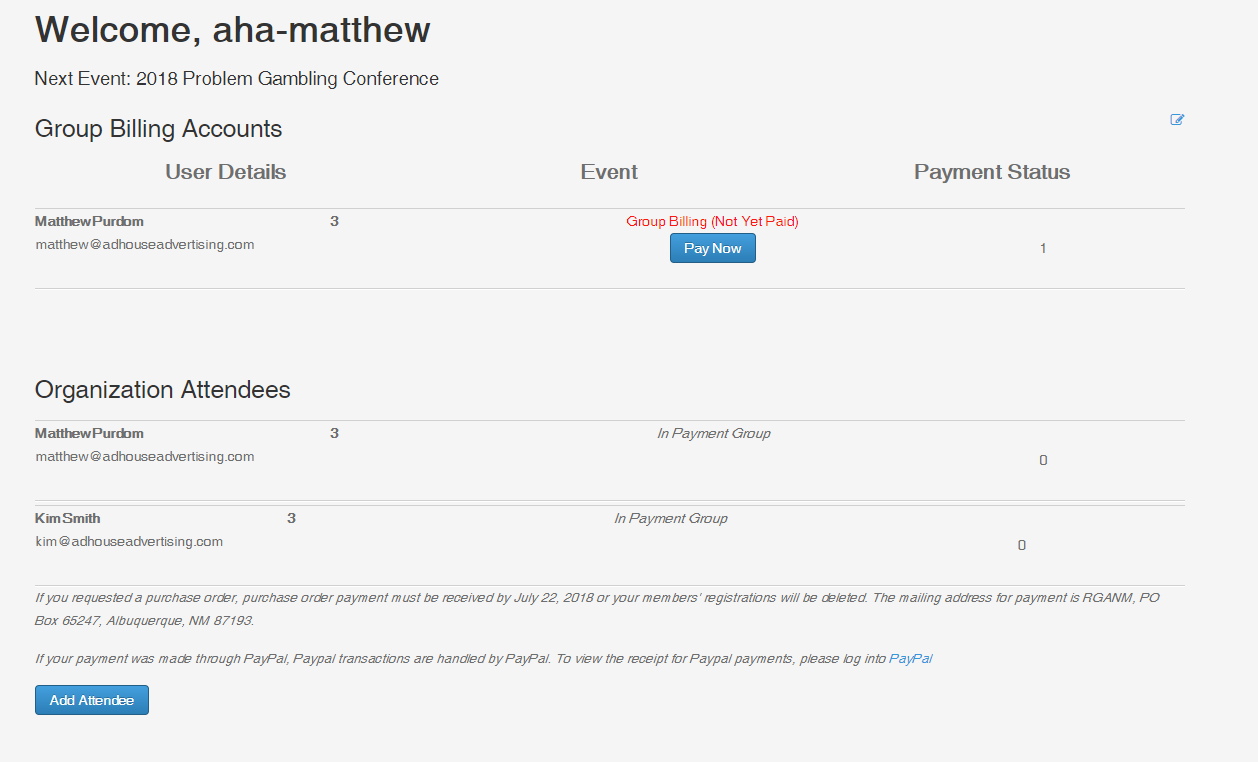
and the attached image is what the page ends up looking like. I added the above script snippet because I'm using code that was made from another developer that is no longer with us, and he wrote this using the Itemid=317 for multiple years, but when that particular event ends (say in 2016 or 2017) then the closed event message is shown and there is no way to continue to pay.
How do I call a past payment for a user in their account, if they didn't pay upon registration, but would like to come back and pay for it after? I hope this makes sense.
I'm trying to figure out how to let a user who registered for an event, but didn't pay for PayPal during registration, so come back and pay later for their event. I have a bit of JS written for this account page:
Code:
if (jQuery("#table_" + counter + " td:nth-child(6):contains('PayPal')").length > 0) {
jQuery("#table_" + counter + " td:nth-child(5)").html(function () {
return jQuery(this).html().replace("0", "<span style=\"color: red;\">Not Yet Paid</span><br /><a class=\"btn btn-primary\" href=\"https://rganm.org/en/component/eventbooking/2018-conference/individual-registration?Itemid=317\">Pay Now</a>");
}
);
and the attached image is what the page ends up looking like. I added the above script snippet because I'm using code that was made from another developer that is no longer with us, and he wrote this using the Itemid=317 for multiple years, but when that particular event ends (say in 2016 or 2017) then the closed event message is shown and there is no way to continue to pay.
How do I call a past payment for a user in their account, if they didn't pay upon registration, but would like to come back and pay for it after? I hope this makes sense.
Please Log in or Create an account to join the conversation.
- Tuan Pham Ngoc
- Offline
- Administrator
-

8 years 5 months ago #112623
by Tuan Pham Ngoc
Replied by Tuan Pham Ngoc on topic Group and Individual Pay Now Buttons in Account Info page
I would say that it's hard. The easiest way would be ask them to pay for you manually (for example, send payment directly via PayPal). Once you received payment, you can edit his registration record and change registration status from Pending to Paid (approve the registration)
Regards,
Tuan
Regards,
Tuan
Please Log in or Create an account to join the conversation.
- Matthew Purdom
- Topic Author
- Offline
- New Member
-
Less
More
- Posts: 3
- Thank you received: 0
8 years 5 months ago #112673
by Matthew Purdom
Replied by Matthew Purdom on topic Group and Individual Pay Now Buttons in Account Info page
Hrm, maybe I should rephrase this. I have overwritten a previous event which was in 2017 for this year. There is some custom Javascript that was written where if a user cancelled their payment at PayPal, and later came back to view their "Account" then they would click a button that says "Pay Now". In an individuals account, it will populate the individuals registration form with the form data that they input before and then they can go to PayPal and make a payment. However, the Group Account uses the URL:
rganm.org/en/component/eventbooking/2018...istration?Itemid=317
The Itemid=317 takes them back to the 2017 registration form, and since that event is closed already, they get our closed message. How can I target the current 2018 event and have it autopopulate like the individuals does? At least if I can target the current 2018 event instead of the 2017 event, that would be great. Looking in Events Manager>Events only shows 3 events, 2016 with an ID of 1, 2017 with an ID of 2, and 2018 with an ID of 3...I'm not finding where this ?Itemid=317 is coming from...Thank you so much for your help!
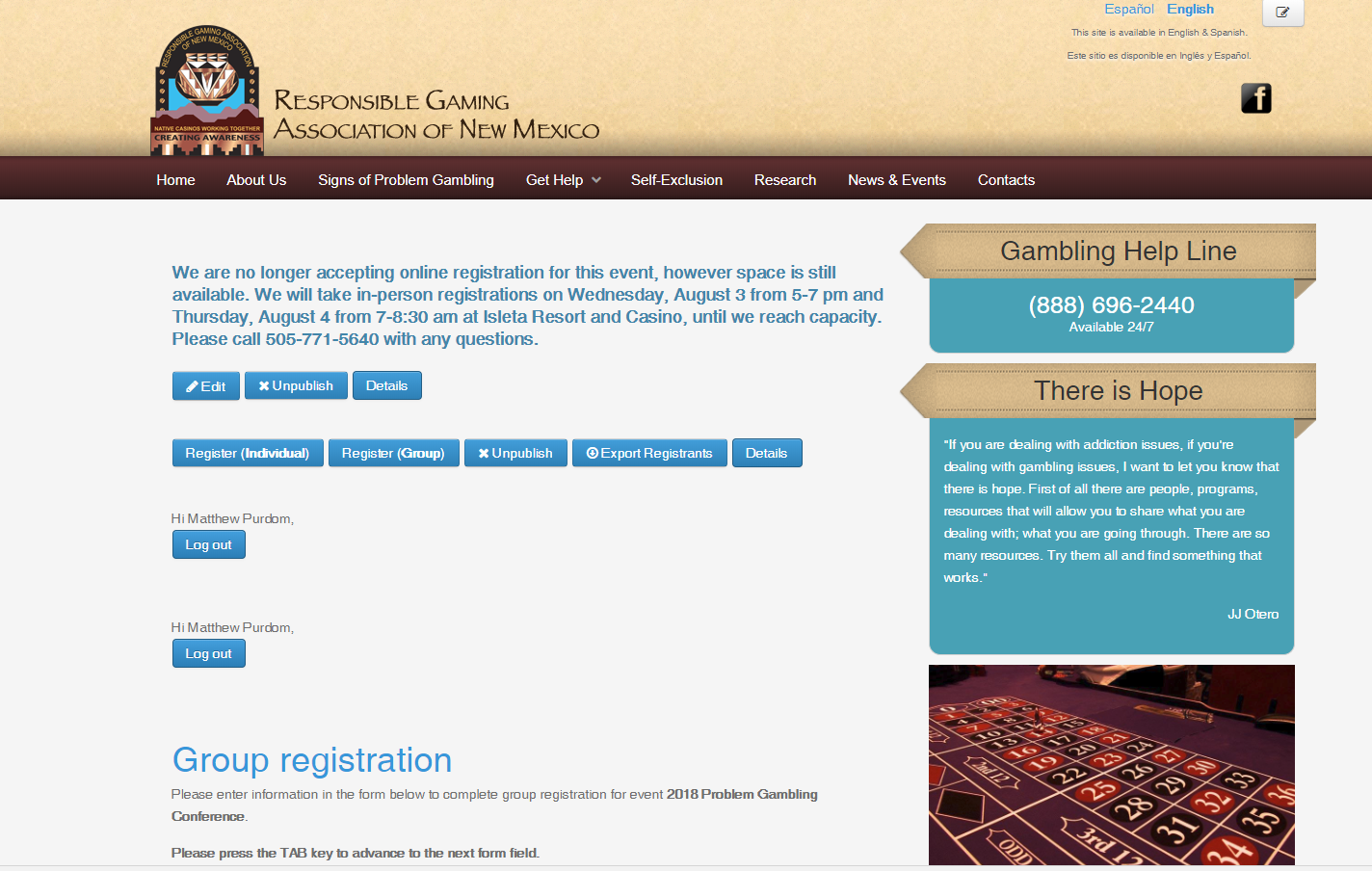
The image attached shows the message that the event has closed, where can I find that message (that might help) as I can't seem to find past events messages after the event has ended.
rganm.org/en/component/eventbooking/2018...istration?Itemid=317
The Itemid=317 takes them back to the 2017 registration form, and since that event is closed already, they get our closed message. How can I target the current 2018 event and have it autopopulate like the individuals does? At least if I can target the current 2018 event instead of the 2017 event, that would be great. Looking in Events Manager>Events only shows 3 events, 2016 with an ID of 1, 2017 with an ID of 2, and 2018 with an ID of 3...I'm not finding where this ?Itemid=317 is coming from...Thank you so much for your help!
The image attached shows the message that the event has closed, where can I find that message (that might help) as I can't seem to find past events messages after the event has ended.
Please Log in or Create an account to join the conversation.
- Tuan Pham Ngoc
- Offline
- Administrator
-
8 years 5 months ago #112680
by Tuan Pham Ngoc
Replied by Tuan Pham Ngoc on topic Group and Individual Pay Now Buttons in Account Info page
Hello Matthew
Itemid=317 is related to a menu item with ID = 317. I don't know how it's populated - setup on your site and could not answer this question. Maybe you can login to administrator area of your site, access to Menus -> All Menu Items, find the menu item with ID = 317. Click on it to edit, if it's linked to your 2017 event, try to change it to your 2018 event to see whether it works
So the key point here is you will need to find and change the menu item with ID = 317 (317 is ID of menu item, not ID of event)
Regards
Tuan
Itemid=317 is related to a menu item with ID = 317. I don't know how it's populated - setup on your site and could not answer this question. Maybe you can login to administrator area of your site, access to Menus -> All Menu Items, find the menu item with ID = 317. Click on it to edit, if it's linked to your 2017 event, try to change it to your 2018 event to see whether it works
So the key point here is you will need to find and change the menu item with ID = 317 (317 is ID of menu item, not ID of event)
Regards
Tuan
Please Log in or Create an account to join the conversation.
- Matthew Purdom
- Topic Author
- Offline
- New Member
-
Less
More
- Posts: 3
- Thank you received: 0
8 years 5 months ago #112724
by Matthew Purdom
Replied by Matthew Purdom on topic Group and Individual Pay Now Buttons in Account Info page
Tuan,
Thank you for explaining the menu items. That helps!
Thank you for explaining the menu items. That helps!
Please Log in or Create an account to join the conversation.
- Tuan Pham Ngoc
- Offline
- Administrator
-
8 years 5 months ago #112733
by Tuan Pham Ngoc
Replied by Tuan Pham Ngoc on topic Group and Individual Pay Now Buttons in Account Info page
Great, happy to hear that it helps
Regards,
Tuan
Regards,
Tuan
Please Log in or Create an account to join the conversation.
Moderators: Tuan Pham Ngoc
Support
Documentation
Information
Copyright © 2026 Joomla Extensions by Joomdonation. All Rights Reserved.
joomdonation.com is not affiliated with or endorsed by the Joomla! Project or Open Source Matters.
The Joomla! name and logo is used under a limited license granted by Open Source Matters the trademark holder in the United States and other countries.
The Joomla! name and logo is used under a limited license granted by Open Source Matters the trademark holder in the United States and other countries.