- Posts: 148
- Thank you received: 4

Need help with Joomla? We are available for hire to help with Joomla customization, upgrades, maintenance, and custom development.
Explore our services Prioritize an event entry in lists
- LAC Webadmin
- Topic Author
- Offline
- Premium Member
-

Less
More
8 years 6 months ago #111964
by LAC Webadmin
Prioritize an event entry in lists was created by LAC Webadmin
Hello!
Is there a way to prioritize an event entry in any list of Event Booking? For example, I create an event, although it will be happening like 3 months from now but I want it to show up as first in the listing.
Thanks,
Jackson
Is there a way to prioritize an event entry in any list of Event Booking? For example, I create an event, although it will be happening like 3 months from now but I want it to show up as first in the listing.
Thanks,
Jackson
Please Log in or Create an account to join the conversation.
- James Riley
-

- Offline
- Platinum Member
-

8 years 6 months ago - 8 years 6 months ago #111976
by James Riley
James Riley .: EventBooking user since 2014 ::: JoomDonation user since 2016 :.
.: grfx & web design / IT / AV @ St. Therese Institute of Faith and Mission, Bruno, SK, Canada :.
Replied by James Riley on topic Prioritize an event entry in lists
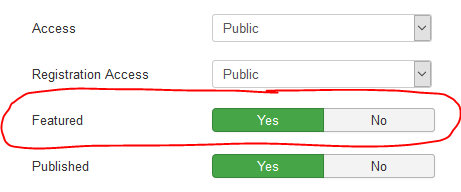
In the event's properties, try setting [ Featured ] -> [ Yes ]. I know that will prioritize the event to the top of the list in the Upcoming Events module, and perhaps other modules / layouts too.
James Riley .: EventBooking user since 2014 ::: JoomDonation user since 2016 :.
.: grfx & web design / IT / AV @ St. Therese Institute of Faith and Mission, Bruno, SK, Canada :.
Last edit: 8 years 6 months ago by James Riley.
Please Log in or Create an account to join the conversation.
- Tuan Pham Ngoc
- Offline
- Administrator
-

8 years 6 months ago #111982
by Tuan Pham Ngoc
Replied by Tuan Pham Ngoc on topic Prioritize an event entry in lists
Hi
1. You can edit the event, set Featured setting to Yes
2. Go to Events Booking -> Configuration, look at Themes tab, set Display featured events on top
config option to Yes
After that, featured events will be displayed at the top of list and it should solve your requirement
Regards,
Tuan
1. You can edit the event, set Featured setting to Yes
2. Go to Events Booking -> Configuration, look at Themes tab, set Display featured events on top
config option to Yes
After that, featured events will be displayed at the top of list and it should solve your requirement
Regards,
Tuan
Please Log in or Create an account to join the conversation.
Moderators: Tuan Pham Ngoc
Support
Documentation
Information
Copyright © 2026 Joomla Extensions by Joomdonation. All Rights Reserved.
joomdonation.com is not affiliated with or endorsed by the Joomla! Project or Open Source Matters.
The Joomla! name and logo is used under a limited license granted by Open Source Matters the trademark holder in the United States and other countries.
The Joomla! name and logo is used under a limited license granted by Open Source Matters the trademark holder in the United States and other countries.