- Posts: 66
- Thank you received: 1

Need help with Joomla? We are available for hire to help with Joomla customization, upgrades, maintenance, and custom development.
Explore our services Multiple levels of choices with price changes
- Lon Czarnecki
- Topic Author
- Offline
- Senior Member
-

Less
More
8 years 7 months ago #111217
by Lon Czarnecki
Multiple levels of choices with price changes was created by Lon Czarnecki
I'm having trouble working out the best way to organize registrations for a client and I tried Custom Fee Fields, Additional Dates, & Ticket Types. None of them really seem to be a good way to present my registration.
They have summer programs for kids that run for 11 weeks, each week includes 5 days (Mon, Tue, Wed, Thur, Fri). They want people to be able to sign up for any multitude of days, meaning: someone wants to sign up for 1 week, all 5 days, another wants to sign up for 3 weeks but only Tuesdays & Wednesdays of those weeks, and another may want to sign up for every other week for Monday, Tuesday, Wednesday, on week 1 & 3, but Wednesday, & Thursday on weeks 2, 4, & 5.
... Now the pricing would go as follows: If you sign up for one or two days per week the cost is $60 per day. If you sign up for 3, 4 or 5 days per week the price is $50 per day. In addition, if you sign up for all 11 weeks, all 5 days you get a discount of $400. If you sign up for all 11 weeks, 4 days per week, you get a discount of $300, and if you sign up for all 11 weeks, 3 days per week, you get a discount of $200. Complicated, right?
I've tried breaking up the weeks as individual events & setting up the days of the week as "Additional Dates" - but that forces them to sign up one day at a time.
I've tried adding Custom fee fields but have no idea how to enter [FIELD_VALUE] formulas... and yes I've read the documentation on custom fee fields. How would i configure it to change pricing from $60 per day to $50 per day when it reaches 3 days? This is also the problem with Ticket Types (of which there are only 4 anyway).
I'm sure there is a way to have events that have so many choices, but I don't know the best way to configure it where the price works out the way they want.
...help...
They have summer programs for kids that run for 11 weeks, each week includes 5 days (Mon, Tue, Wed, Thur, Fri). They want people to be able to sign up for any multitude of days, meaning: someone wants to sign up for 1 week, all 5 days, another wants to sign up for 3 weeks but only Tuesdays & Wednesdays of those weeks, and another may want to sign up for every other week for Monday, Tuesday, Wednesday, on week 1 & 3, but Wednesday, & Thursday on weeks 2, 4, & 5.
... Now the pricing would go as follows: If you sign up for one or two days per week the cost is $60 per day. If you sign up for 3, 4 or 5 days per week the price is $50 per day. In addition, if you sign up for all 11 weeks, all 5 days you get a discount of $400. If you sign up for all 11 weeks, 4 days per week, you get a discount of $300, and if you sign up for all 11 weeks, 3 days per week, you get a discount of $200. Complicated, right?
I've tried breaking up the weeks as individual events & setting up the days of the week as "Additional Dates" - but that forces them to sign up one day at a time.
I've tried adding Custom fee fields but have no idea how to enter [FIELD_VALUE] formulas... and yes I've read the documentation on custom fee fields. How would i configure it to change pricing from $60 per day to $50 per day when it reaches 3 days? This is also the problem with Ticket Types (of which there are only 4 anyway).
I'm sure there is a way to have events that have so many choices, but I don't know the best way to configure it where the price works out the way they want.
...help...
Please Log in or Create an account to join the conversation.
- Lon Czarnecki
- Topic Author
- Offline
- Senior Member
-
Less
More
- Posts: 66
- Thank you received: 1
8 years 7 months ago #111262
by Lon Czarnecki
Replied by Lon Czarnecki on topic Multiple levels of choices with price changes
Is this too big of an issue to get into? I would really appreciate the help figuring out a way to do this. I have no idea if this can even be done with this software or not.
Can it do multiple levels of weeks, days, & prices?
Can it do multiple levels of weeks, days, & prices?
Please Log in or Create an account to join the conversation.
- Tuan Pham Ngoc
- Offline
- Administrator
-

8 years 6 months ago #111270
by Tuan Pham Ngoc
Replied by Tuan Pham Ngoc on topic Multiple levels of choices with price changes
Hi
I would say that it is not possible to handle it by default, so if you want to use Events Booking to handle it, I think you will have to customize the extension to have the price calculated with that rule. I don't think there is any extensions can handle this requirement out of the box
I think the easiest way to handle this registration is:
1. Creating just 1 event
2. Creating custom fee field checkboxes, each field for one week to allow users to choose to register for the days in the week they want (each day is a checkbox option). See eventbookingdoc.joomservices.com/basic-s...ct-custom-field-type
3. Then customize the code of the extension to have fee calculated in the way you want
Regards,
Tuan
I would say that it is not possible to handle it by default, so if you want to use Events Booking to handle it, I think you will have to customize the extension to have the price calculated with that rule. I don't think there is any extensions can handle this requirement out of the box
I think the easiest way to handle this registration is:
1. Creating just 1 event
2. Creating custom fee field checkboxes, each field for one week to allow users to choose to register for the days in the week they want (each day is a checkbox option). See eventbookingdoc.joomservices.com/basic-s...ct-custom-field-type
3. Then customize the code of the extension to have fee calculated in the way you want
Regards,
Tuan
Please Log in or Create an account to join the conversation.
- Lon Czarnecki
- Topic Author
- Offline
- Senior Member
-
Less
More
- Posts: 66
- Thank you received: 1
8 years 6 months ago #111287
by Lon Czarnecki
Replied by Lon Czarnecki on topic Multiple levels of choices with price changes
Thanks Tuan, I appreciate your help.
I thought this might be a bit too complicated. I'm concerned about customizing the code so I'll try to break down the events to more manageable pieces. Maybe separate events into individual weeks. I'll need to add the shopping cart feature because I want people to register for each of the separated events and then pay for them all at once. However when I activate the shopping cart in the configuration and click on the register button on the Event Detail page, the page just dims and nothing happens. It looks like it's trying to open a popup but I see nothing. Is there another setting I need to switch on or off for the shopping cart to work?
I thought this might be a bit too complicated. I'm concerned about customizing the code so I'll try to break down the events to more manageable pieces. Maybe separate events into individual weeks. I'll need to add the shopping cart feature because I want people to register for each of the separated events and then pay for them all at once. However when I activate the shopping cart in the configuration and click on the register button on the Event Detail page, the page just dims and nothing happens. It looks like it's trying to open a popup but I see nothing. Is there another setting I need to switch on or off for the shopping cart to work?
Please Log in or Create an account to join the conversation.
- Tuan Pham Ngoc
- Offline
- Administrator
-
8 years 6 months ago #111292
by Tuan Pham Ngoc
Replied by Tuan Pham Ngoc on topic Multiple levels of choices with price changes
Hi Lon
There might some javascript conflict causing the popup doesn't work properly. You can submit a support ticket sending us super admin account of your site so that we can correct it for you
However, even with shopping cart, I don't think the price can be calculated like you said. So customization will still be needed if you want to have it works like that. But we need to have shopping cart works OK first
Regards,
Tuan
There might some javascript conflict causing the popup doesn't work properly. You can submit a support ticket sending us super admin account of your site so that we can correct it for you
However, even with shopping cart, I don't think the price can be calculated like you said. So customization will still be needed if you want to have it works like that. But we need to have shopping cart works OK first
Regards,
Tuan
Please Log in or Create an account to join the conversation.
- Lon Czarnecki
- Topic Author
- Offline
- Senior Member
-
Less
More
- Posts: 66
- Thank you received: 1
8 years 6 months ago #111293
by Lon Czarnecki
Replied by Lon Czarnecki on topic Multiple levels of choices with price changes
Ok, I'll submit a ticket for the shopping cart issue.
Please Log in or Create an account to join the conversation.
- Tuan Pham Ngoc
- Offline
- Administrator
-
8 years 6 months ago #111304
by Tuan Pham Ngoc
Replied by Tuan Pham Ngoc on topic Multiple levels of choices with price changes
OK Lon. We'll check it once we received your ticket
Regards,
Tuan
Regards,
Tuan
Please Log in or Create an account to join the conversation.
- Lon Czarnecki
- Topic Author
- Offline
- Senior Member
-
Less
More
- Posts: 66
- Thank you received: 1
8 years 6 months ago #111590
by Lon Czarnecki
Replied by Lon Czarnecki on topic Multiple levels of choices with price changes
So I think I have a way to organize this figured out but there are still some issues popping up. I apologize ahead of time for the lengthy details!
What I did:
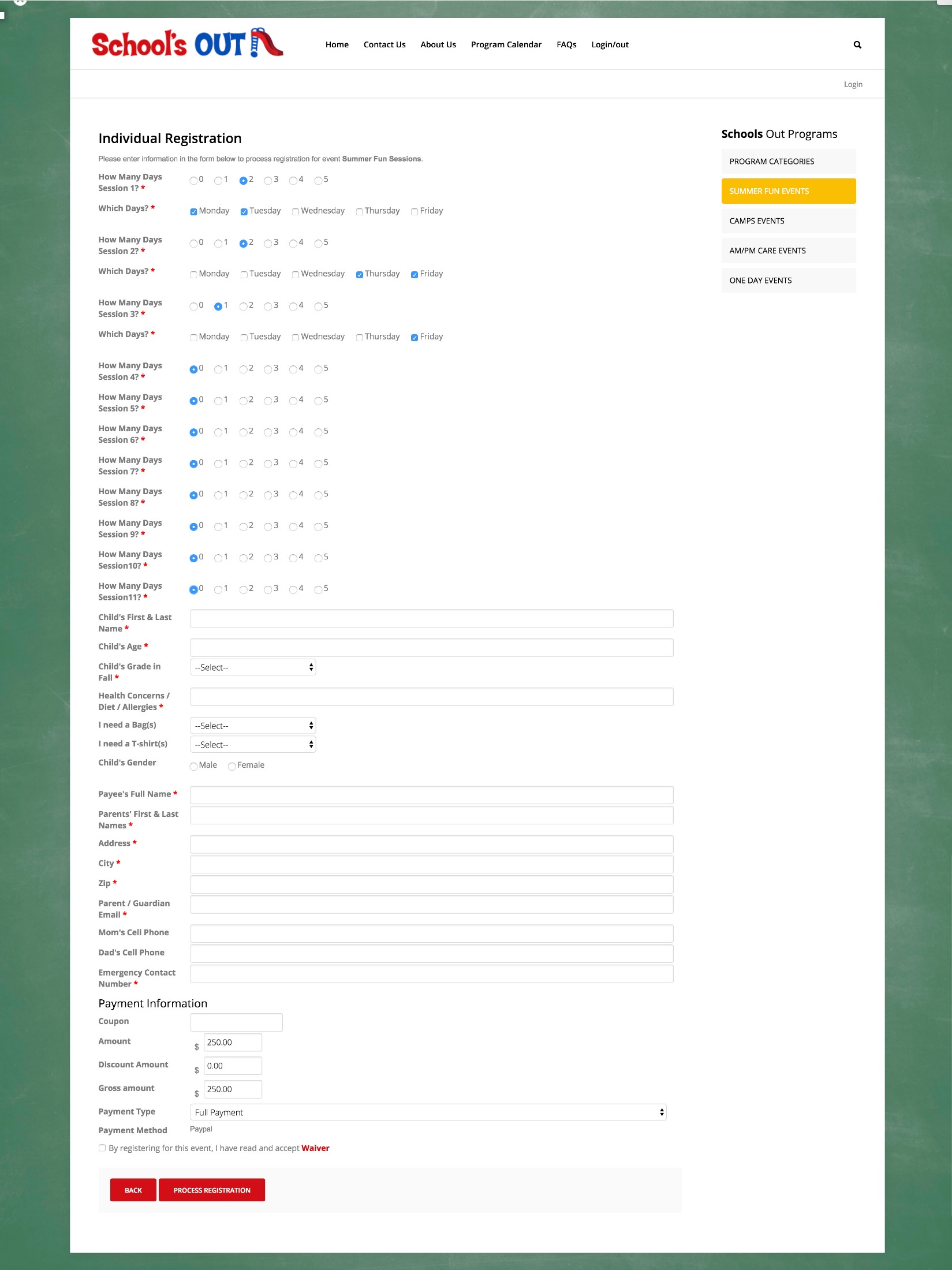
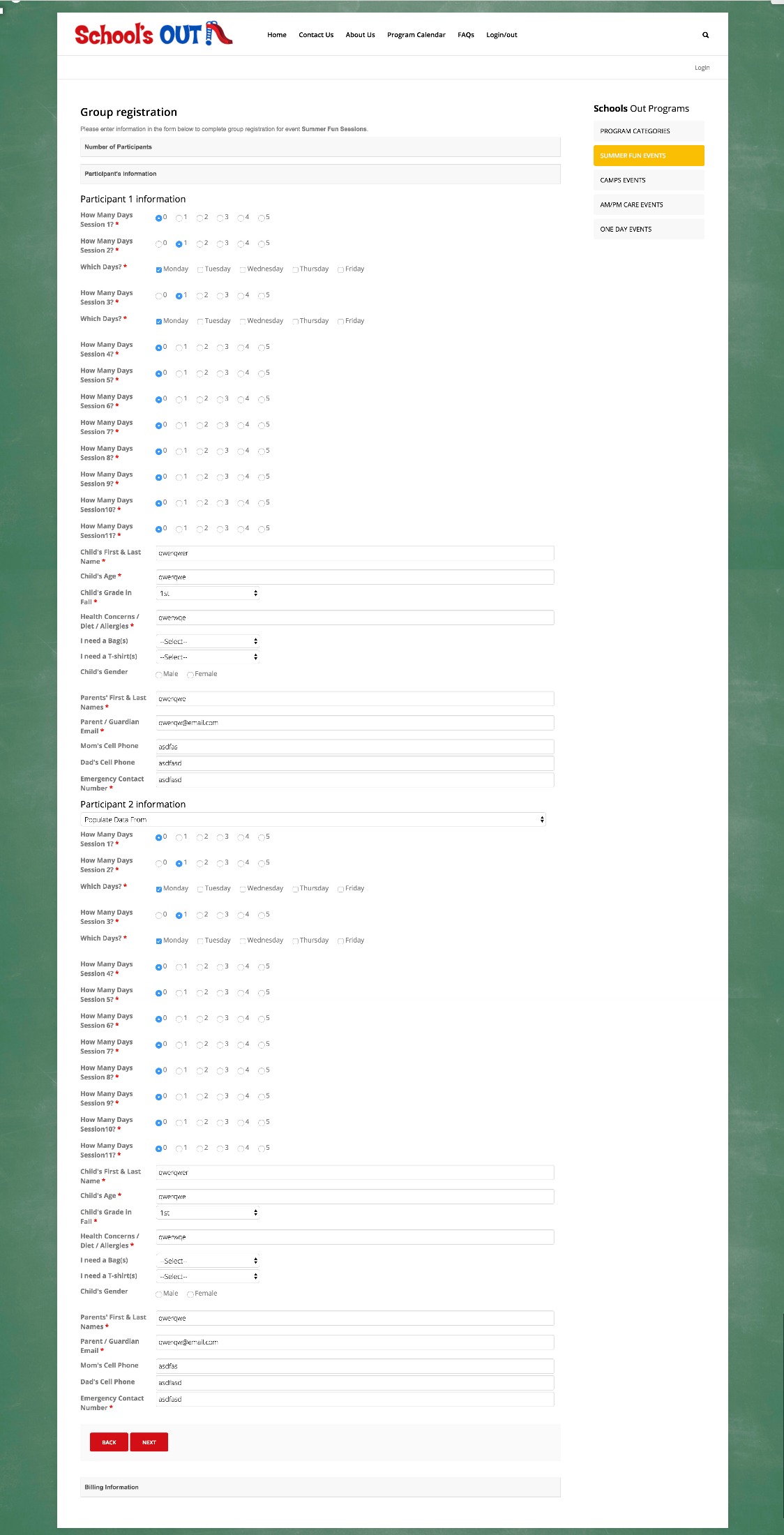
• I created one event to handle everything because it would be too much for people to register multiple people for 11 separate events for the summer. All 11 weeks are in one event.
• I created custom fields for each week called a SESSION: Radio button choices of how many days for that week they choose. I set up Field Values of - 1 day $60, 2 days $120, (then a price break for 3 days or more) 3 days $150, 4 days $200, 5 days $250. This amount is the only fees. I have to make the event fee $0.00 because all fees are set by the custom Field Values.
• Then added another custom field that shows only when they chose the Session, that asks which days of that week they want using checkboxes for multiple choices. No fees associated with this field, we just need to know which days.
Now a 2nd discount is added:
The client wants a $15 discount to the 2nd, 3rd, or 4th kid for people registering multiple kids. Discount does not apply to the first kid. In the custom field for each SESSION I've added the fee formula [SESSION1]*0.8333333 and [SESSION2]*0.8333333 and [SESSION3]*0.8333333 and so on for each SESSION. This applies a universal discount to multiple kids and comes pretty close to the discount they requested. Problem solved!
Everything to this point is working perfectly (or at least prices add up close enough)! The forms are long and the list of custom fields is HUGE, but so far so good.
Here is the NEW problem:
• They want to give specific people (school members) an additional discount of 15%.
• They also want to give $100 off to people who pay in full (we have the deposit feature set up for all events)
I know of two ways to do this:
• Create a Member Registration for families who are school members and then I can set a discount according to their membership status in the event's Discount Setting.
• I can create a coupon that the administration can give a family to apply a $100 discount for paying in full.
THE PROBLEM:
Coupons and Event Discount Setting do not apply to custom fields!! So how can I discount anything from a custom field that has a price set in the Field Values? This seems to be a flaw. Why offer to add costs in the Custom Field Values if no discounts in the system apply to them?
In working with and learning this plugin I believe it is the best plugin for the job, and the help forum is top notch! How can I use the event's discounts like coupons and Event Discount Settings that effect the Custom Field Values?
What I did:
• I created one event to handle everything because it would be too much for people to register multiple people for 11 separate events for the summer. All 11 weeks are in one event.
• I created custom fields for each week called a SESSION: Radio button choices of how many days for that week they choose. I set up Field Values of - 1 day $60, 2 days $120, (then a price break for 3 days or more) 3 days $150, 4 days $200, 5 days $250. This amount is the only fees. I have to make the event fee $0.00 because all fees are set by the custom Field Values.
• Then added another custom field that shows only when they chose the Session, that asks which days of that week they want using checkboxes for multiple choices. No fees associated with this field, we just need to know which days.
Now a 2nd discount is added:
The client wants a $15 discount to the 2nd, 3rd, or 4th kid for people registering multiple kids. Discount does not apply to the first kid. In the custom field for each SESSION I've added the fee formula [SESSION1]*0.8333333 and [SESSION2]*0.8333333 and [SESSION3]*0.8333333 and so on for each SESSION. This applies a universal discount to multiple kids and comes pretty close to the discount they requested. Problem solved!
Everything to this point is working perfectly (or at least prices add up close enough)! The forms are long and the list of custom fields is HUGE, but so far so good.
Here is the NEW problem:
• They want to give specific people (school members) an additional discount of 15%.
• They also want to give $100 off to people who pay in full (we have the deposit feature set up for all events)
I know of two ways to do this:
• Create a Member Registration for families who are school members and then I can set a discount according to their membership status in the event's Discount Setting.
• I can create a coupon that the administration can give a family to apply a $100 discount for paying in full.
THE PROBLEM:
Coupons and Event Discount Setting do not apply to custom fields!! So how can I discount anything from a custom field that has a price set in the Field Values? This seems to be a flaw. Why offer to add costs in the Custom Field Values if no discounts in the system apply to them?
In working with and learning this plugin I believe it is the best plugin for the job, and the help forum is top notch! How can I use the event's discounts like coupons and Event Discount Settings that effect the Custom Field Values?
Please Log in or Create an account to join the conversation.
- Tuan Pham Ngoc
- Offline
- Administrator
-
8 years 6 months ago #111600
by Tuan Pham Ngoc
Replied by Tuan Pham Ngoc on topic Multiple levels of choices with price changes
Coupon and Discount settings should apply to custom fields, too, unless you set Discountable setting of the custom field to No
Could you please edit the custom field, set Discountable parameter to Yes, then try again?
Regards,
Tuan
Could you please edit the custom field, set Discountable parameter to Yes, then try again?
Regards,
Tuan
Please Log in or Create an account to join the conversation.
- Lon Czarnecki
- Topic Author
- Offline
- Senior Member
-
Less
More
- Posts: 66
- Thank you received: 1
8 years 6 months ago #111630
by Lon Czarnecki
Replied by Lon Czarnecki on topic Multiple levels of choices with price changes
Of course, the form that I was testing out of the two had the Discountable parameter set to NO!
Tuan saves the day again! That did it!
With that handled I think I have about everything covered in turning this huge, complicated discounting requirements, into a workable format using the plugin as-is. No custom code needed.
Thanks as always Tuan, and as I enter more events, I'll let you know if I come across any issues.
Tuan saves the day again! That did it!
With that handled I think I have about everything covered in turning this huge, complicated discounting requirements, into a workable format using the plugin as-is. No custom code needed.
Thanks as always Tuan, and as I enter more events, I'll let you know if I come across any issues.
Please Log in or Create an account to join the conversation.
Moderators: Tuan Pham Ngoc
Support
Documentation
Information
Copyright © 2026 Joomla Extensions by Joomdonation. All Rights Reserved.
joomdonation.com is not affiliated with or endorsed by the Joomla! Project or Open Source Matters.
The Joomla! name and logo is used under a limited license granted by Open Source Matters the trademark holder in the United States and other countries.
The Joomla! name and logo is used under a limited license granted by Open Source Matters the trademark holder in the United States and other countries.