- Posts: 3
- Thank you received: 0

Need help with Joomla? We are available for hire to help with Joomla customization, upgrades, maintenance, and custom development.
Explore our services Customize register page in Events booking plugin
- Andreas Johannessen
- Topic Author
- Offline
- New Member
-

Less
More
8 years 8 months ago #109984
by Andreas Johannessen
Customize register page in Events booking plugin was created by Andreas Johannessen
Hi
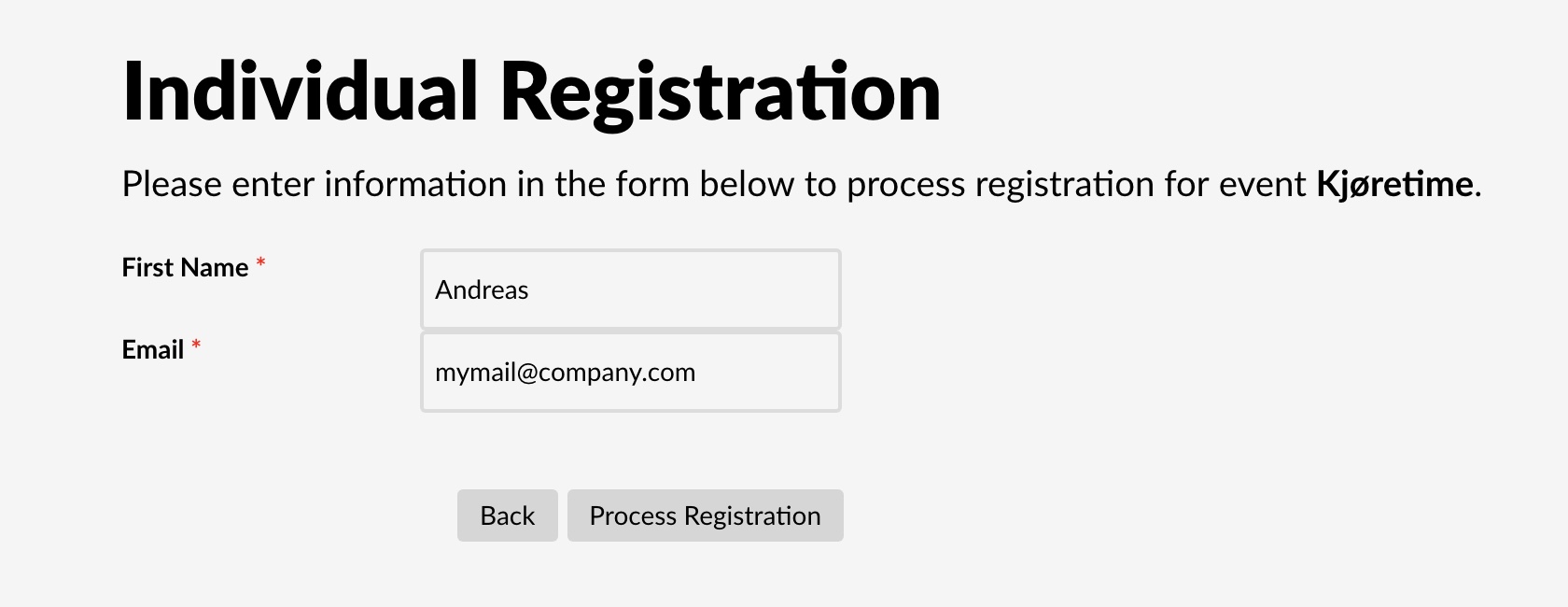
I recently purchased the Events Booking from you. I try to configure it now. When a user register for an event, I would like the fields on the page that I show in the picture to be read only. And are there any way of adding fields to this screen? The last name also is missing.
I recently purchased the Events Booking from you. I try to configure it now. When a user register for an event, I would like the fields on the page that I show in the picture to be read only. And are there any way of adding fields to this screen? The last name also is missing.
Please Log in or Create an account to join the conversation.
- James Riley
-

- Offline
- Platinum Member
-

8 years 8 months ago #109986
by James Riley
James Riley .: EventBooking user since 2014 ::: JoomDonation user since 2016 :.
.: grfx & web design / IT / AV @ St. Therese Institute of Faith and Mission, Bruno, SK, Canada :.
Replied by James Riley on topic Customize register page in Events booking plugin
Looking at {Event Booking -> Custom Fields}, I don't see any way of making text boxes read only. @Tuan would know for sure if there is any built-in way of doing this, but I'm suspecting that you'll need to make a few small changes to Event Booking's code.
I'm assuming that you only allow registered users to register for events and that you're filling these fields from their user data automatically.
For the LAST NAME field, make sure that {Event Booking -> Custom Fields -> last_name} is PUBLISHED, and that {Display In} is set to the proper value (eg. ALL). You can use the Custom Fields manager to add other fields to this screen. See the documentation for Custom Fields at eventbookingdoc.joomservices.com/basic-setup/custom-fields
I'm assuming that you only allow registered users to register for events and that you're filling these fields from their user data automatically.
For the LAST NAME field, make sure that {Event Booking -> Custom Fields -> last_name} is PUBLISHED, and that {Display In} is set to the proper value (eg. ALL). You can use the Custom Fields manager to add other fields to this screen. See the documentation for Custom Fields at eventbookingdoc.joomservices.com/basic-setup/custom-fields
James Riley .: EventBooking user since 2014 ::: JoomDonation user since 2016 :.
.: grfx & web design / IT / AV @ St. Therese Institute of Faith and Mission, Bruno, SK, Canada :.
Please Log in or Create an account to join the conversation.
- Andreas Johannessen
- Topic Author
- Offline
- New Member
-
Less
More
- Posts: 3
- Thank you received: 0
8 years 8 months ago #109987
by Andreas Johannessen
Replied by Andreas Johannessen on topic Customize register page in Events booking plugin
Publishing the «last name» fixed that problem. Thanks. Now I only need to customize the design of that page so it acts as a read only. I only allow registered users to register at events.
Please Log in or Create an account to join the conversation.
- Tuan Pham Ngoc
- Away
- Administrator
-

8 years 8 months ago #109992
by Tuan Pham Ngoc
Replied by Tuan Pham Ngoc on topic Customize register page in Events booking plugin
Hi
Try to edit the first_name and last_name field, there is a setting called extra. Enter readonly into that setting, then check it again, the field should be read-only
Regards,
Tuhan
Try to edit the first_name and last_name field, there is a setting called extra. Enter readonly into that setting, then check it again, the field should be read-only
Regards,
Tuhan
Please Log in or Create an account to join the conversation.
Moderators: Tuan Pham Ngoc
Support
Documentation
Information
Copyright © 2026 Joomla Extensions by Joomdonation. All Rights Reserved.
joomdonation.com is not affiliated with or endorsed by the Joomla! Project or Open Source Matters.
The Joomla! name and logo is used under a limited license granted by Open Source Matters the trademark holder in the United States and other countries.
The Joomla! name and logo is used under a limited license granted by Open Source Matters the trademark holder in the United States and other countries.