
Sync with Community Builder
- Tuan Pham Ngoc
- Offline
- Administrator
-

Less
More
8 years 1 month ago #109500
by Tuan Pham Ngoc
Replied by Tuan Pham Ngoc on topic Sync with Community Builder
Each field is surrounded by a div with it own ID, so I believe you can add some css code display:none to make it invisible
However, I don't think it is the right approach. What if the user logged in using an account doesn't have any data for that field? I guess it won't work well
Tuan
However, I don't think it is the right approach. What if the user logged in using an account doesn't have any data for that field? I guess it won't work well
Tuan
Please Log in or Create an account to join the conversation.
- Tuan Pham Ngoc
- Offline
- Administrator
-
8 years 1 month ago #109501
by Tuan Pham Ngoc
Replied by Tuan Pham Ngoc on topic Sync with Community Builder
So maybe not showing these fields in EB registration form, and then modify the export script to get data from CB to export to the Excel file. That would be the correct way
Tuan
Tuan
Please Log in or Create an account to join the conversation.
- Bob Leavitt
- Topic Author
- Offline
- Senior Member
-

Less
More
- Posts: 54
- Thank you received: 0
8 years 1 month ago #109505
by Bob Leavitt
Replied by Bob Leavitt on topic Sync with Community Builder
Regarding the CSS option, if the logged in user has no data in a field then it would be carried forward as blank or null. The resulting field in the extract file would then be empty for that user. This sounds ok to me if I need to use this approach.
Modifying the export script sounds like the better idea as it would give me the most flexibility. Where do I find this script? It will need to be an override so as not to be lost when upgrading EB.
Modifying the export script sounds like the better idea as it would give me the most flexibility. Where do I find this script? It will need to be an override so as not to be lost when upgrading EB.
Please Log in or Create an account to join the conversation.
- Tuan Pham Ngoc
- Offline
- Administrator
-
8 years 1 month ago #109506
by Tuan Pham Ngoc
Replied by Tuan Pham Ngoc on topic Sync with Community Builder
If that's the case, maybe you should use css to hide the fields, it is much easier than modify the export script. You can send me the link to registration form and tell me a sample file you want to hide, I will give you sample css code which you can do the same for other fields
Tuan
Tuan
Please Log in or Create an account to join the conversation.
- Bob Leavitt
- Topic Author
- Offline
- Senior Member
-
Less
More
- Posts: 54
- Thank you received: 0
8 years 1 month ago #109507
by Bob Leavitt
Replied by Bob Leavitt on topic Sync with Community Builder
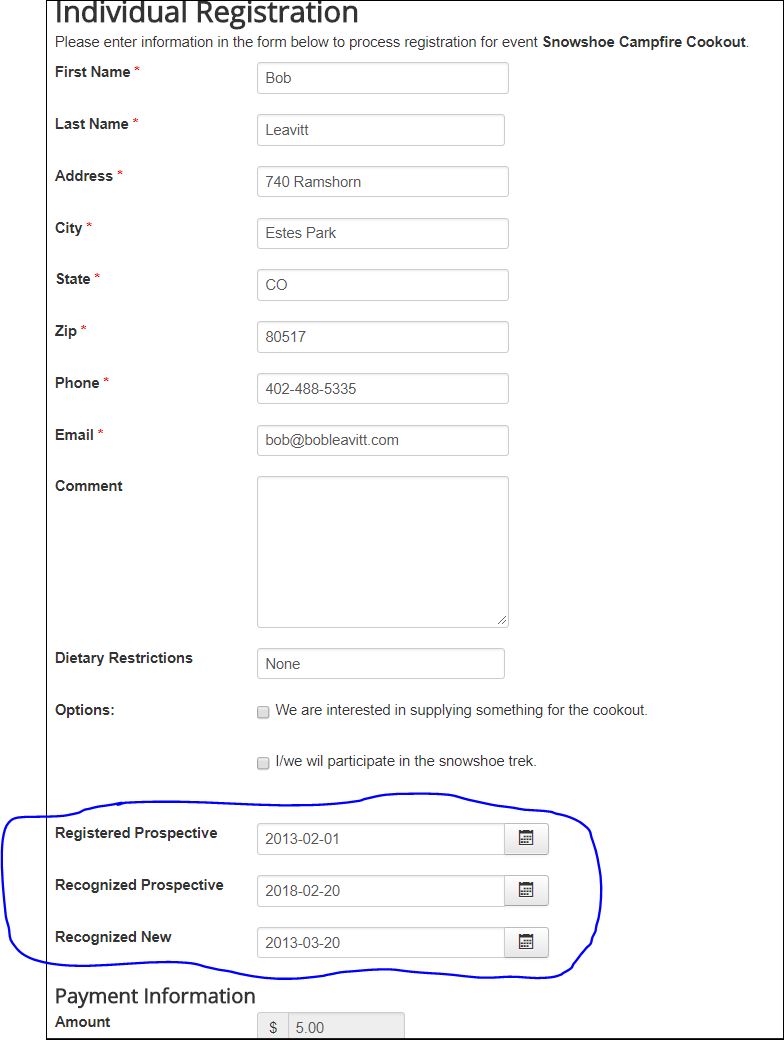
Do you want me to add you to our backend access? The fields I'm wanting to hide are on the attached screen shot.
Please Log in or Create an account to join the conversation.
- Tuan Pham Ngoc
- Offline
- Administrator
-
8 years 1 month ago #109508
by Tuan Pham Ngoc
Replied by Tuan Pham Ngoc on topic Sync with Community Builder
I need you to send me the link to that page so that I can look at it, get id of the field and guide you with css code.
Please Log in or Create an account to join the conversation.
- Bob Leavitt
- Topic Author
- Offline
- Senior Member
-
Less
More
- Posts: 54
- Thank you received: 0
8 years 1 month ago #109509
by Bob Leavitt
Replied by Bob Leavitt on topic Sync with Community Builder
The link to the page is here. You may not be able to view it without a sign-on to the web site.
estesparknewcomers.org/index.php/special...ividual-registration
The custom fields in question look like this attachment.
estesparknewcomers.org/index.php/special...ividual-registration
The custom fields in question look like this attachment.

Please Log in or Create an account to join the conversation.
- Tuan Pham Ngoc
- Offline
- Administrator
-
8 years 1 month ago #109510
by Tuan Pham Ngoc
Replied by Tuan Pham Ngoc on topic Sync with Community Builder
You can go to Events Booking -> Configuration, look at Custom CSS tab, put this custom css code, save it;
#field_RegisteredPerspectivefield_RecognizedPerspective, #field_RegisteredPerspective, #field_RecognizedNew
{
display: none;
}
And it should be Ok
Tuan
#field_RegisteredPerspectivefield_RecognizedPerspective, #field_RegisteredPerspective, #field_RecognizedNew
{
display: none;
}
And it should be Ok
Tuan
Please Log in or Create an account to join the conversation.
- Bob Leavitt
- Topic Author
- Offline
- Senior Member
-
Less
More
- Posts: 54
- Thank you received: 0
8 years 1 month ago #109512
by Bob Leavitt
Replied by Bob Leavitt on topic Sync with Community Builder
Everything works except field_RecognizedPerspective. I tried as follows and it is still not working for that one field. Other fields are hidden. You also have #field_RegisteredPerspective listed twice but I left that in.
#field_RegisteredPerspective, #field_RecognizedPerspective, #field_RegisteredPerspective, #field_RecognizedNew
{
display: none;
}
#field_RegisteredPerspective, #field_RecognizedPerspective, #field_RegisteredPerspective, #field_RecognizedNew
{
display: none;
}
Please Log in or Create an account to join the conversation.
- Tuan Pham Ngoc
- Offline
- Administrator
-
8 years 1 month ago #109521
by Tuan Pham Ngoc
Replied by Tuan Pham Ngoc on topic Sync with Community Builder
Look like you figured out, I don't see the field displayed anymore?
Tuan
Tuan
Please Log in or Create an account to join the conversation.
Moderators: Tuan Pham Ngoc
Support
Documentation
Information
Copyright © 2026 Joomla Extensions by Joomdonation. All Rights Reserved.
joomdonation.com is not affiliated with or endorsed by the Joomla! Project or Open Source Matters.
The Joomla! name and logo is used under a limited license granted by Open Source Matters the trademark holder in the United States and other countries.
The Joomla! name and logo is used under a limited license granted by Open Source Matters the trademark holder in the United States and other countries.