- Posts: 36
- Thank you received: 1

Where to change a default wording for header
- ADaniel
- Topic Author
- Offline
- Junior Member
-

Less
More
8 years 1 month ago #109328
by ADaniel
Where to change a default wording for header was created by ADaniel
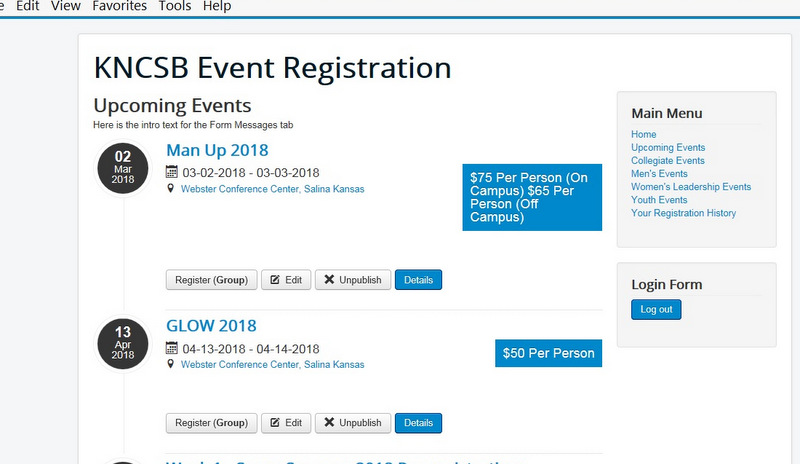
I've added a Joomla menu item to show upcoming events. When I click that menu item, the events display properly, but at the top of the page, beneath my page header, and my page title, it shows these words:
Here is the intro text for the Form Messages tab
Where do I change that wording ? I've looked several places, but have not yet found it.
Thanks !
Here is the intro text for the Form Messages tab
Where do I change that wording ? I've looked several places, but have not yet found it.
Thanks !
Please Log in or Create an account to join the conversation.
- Tuan Pham Ngoc
- Offline
- Administrator
-

8 years 1 month ago #109335
by Tuan Pham Ngoc
Replied by Tuan Pham Ngoc on topic Where to change a default wording for header
Hello Daniel
Look like that text added by someone, not by the extension by default. Could you please attach a screenshot of that page so that I can take a look and guide you where to change it?
Regards,
Tuan
Look like that text added by someone, not by the extension by default. Could you please attach a screenshot of that page so that I can take a look and guide you where to change it?
Regards,
Tuan
Please Log in or Create an account to join the conversation.
- ADaniel
- Topic Author
- Offline
- Junior Member
-
Less
More
- Posts: 36
- Thank you received: 1
8 years 1 month ago #109346
by ADaniel
Replied by ADaniel on topic Where to change a default wording for header
Here is a screen shot. It is on the left side, third line from the top.
Please Log in or Create an account to join the conversation.
- Tuan Pham Ngoc
- Offline
- Administrator
-
8 years 1 month ago #109351
by Tuan Pham Ngoc
Replied by Tuan Pham Ngoc on topic Where to change a default wording for header
Please go to Events Booking -> Emails & Messages, find the message Introtext at the top, remove the text you entered there (or change it to have the text you want)
After that, check it again. It should work as expected
Tuan
After that, check it again. It should work as expected
Tuan
Please Log in or Create an account to join the conversation.
- ADaniel
- Topic Author
- Offline
- Junior Member
-
Less
More
- Posts: 36
- Thank you received: 1
8 years 1 month ago #109362
by ADaniel
Replied by ADaniel on topic Where to change a default wording for header
Thanks, Tuan, that was where the text was stored. Simple fix once it was located.
If that is not a default string, it is a mystery how it ever got into IntroText to begin with. It is interesting that the only time the text showed is after we just activated Upcoming Events. No other pages have displayed this string.
If that is not a default string, it is a mystery how it ever got into IntroText to begin with. It is interesting that the only time the text showed is after we just activated Upcoming Events. No other pages have displayed this string.
Please Log in or Create an account to join the conversation.
- Tuan Pham Ngoc
- Offline
- Administrator
-
8 years 1 month ago #109377
by Tuan Pham Ngoc
Replied by Tuan Pham Ngoc on topic Where to change a default wording for header
That introtext is empty by default. It will be used in some page like Upcoming events as you figured out, categories list and calendar page, too
Regards,
Tuan
Regards,
Tuan
Please Log in or Create an account to join the conversation.
Moderators: Tuan Pham Ngoc
Support
Documentation
Information
Copyright © 2026 Joomla Extensions by Joomdonation. All Rights Reserved.
joomdonation.com is not affiliated with or endorsed by the Joomla! Project or Open Source Matters.
The Joomla! name and logo is used under a limited license granted by Open Source Matters the trademark holder in the United States and other countries.
The Joomla! name and logo is used under a limited license granted by Open Source Matters the trademark holder in the United States and other countries.