
Need help with Joomla? We are available for hire to help with Joomla customization, upgrades, maintenance, and custom development.
Explore our services Paypal radio button in a strange place
- T. Gath
-
 Topic Author
- Offline
- Junior Member
-

Less
More
8 years 8 months ago #109046
by T. Gath
Paypal radio button in a strange place was created by T. Gath
The radio button (that should be) in front of the PayPal payment option in left justified on the line above the PayPal option. See screenshot:
www.dropbox.com/s/ntccpdg88jdejiy/Screen...%2009.50.53.png?dl=0
To evoke the form and see it live: register/checkout @ rohefarms.com/index.php/summer/july-9-13
Thanks for looking
To evoke the form and see it live: register/checkout @ rohefarms.com/index.php/summer/july-9-13
Thanks for looking
Please Log in or Create an account to join the conversation.
- Tuan Pham Ngoc
- Away
- Administrator
-

8 years 8 months ago #109076
by Tuan Pham Ngoc
Replied by Tuan Pham Ngoc on topic Paypal radio button in a strange place
Hello
I guess there is some css conflict with your site template causing the issue. Please submit a support ticket sending us super admin account of your site and link to that page
I will have my template developer to look at it and get it sorted for you
Regards,
Tuan
I guess there is some css conflict with your site template causing the issue. Please submit a support ticket sending us super admin account of your site and link to that page
I will have my template developer to look at it and get it sorted for you
Regards,
Tuan
Please Log in or Create an account to join the conversation.
- Peter Solar
- Offline
- New Member
-

Less
More
- Posts: 3
- Thank you received: 0
7 years 9 months ago #121504
by Peter Solar
Replied by Peter Solar on topic Paypal radio button in a strange place
Hello
can I also submit a support ticket if I have same issue as T.Gath?
www.vysledkovyservis.sk/prihlaska/kbk53
I have 2 payment method. Radio button for first method is float to right side.
Peter
can I also submit a support ticket if I have same issue as T.Gath?
www.vysledkovyservis.sk/prihlaska/kbk53
I have 2 payment method. Radio button for first method is float to right side.
Peter
Please Log in or Create an account to join the conversation.
- James Riley
-

- Offline
- Platinum Member
-

7 years 9 months ago - 7 years 9 months ago #121506
by James Riley
James Riley .: EventBooking user since 2014 ::: JoomDonation user since 2016 :.
.: grfx & web design / IT / AV @ St. Therese Institute of Faith and Mission, Bruno, SK, Canada :.
Replied by James Riley on topic Paypal radio button in a strange place
Here's how to fix this yourself 
In the administrator [ Event Booking > Configuration > Custom CSS tab > Custom CSS box ], just add the following CSS rule set:
@PeterSolar: I also noticed that your currency symbol is not defined (that is why there is a grey line before your price fields just above the payment options). You can specify the currency symbol to be displayed in [Event Booking > Configuration > General tab > Currency symbol].
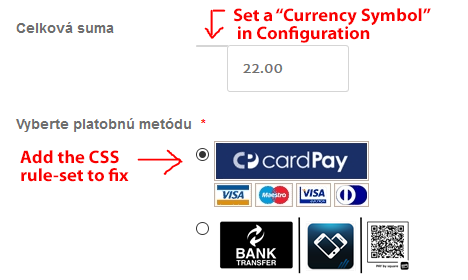
In the administrator [ Event Booking > Configuration > Custom CSS tab > Custom CSS box ], just add the following CSS rule set:
Code:
.radio input[type="radio"], .checkbox input[type="checkbox"] {clear: both;}
@PeterSolar: I also noticed that your currency symbol is not defined (that is why there is a grey line before your price fields just above the payment options). You can specify the currency symbol to be displayed in [Event Booking > Configuration > General tab > Currency symbol].
James Riley .: EventBooking user since 2014 ::: JoomDonation user since 2016 :.
.: grfx & web design / IT / AV @ St. Therese Institute of Faith and Mission, Bruno, SK, Canada :.
Last edit: 7 years 9 months ago by James Riley.
The following user(s) said Thank You: Peter Solar
Please Log in or Create an account to join the conversation.
- Tuan Pham Ngoc
- Away
- Administrator
-
7 years 9 months ago #121517
by Tuan Pham Ngoc
Replied by Tuan Pham Ngoc on topic Paypal radio button in a strange place
Thanks James for the css code. I would suggest that we are using .eb-container before any selector to make the change only effect Events Booking and nothing else
So the above code should be:
Regards,
Tuan
So the above code should be:
Code:
.eb-container .radio input[type="radio"], .eb-container .checkbox input[type="checkbox"] {clear: both;}
Regards,
Tuan
Please Log in or Create an account to join the conversation.
Moderators: Tuan Pham Ngoc
Support
Documentation
Information
Copyright © 2026 Joomla Extensions by Joomdonation. All Rights Reserved.
joomdonation.com is not affiliated with or endorsed by the Joomla! Project or Open Source Matters.
The Joomla! name and logo is used under a limited license granted by Open Source Matters the trademark holder in the United States and other countries.
The Joomla! name and logo is used under a limited license granted by Open Source Matters the trademark holder in the United States and other countries.