- Posts: 37
- Thank you received: 0

How to minimize size of Event Booking on MOBILE?
- Brian
- Topic Author
- Offline
- Junior Member
-

Less
More
8 years 3 months ago #107531
by Brian
How to minimize size of Event Booking on MOBILE? was created by Brian
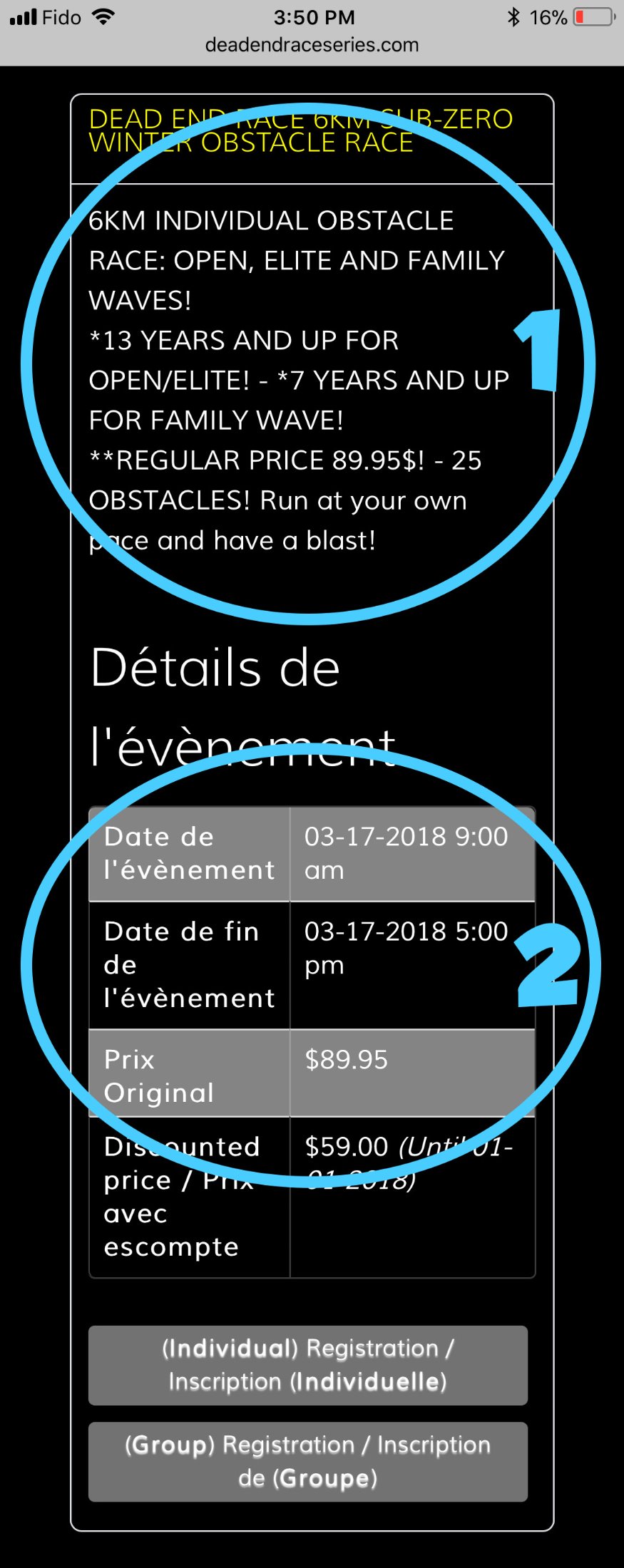
A few question:
1- Can we make the TEXT DESCRIPTION smaller? It is sooooo long on the Iphone.
2- Can we remove the Event Start Date and Event End Date in the front end?
3- Can we add an image instead of the TEXT DESCRIPTION THAT is RESPONSIVE on Mobile?
Thank-you.
1- Can we make the TEXT DESCRIPTION smaller? It is sooooo long on the Iphone.
2- Can we remove the Event Start Date and Event End Date in the front end?
3- Can we add an image instead of the TEXT DESCRIPTION THAT is RESPONSIVE on Mobile?
Thank-you.
Please Log in or Create an account to join the conversation.
- Tuan Pham Ngoc
- Away
- Administrator
-

8 years 3 months ago #107535
by Tuan Pham Ngoc
Replied by Tuan Pham Ngoc on topic How to minimize size of Event Booking on MOBILE?
Hi
So basically, you only want to make change on mobile only? On normal screen, everything should still works as how it is:
1. I believe if you know css, you can go to events Booking -> Configuration, custom css tab, add some custom css code to make font-size of the text smaller, so it will become shorter
2. Start date could not be removed unless you edit the code to remove it. For end date, when you create event, just leave it empty and it won't be shown
3. Right now, we don't have a way to make image responsive. It is still handled completely by the web browser
Regards,
Tuan
So basically, you only want to make change on mobile only? On normal screen, everything should still works as how it is:
1. I believe if you know css, you can go to events Booking -> Configuration, custom css tab, add some custom css code to make font-size of the text smaller, so it will become shorter
2. Start date could not be removed unless you edit the code to remove it. For end date, when you create event, just leave it empty and it won't be shown
3. Right now, we don't have a way to make image responsive. It is still handled completely by the web browser
Regards,
Tuan
Please Log in or Create an account to join the conversation.
Moderators: Tuan Pham Ngoc
Support
Documentation
Information
Copyright © 2026 Joomla Extensions by Joomdonation. All Rights Reserved.
joomdonation.com is not affiliated with or endorsed by the Joomla! Project or Open Source Matters.
The Joomla! name and logo is used under a limited license granted by Open Source Matters the trademark holder in the United States and other countries.
The Joomla! name and logo is used under a limited license granted by Open Source Matters the trademark holder in the United States and other countries.