- Posts: 174
- Thank you received: 4

Grouping Events by "higher level" location
- Mike
- Topic Author
- Offline
- Elite Member
-

Less
More
8 years 7 months ago #103236
by Mike
.....and society inscribe on its banners...
Grouping Events by "higher level" location was created by Mike
Hi folks,
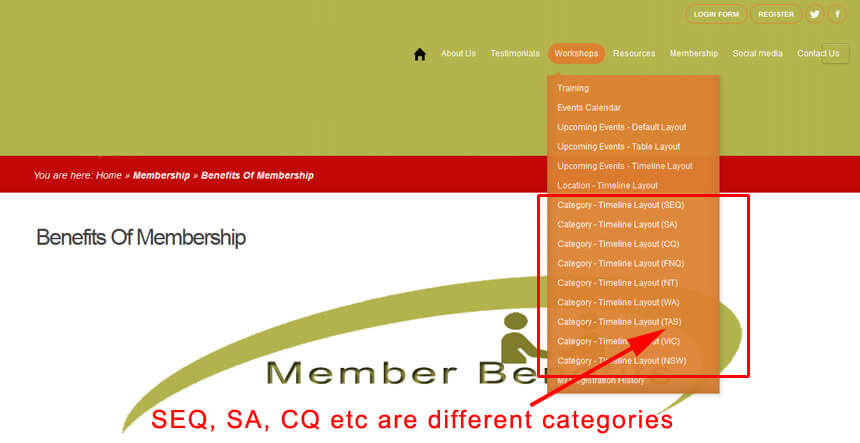
in my attached image (event_locations.jpg), the highlighted items are all higher level locations, where there will be a number of specific locations within that higher location.... eg Higher Location is Hanoi, and within that, the actual event locations are #A1, #A2, #A3, etc. Similarly, the higher location could be Ho Chi Mihn City, and within that, the actual event locations are #X4, #X5, #X6, etc.
I would like to see all event locations on a timeline, for a specific Higher Location, eg all in Hanoi city, or all in Ho Chi Minh city etc.
One way I have done it in my test is to use Categories, so (on my image), SEQ might be Hanoi, SA, may be Ho Chi Mihn City etc., then I do various Category - Timeline layouts for each of the higher level locations (ie "categories").
This works well, but I may need a huge number of these "higher loccation" categories to cover everything, so its not really practical.
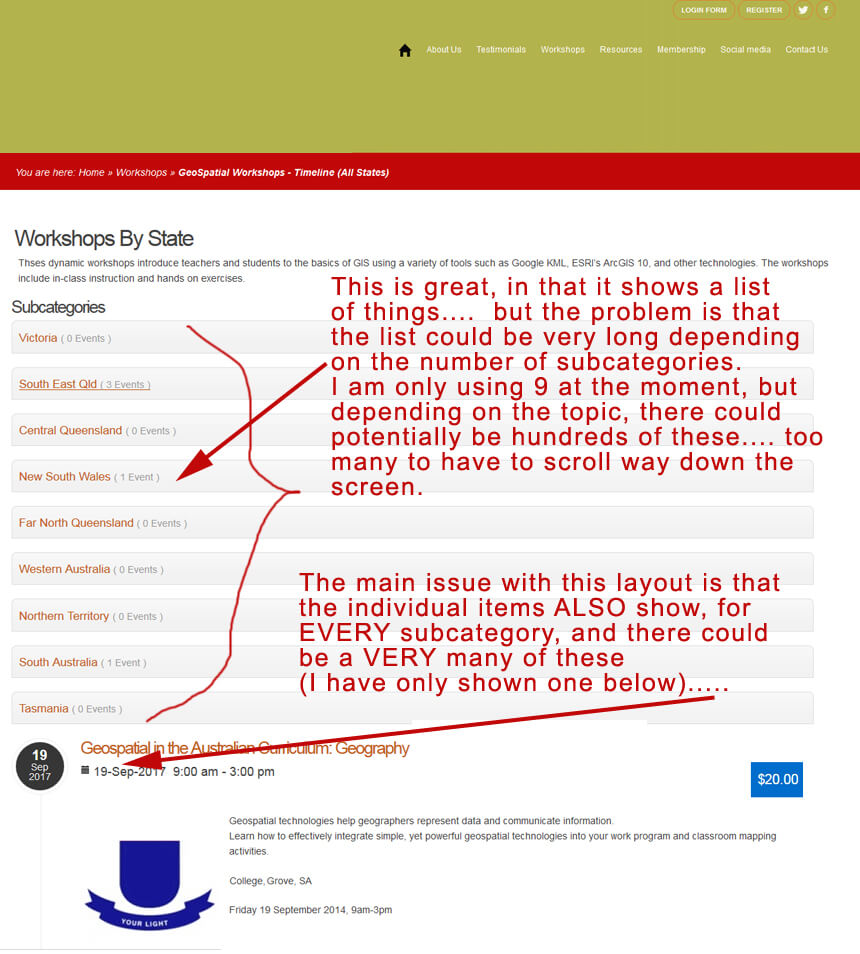
A better way to approach this is in the second screen shot (event_locations_2.jpg), I know I could use a higher level category in the menu item "Category - Timeline Layout", and the screen will display a list of the SubCategories, but the problem is that I could have very many subcategories, and thus the screen page would be very long (I only have 9 now, so its OK)
Using this method, the Subcategories are listed (which is OK in my case for now, but the number could grow over time), but the biggest issue is that ALL the individual events ALSO are listed on this same screen below the subcategories for ALL subcategories.
I have set the Menu Item Options tab to "Hide Children Events", but this makes no difference - the individual events still show.
So, the real question is: Is there a way to have just ONE menu item, and then have a drop-down for the user to select the actual (higher level), location (or SubCategory, using the example in this note)?
I hope I have explained that properly!
thanks,
Mike
in my attached image (event_locations.jpg), the highlighted items are all higher level locations, where there will be a number of specific locations within that higher location.... eg Higher Location is Hanoi, and within that, the actual event locations are #A1, #A2, #A3, etc. Similarly, the higher location could be Ho Chi Mihn City, and within that, the actual event locations are #X4, #X5, #X6, etc.
I would like to see all event locations on a timeline, for a specific Higher Location, eg all in Hanoi city, or all in Ho Chi Minh city etc.
One way I have done it in my test is to use Categories, so (on my image), SEQ might be Hanoi, SA, may be Ho Chi Mihn City etc., then I do various Category - Timeline layouts for each of the higher level locations (ie "categories").
This works well, but I may need a huge number of these "higher loccation" categories to cover everything, so its not really practical.
A better way to approach this is in the second screen shot (event_locations_2.jpg), I know I could use a higher level category in the menu item "Category - Timeline Layout", and the screen will display a list of the SubCategories, but the problem is that I could have very many subcategories, and thus the screen page would be very long (I only have 9 now, so its OK)
Using this method, the Subcategories are listed (which is OK in my case for now, but the number could grow over time), but the biggest issue is that ALL the individual events ALSO are listed on this same screen below the subcategories for ALL subcategories.
I have set the Menu Item Options tab to "Hide Children Events", but this makes no difference - the individual events still show.
So, the real question is: Is there a way to have just ONE menu item, and then have a drop-down for the user to select the actual (higher level), location (or SubCategory, using the example in this note)?
I hope I have explained that properly!
thanks,
Mike
.....and society inscribe on its banners...
Please Log in or Create an account to join the conversation.
- Tuan Pham Ngoc
- Offline
- Administrator
-

8 years 7 months ago #103259
by Tuan Pham Ngoc
Replied by Tuan Pham Ngoc on topic Grouping Events by "higher level" location
Hi Mike
In the option #2, you can go to Events Booking -> Configuration, set the config option Show events from all children categories to No and events from children categories won't be displayed
That should help solving your concern
Regards,
Tuan
In the option #2, you can go to Events Booking -> Configuration, set the config option Show events from all children categories to No and events from children categories won't be displayed
That should help solving your concern
Regards,
Tuan
Please Log in or Create an account to join the conversation.
- Mike
- Topic Author
- Offline
- Elite Member
-
Less
More
- Posts: 174
- Thank you received: 4
8 years 7 months ago #103277
by Mike
.....and society inscribe on its banners...
Replied by Mike on topic Grouping Events by "higher level" location
Hi Tuan,
thanks for your reply, but that did not do the trick...
I had already set "Show events from all children categories" to No in BOTH the main Config page and ALSO in the Menu Item itself...... Maybe the "Timeline" layout will always show the child events no matter what???
If I can't get a work around for this, I will see if I can use some other option.....
thanks,
Mike
thanks for your reply, but that did not do the trick...
I had already set "Show events from all children categories" to No in BOTH the main Config page and ALSO in the Menu Item itself...... Maybe the "Timeline" layout will always show the child events no matter what???
If I can't get a work around for this, I will see if I can use some other option.....
thanks,
Mike
.....and society inscribe on its banners...
Please Log in or Create an account to join the conversation.
- Tuan Pham Ngoc
- Offline
- Administrator
-
8 years 7 months ago #103278
by Tuan Pham Ngoc
Replied by Tuan Pham Ngoc on topic Grouping Events by "higher level" location
Hi Mike
I think you can submit a support ticket sending us super admin account of your site. We will check that page and we can discuss about it further (maybe I mis-understood your requirement)
Regards,
Tuan
I think you can submit a support ticket sending us super admin account of your site. We will check that page and we can discuss about it further (maybe I mis-understood your requirement)
Regards,
Tuan
Please Log in or Create an account to join the conversation.
Moderators: Tuan Pham Ngoc
Support
Documentation
Information
Copyright © 2026 Joomla Extensions by Joomdonation. All Rights Reserved.
joomdonation.com is not affiliated with or endorsed by the Joomla! Project or Open Source Matters.
The Joomla! name and logo is used under a limited license granted by Open Source Matters the trademark holder in the United States and other countries.
The Joomla! name and logo is used under a limited license granted by Open Source Matters the trademark holder in the United States and other countries.