- Posts: 8
- Thank you received: 0

Up-coming events module - show icons
- Stefan Schmidt
- Topic Author
- Offline
- New Member
-

Less
More
8 years 7 months ago - 8 years 7 months ago #103224
by Stefan Schmidt
Up-coming events module - show icons was created by Stefan Schmidt
Hi everybody,
Sorry for asking another newbee question.
Recently, I updated my EB to Version 3.0.3.
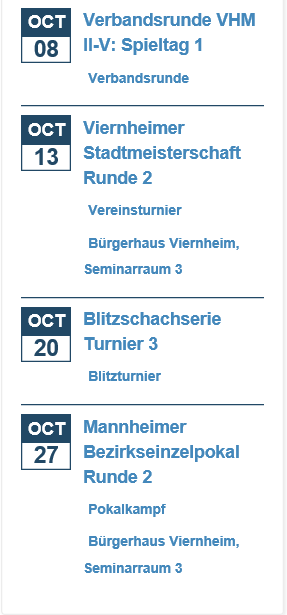
I'd like to display Icons in front of "Location" and "category" as shown in the documentation.
eventbookingdoc.joomservices.com/fronten...coming-events-module
Currently, no icons are displayed, even when I turn on the appropriate filed in the events configuration.
(see Attachement)
1) Do I need to overrule the CSS on my own to get this run? Or is this a bug?
2) Is there any tricky way to display a german date (OKT) instead of the english one (OCT)?
Thanks in advance
Stefan
Sorry for asking another newbee question.
Recently, I updated my EB to Version 3.0.3.
I'd like to display Icons in front of "Location" and "category" as shown in the documentation.
eventbookingdoc.joomservices.com/fronten...coming-events-module
Currently, no icons are displayed, even when I turn on the appropriate filed in the events configuration.
(see Attachement)
1) Do I need to overrule the CSS on my own to get this run? Or is this a bug?
2) Is there any tricky way to display a german date (OKT) instead of the english one (OCT)?
Thanks in advance
Stefan
Last edit: 8 years 7 months ago by Stefan Schmidt.
Please Log in or Create an account to join the conversation.
- Tuan Pham Ngoc
- Offline
- Administrator
-

8 years 7 months ago #103229
by Tuan Pham Ngoc
Replied by Tuan Pham Ngoc on topic Up-coming events module - show icons
Hi Stefan
1=> Look like there is some kind of css conflict with your site template. Please submit a support ticket sending us super admin account and the link to the page so that our developer can check and correct it?
2=> It is translatable. You can go to Events Booking -> Translation, select your language, find these languages items and change it:
EB_JAN_SHORT
EB_FEB_SHORT
EB_MARCH_SHORT
EB_APR_SHORT
EB_MAY_SHORT
EB_JUNE_SHORT
EB_JULY_SHORT
EB_AUG_SHORT
EB_SEP_SHORT
EB_OCT_SHORT
EB_NOV_SHORT
EB_DEC_SHORT
Regards,
Tuan
1=> Look like there is some kind of css conflict with your site template. Please submit a support ticket sending us super admin account and the link to the page so that our developer can check and correct it?
2=> It is translatable. You can go to Events Booking -> Translation, select your language, find these languages items and change it:
EB_JAN_SHORT
EB_FEB_SHORT
EB_MARCH_SHORT
EB_APR_SHORT
EB_MAY_SHORT
EB_JUNE_SHORT
EB_JULY_SHORT
EB_AUG_SHORT
EB_SEP_SHORT
EB_OCT_SHORT
EB_NOV_SHORT
EB_DEC_SHORT
Regards,
Tuan
The following user(s) said Thank You: Stefan Schmidt
Please Log in or Create an account to join the conversation.
- Stefan Schmidt
- Topic Author
- Offline
- New Member
-
Less
More
- Posts: 8
- Thank you received: 0
8 years 7 months ago #103356
by Stefan Schmidt
Replied by Stefan Schmidt on topic Up-coming events module - show icons
Hi Tuan,
Thanks a lot for your quick reply!
I really appreciate it!
Kind regards,
Stefan
Thanks a lot for your quick reply!
I really appreciate it!
Kind regards,
Stefan
Please Log in or Create an account to join the conversation.
Moderators: Tuan Pham Ngoc
Support
Documentation
Information
Copyright © 2026 Joomla Extensions by Joomdonation. All Rights Reserved.
joomdonation.com is not affiliated with or endorsed by the Joomla! Project or Open Source Matters.
The Joomla! name and logo is used under a limited license granted by Open Source Matters the trademark holder in the United States and other countries.
The Joomla! name and logo is used under a limited license granted by Open Source Matters the trademark holder in the United States and other countries.