- Posts: 5
- Thank you received: 0

Upcoming Events
- Aitor Zalacain
- Topic Author
- Offline
- New Member
-

Less
More
8 years 7 months ago #103092
by Aitor Zalacain
Upcoming Events was created by Aitor Zalacain
Hi there,
How can I display"upcoming events on front page as shown on your demo page?
Is there any template or any specific CSS for this module?
Thank you
How can I display"upcoming events on front page as shown on your demo page?
Is there any template or any specific CSS for this module?
Thank you
Please Log in or Create an account to join the conversation.
- Tuan Pham Ngoc
- Offline
- Administrator
-

8 years 7 months ago #103102
by Tuan Pham Ngoc
Replied by Tuan Pham Ngoc on topic Upcoming Events
Hi
You just need to change the Home menu item of your site to link to Upcoming events timeline layout menu option of Events Booking and it will look like the homepage of our demo site
Tuan
You just need to change the Home menu item of your site to link to Upcoming events timeline layout menu option of Events Booking and it will look like the homepage of our demo site
Tuan
Please Log in or Create an account to join the conversation.
- Aitor Zalacain
- Topic Author
- Offline
- New Member
-
Less
More
- Posts: 5
- Thank you received: 0
8 years 7 months ago #103105
by Aitor Zalacain
Replied by Aitor Zalacain on topic Upcoming Events
Thank you Tuan but, I need to show upcoming events in a module position, not like a page.
Is not there a way to give that aspect from the module?
Thanks
Is not there a way to give that aspect from the module?
Thanks
Please Log in or Create an account to join the conversation.
- Tuan Pham Ngoc
- Offline
- Administrator
-
8 years 7 months ago #103117
by Tuan Pham Ngoc
Replied by Tuan Pham Ngoc on topic Upcoming Events
Hi
Yes, luckily there is a way. You can publish and use Events Booking - View module with following parameters:
1.View : Set it to Upcoming events
2. Query String: layout=timeline&Itemid=ID_OF_ACTIVE_MENU_ITEM
To have ID_OF_ACTIVE_MENU_ITEM , you should create a hidden menu item to link to upcoming events timeline layout menu option of Events Booking and get ID of that menu item to use as ID_OF_ACTIVE_MENU_ITEM
Please try to config that and let us know if you need more help
Tuan
Yes, luckily there is a way. You can publish and use Events Booking - View module with following parameters:
1.View : Set it to Upcoming events
2. Query String: layout=timeline&Itemid=ID_OF_ACTIVE_MENU_ITEM
To have ID_OF_ACTIVE_MENU_ITEM , you should create a hidden menu item to link to upcoming events timeline layout menu option of Events Booking and get ID of that menu item to use as ID_OF_ACTIVE_MENU_ITEM
Please try to config that and let us know if you need more help
Tuan
Please Log in or Create an account to join the conversation.
- Aitor Zalacain
- Topic Author
- Offline
- New Member
-
Less
More
- Posts: 5
- Thank you received: 0
8 years 7 months ago #103121
by Aitor Zalacain
Replied by Aitor Zalacain on topic Upcoming Events
Thanks Tuan but, it's not what I need.
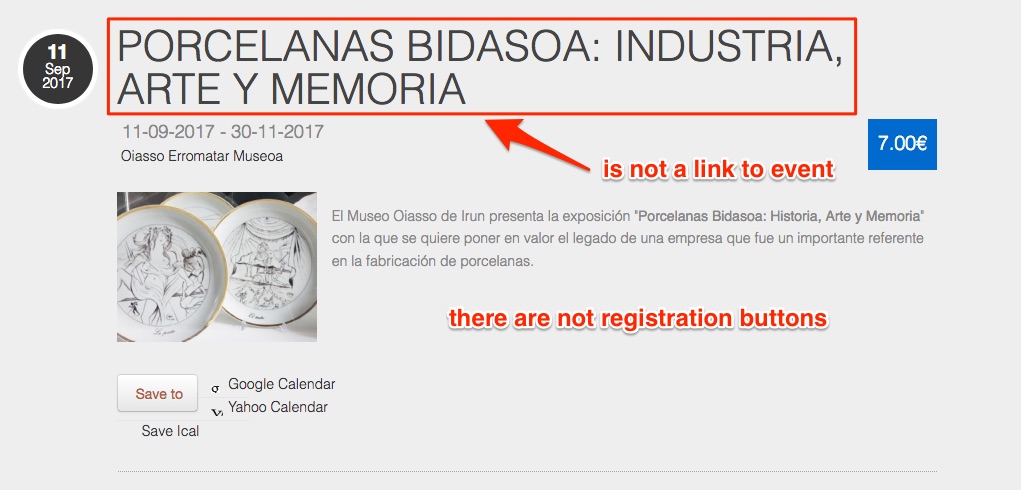
I can modify the view of the module using CSS but, the title is not a link that takes me to the event nor the registration buttons appear ... etc.
It's a shame, because the view you have on the demo I really liked.
I will look for a component that fits my needs.
A greeting.
I can modify the view of the module using CSS but, the title is not a link that takes me to the event nor the registration buttons appear ... etc.
It's a shame, because the view you have on the demo I really liked.
I will look for a component that fits my needs.
A greeting.
Please Log in or Create an account to join the conversation.
- Tuan Pham Ngoc
- Offline
- Administrator
-
8 years 7 months ago #103142
by Tuan Pham Ngoc
Replied by Tuan Pham Ngoc on topic Upcoming Events
Hi Aitor
It is just something wrong with your settings. The module will display events like on our demo site. In this case, please submit a support ticket sending us super admin account of your site, we will check and tell you the reasons it doesn't work as expected and correct it, too
Regards,
Tuan
It is just something wrong with your settings. The module will display events like on our demo site. In this case, please submit a support ticket sending us super admin account of your site, we will check and tell you the reasons it doesn't work as expected and correct it, too
Regards,
Tuan
Please Log in or Create an account to join the conversation.
Moderators: Tuan Pham Ngoc
Support
Documentation
Information
Copyright © 2026 Joomla Extensions by Joomdonation. All Rights Reserved.
joomdonation.com is not affiliated with or endorsed by the Joomla! Project or Open Source Matters.
The Joomla! name and logo is used under a limited license granted by Open Source Matters the trademark holder in the United States and other countries.
The Joomla! name and logo is used under a limited license granted by Open Source Matters the trademark holder in the United States and other countries.