- Posts: 100
- Thank you received: 4

image path changed
- Helen Nunley
- Topic Author
- Offline
- Premium Member
-

Less
More
8 years 7 months ago - 8 years 7 months ago #102982
by Helen Nunley
image path changed was created by Helen Nunley
Hi,
I set up Event Booking for a client in March. Now I see a great slowdown in the backend and the images cannot be found. When checking the path already in place, it is going to media/com_eventbooking/images/my-image.jpg but the system is looking in images/com_eventbooking/my-image.jpg. Do I need to do a database edit or is this a bug with the current programming?
Thanks,
Helen
I set up Event Booking for a client in March. Now I see a great slowdown in the backend and the images cannot be found. When checking the path already in place, it is going to media/com_eventbooking/images/my-image.jpg but the system is looking in images/com_eventbooking/my-image.jpg. Do I need to do a database edit or is this a bug with the current programming?
Thanks,
Helen
Last edit: 8 years 7 months ago by Helen Nunley.
Please Log in or Create an account to join the conversation.
- Helen Nunley
- Topic Author
- Offline
- Premium Member
-
Less
More
- Posts: 100
- Thank you received: 4
8 years 7 months ago #102984
by Helen Nunley
Replied by Helen Nunley on topic image path changed
However on the front end, images are found for each event. Sigh. When saving or closing the backend event, browser error indicates there is a script slowing down the page. I cannot isolate that script but the error does not occur within Joomla articles so it is only within Events Booking. No errors within the error log in Joomla or within the hosting account.
Please Log in or Create an account to join the conversation.
- Tuan Pham Ngoc
- Offline
- Administrator
-

8 years 7 months ago #103001
by Tuan Pham Ngoc
Replied by Tuan Pham Ngoc on topic image path changed
Hi Helen
We changed the path of the image so that it is easier for admin to select an existing image using Joomla core media manager
Although the path is changed, there is code which supposes to move existing images to new location automatically during the update. For some reasons, it doesn't work OK on your installation, in this case, please submit a support ticket sending us super admin account of your site, tell us the event which we can edit to see the error
We are going to check and get it sorted
Tuan
We changed the path of the image so that it is easier for admin to select an existing image using Joomla core media manager
Although the path is changed, there is code which supposes to move existing images to new location automatically during the update. For some reasons, it doesn't work OK on your installation, in this case, please submit a support ticket sending us super admin account of your site, tell us the event which we can edit to see the error
We are going to check and get it sorted
Tuan
Please Log in or Create an account to join the conversation.
- Roger
- Offline
- Premium Member
-
Less
More
- Posts: 159
- Thank you received: 2
8 years 7 months ago #103388
by Roger
Replied by Roger on topic image path changed
Hi Tuan
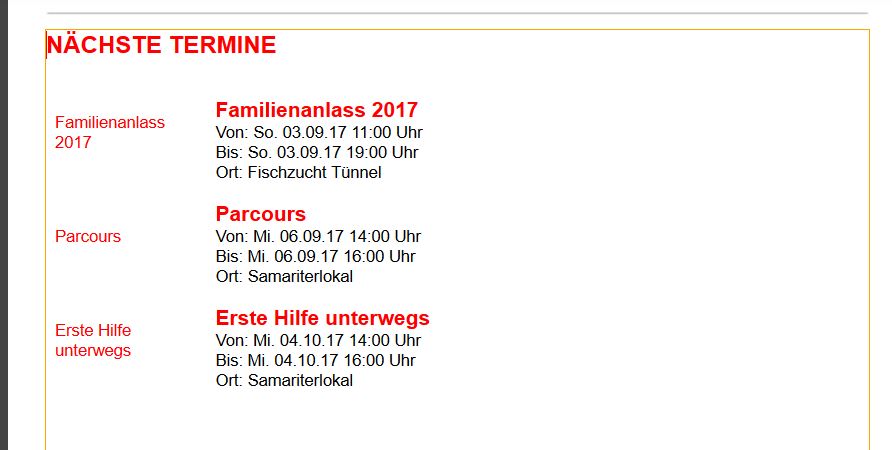
I have a similar problem. I had the problem that Helen had too at the beginning after the upgrade. Now this seems to work. My problem now is, that there are no event pictures in Acymailing from Event Booking anymore.
See at the picture how it looks like. There should be pictures on the left hand side.
Here is the code I use inside the eventbooking.php from acymailing plugin
Do the Acymailing guys have to change their setting in the plugin? Do you know them?
Thanks
Roger
I have a similar problem. I had the problem that Helen had too at the beginning after the upgrade. Now this seems to work. My problem now is, that there are no event pictures in Acymailing from Event Booking anymore.
See at the picture how it looks like. There should be pictures on the left hand side.
Here is the code I use inside the eventbooking.php from acymailing plugin
Code:
<div class="acymailing_content">
<table style="width: 80%; float: left;" cellspacing="5">
<tbody>
<tr>
<td style="width: 100px;"><a href="{link}" target="_blank" >{imagehtml}</a><br /></td>
<td>
<h3><a href="{link}" target="_blank" ><strong>{title}</strong></a><br /></h3>
<p>Von: <?php echo JHTML::_('date', $event->event_date, "D. d.m.y H:i ", null); ?> Uhr<br/>
Bis: <?php echo JHTML::_('date', $event->event_end_date, "D. d.m.y H:i ", null); ?> Uhr<br/>
Ort: {location_name}<br/></p>
</td>
</tr>
</tbody>
</table>
</div>
Do the Acymailing guys have to change their setting in the plugin? Do you know them?
Thanks
Roger
Please Log in or Create an account to join the conversation.
- Tuan Pham Ngoc
- Offline
- Administrator
-
8 years 7 months ago #103400
by Tuan Pham Ngoc
Replied by Tuan Pham Ngoc on topic image path changed
Hi Roger
We haven't been in contacting with them. As that plugin is developed by ACYMailing, please help contacting them and ask them to check and change path if needed to correct the issue. It should be an easy job
Tuan
We haven't been in contacting with them. As that plugin is developed by ACYMailing, please help contacting them and ask them to check and change path if needed to correct the issue. It should be an easy job
Tuan
Please Log in or Create an account to join the conversation.
- Roger
- Offline
- Premium Member
-
Less
More
- Posts: 159
- Thank you received: 2
8 years 6 months ago #103779
by Roger
Replied by Roger on topic image path changed
Hi Tuan
Acyba asked me to provide the latest software, so I sent the package to them. I will get back to you when there are news.
Roger
Acyba asked me to provide the latest software, so I sent the package to them. I will get back to you when there are news.
Roger
Please Log in or Create an account to join the conversation.
- Tuan Pham Ngoc
- Offline
- Administrator
-
8 years 6 months ago #103796
by Tuan Pham Ngoc
Replied by Tuan Pham Ngoc on topic image path changed
OK. Thanks Roger !
Please Log in or Create an account to join the conversation.
- Roger
- Offline
- Premium Member
-
Less
More
- Posts: 159
- Thank you received: 2
8 years 6 months ago #103882
by Roger
Replied by Roger on topic image path changed
Acyba fixed the path problem. Please download the latest plugin for Event Booking from Acyba.
Cheers
Roger
Cheers
Roger
The following user(s) said Thank You: Tuan Pham Ngoc
Please Log in or Create an account to join the conversation.
- Tuan Pham Ngoc
- Offline
- Administrator
-
8 years 6 months ago #103900
by Tuan Pham Ngoc
Replied by Tuan Pham Ngoc on topic image path changed
Thanks for the sharing information Roger !
Tuan
Tuan
Please Log in or Create an account to join the conversation.
Moderators: Tuan Pham Ngoc
Support
Documentation
Information
Copyright © 2026 Joomla Extensions by Joomdonation. All Rights Reserved.
joomdonation.com is not affiliated with or endorsed by the Joomla! Project or Open Source Matters.
The Joomla! name and logo is used under a limited license granted by Open Source Matters the trademark holder in the United States and other countries.
The Joomla! name and logo is used under a limited license granted by Open Source Matters the trademark holder in the United States and other countries.