- Posts: 3
- Thank you received: 0

Removing an optional Registration field
- Glen Soward
- Topic Author
- Offline
- New Member
-

Less
More
8 years 10 months ago #99332
by Glen Soward
Removing an optional Registration field was created by Glen Soward
Hi,
Registering for our event involves a number of optional items which attract an additional charge. This includes an "Early Bird" offer. We implemented the Early Bird offer with List field type, and as a "Fee Field". The options in the list are "$0" and "$120".
After a certain date we want to stop this "Early Bird" option so it is no longer selectable for Registrants.
Since we don't use the Group booking feature I considered setting the "Display In" to "Group Member Form" only. This removed it from the Registration form, and the field was still visible in the "Registrants Manager: Registrants" list. However when I edited the Registrant, it was removed from the edit screen! This is no good if we need to edit a Registrant who has already paid the Early Bird offer.
Is this a bug, or is there a better way to remove paying options from Registrants while keeping them available to administrators?
Thanks.
Registering for our event involves a number of optional items which attract an additional charge. This includes an "Early Bird" offer. We implemented the Early Bird offer with List field type, and as a "Fee Field". The options in the list are "$0" and "$120".
After a certain date we want to stop this "Early Bird" option so it is no longer selectable for Registrants.
Since we don't use the Group booking feature I considered setting the "Display In" to "Group Member Form" only. This removed it from the Registration form, and the field was still visible in the "Registrants Manager: Registrants" list. However when I edited the Registrant, it was removed from the edit screen! This is no good if we need to edit a Registrant who has already paid the Early Bird offer.
Is this a bug, or is there a better way to remove paying options from Registrants while keeping them available to administrators?
Thanks.
Please Log in or Create an account to join the conversation.
- James Riley
-

- Offline
- Platinum Member
-

8 years 10 months ago - 8 years 10 months ago #99360
by James Riley
James Riley .: EventBooking user since 2014 ::: JoomDonation user since 2016 :.
.: grfx & web design / IT / AV @ St. Therese Institute of Faith and Mission, Bruno, SK, Canada :.
Replied by James Riley on topic Removing an optional Registration field
I was answering
another post
, and realized that the solution I was proposing there would work for you too. It's still a manual patch (I've been asking for some form of date-regulated custom fields for the past 2 years already), but I think it would work.
Create a CSS class for your website (or for Event Booking in [Configuration -> Custom CSS tab -> Custom CSS] ) such as
(if your website template already has a "hide an element" class defined, you could use that instead)
and put that CSS Class name into the [Css Class] field in any custom field that you want to disable for the user, but not on the backend.
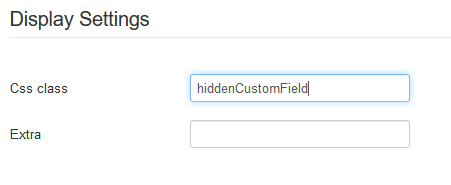
Also, turn on the option in the the custom field for [Hide-on-email] so that the user doesn't see the field in their confirmation email.

Create a CSS class for your website (or for Event Booking in [Configuration -> Custom CSS tab -> Custom CSS] ) such as
Code:
.hiddenCustomField {display:none;}
and put that CSS Class name into the [Css Class] field in any custom field that you want to disable for the user, but not on the backend.
Also, turn on the option in the the custom field for [Hide-on-email] so that the user doesn't see the field in their confirmation email.
James Riley .: EventBooking user since 2014 ::: JoomDonation user since 2016 :.
.: grfx & web design / IT / AV @ St. Therese Institute of Faith and Mission, Bruno, SK, Canada :.
Last edit: 8 years 10 months ago by James Riley.
The following user(s) said Thank You: Tuan Pham Ngoc
Please Log in or Create an account to join the conversation.
- James Riley
-
- Offline
- Platinum Member
-
8 years 10 months ago #99363
by James Riley
James Riley .: EventBooking user since 2014 ::: JoomDonation user since 2016 :.
.: grfx & web design / IT / AV @ St. Therese Institute of Faith and Mission, Bruno, SK, Canada :.
Replied by James Riley on topic Removing an optional Registration field
Oh, and make sure that the custom field is NOT set to REQUIRED, or there will be trouble 
James Riley .: EventBooking user since 2014 ::: JoomDonation user since 2016 :.
.: grfx & web design / IT / AV @ St. Therese Institute of Faith and Mission, Bruno, SK, Canada :.
The following user(s) said Thank You: Glen Soward
Please Log in or Create an account to join the conversation.
- Glen Soward
- Topic Author
- Offline
- New Member
-
Less
More
- Posts: 3
- Thank you received: 0
8 years 10 months ago #99364
by Glen Soward
Replied by Glen Soward on topic Removing an optional Registration field
Thanks James, I think that will work better than what I am trying to do.
Perhaps an enhancement might be for each field to have a "Hidden" property in the configuration, which will remove the field completely from the input form but still leave it available in all administator forms.
Until then, I will use CSS as you suggest!
Perhaps an enhancement might be for each field to have a "Hidden" property in the configuration, which will remove the field completely from the input form but still leave it available in all administator forms.
Until then, I will use CSS as you suggest!
Please Log in or Create an account to join the conversation.
- James Riley
-
- Offline
- Platinum Member
-
8 years 10 months ago - 8 years 10 months ago #99413
by James Riley
James Riley .: EventBooking user since 2014 ::: JoomDonation user since 2016 :.
.: grfx & web design / IT / AV @ St. Therese Institute of Faith and Mission, Bruno, SK, Canada :.
Replied by James Riley on topic Removing an optional Registration field
Or as @Tuan suggested in that other post:
Tuan Pham Ngoc wrote: Or maybe set access level of the custom field to Special would help
Tuan
James Riley .: EventBooking user since 2014 ::: JoomDonation user since 2016 :.
.: grfx & web design / IT / AV @ St. Therese Institute of Faith and Mission, Bruno, SK, Canada :.
Last edit: 8 years 10 months ago by James Riley. Reason: formating
Please Log in or Create an account to join the conversation.
Moderators: Tuan Pham Ngoc
Support
Documentation
Information
Copyright © 2026 Joomla Extensions by Joomdonation. All Rights Reserved.
joomdonation.com is not affiliated with or endorsed by the Joomla! Project or Open Source Matters.
The Joomla! name and logo is used under a limited license granted by Open Source Matters the trademark holder in the United States and other countries.
The Joomla! name and logo is used under a limited license granted by Open Source Matters the trademark holder in the United States and other countries.