
Payment security
- Jean-Sébastien Guénette
-
 Topic Author
- Offline
- Junior Member
-

All other extensions with which we operate redirect participant to the Moneris site when they have to enter their credit card information.
We also started looking for Stripe, and again, unless I misunderstood something, it looks like the credit card information have to be entered in the Event Booking form rather than displaying the Stripe characteristic widget.
Thank you!
Please Log in or Create an account to join the conversation.
- Tuan Pham Ngoc
- Offline
- Administrator
-

1. Yes. That's true for all credit card base payment method. The credit card data entered on the subscription form will be submitted to server before passing to the payment gateway for processing payment. Your site needs to have an SSL certificate so that the data while transfering over internet will be encrypted to be safe
2. Stripe is actually mark better. If you use Stripe, customers will still enter credit card information directly on your site. However, before it is submitted to your server,the data is already encrypted by Stripe JS, so the data passed to your server is actually an encrypted token and it will be more safe
Please note that in both case, credit card data is not stored on the server at all. It is just being passed to server, reach our extension for processing and then our extensions pass that credit card data to payment gateway for payment processing. Nothing is stored in database
For your need, I think Stripe would be the right choice
Tuan
Please Log in or Create an account to join the conversation.
- Jean-Sébastien Guénette
-
Topic Author
- Offline
- Junior Member
-
Tuan Pham Ngoc wrote: If you use Stripe, customers will still enter credit card information directly on your site. However, before it is submitted to your server,the data is already encrypted by Stripe JS, so the data passed to your server is actually an encrypted token and it will be more safe
Thanks for your reply!
For Stripe, I would have preferred that my participants enter their information in the Widget rather than in the form. Is this something you can consider or do I have to program my own plugin?
Please Log in or Create an account to join the conversation.
- Tuan Pham Ngoc
- Offline
- Administrator
-
For that method, you will need to implement it yourself as we don't have support for that method at the moment
And as I said, if you use Stripe, the credit card data is already encrypted by Stripe itself before submitting to server, so you are safe already
Right now, I am focus working on next major release of the product and won't have time to look at the method you want right away. Maybe sometime in the future, after I finishing major releases of my two extensions Events Booking and Membership Pro,
For now, if you need it, please implement it yourself
Tuan
Please Log in or Create an account to join the conversation.
- David Gendron
- Offline
- New Member
-

- Posts: 5
- Thank you received: 0
Thanks for your fast replies.
I’m Jean-Sébastien’s colleague who’s in charge of making this work.
I’ve put some time analyzing the payment code. Here’s what I’ve noticed.
There is indeed a call to the Stripe createToken() function in the script embedded within the form:
Stripe.card.createToken({
number: $('#x_card_num').val(),
cvc: $('#x_card_code').val(),
exp_month: $('select[name^=exp_month]').val(),
exp_year: $('select[name^=exp_year]').val(),
name: $('#card_holder_name').val()
}, stripeResponseHandler);
Although I haven’t found any reference to stripe.js nor to anything served from Stripe.com either in page source, payment gateway source or omnipay library. When I try calling Stripe from the console, I expectedly get the following error : “Uncaught ReferenceError: Stripe is not defined”
Moreover, here’s an excerpt of what really gets posted on our server using a test card:
[payment_method] => os_stripe
[sq_billing_zipcode] =>
[x_card_num] => 4242424242424242
[exp_month] => 5
[exp_year] => 2017
[x_card_code] => 123
[card_type] => Visa
[card_holder_name] => Test
[option] => com_eventbooking
[task] => register.process_individual_registration
No encryption whatsoever.
Unless there is a misunderstanding on my part, I’ll be working to implement a solution myself.
David
Please Log in or Create an account to join the conversation.
- Tuan Pham Ngoc
- Offline
- Administrator
-
It comes from the javascript error above. The code for adding Stripe JS to the page is handled in Stripe Payment Plugin code itself. Look at components/com_eventbooking/payments/os_stripe.php and you will see the code
Also, please note that StripeJS is only used if you enter Public Key in the payment plugin parameter. Could you please check?
Tuan
Please Log in or Create an account to join the conversation.
- David Gendron
- Offline
- New Member
-
- Posts: 5
- Thank you received: 0
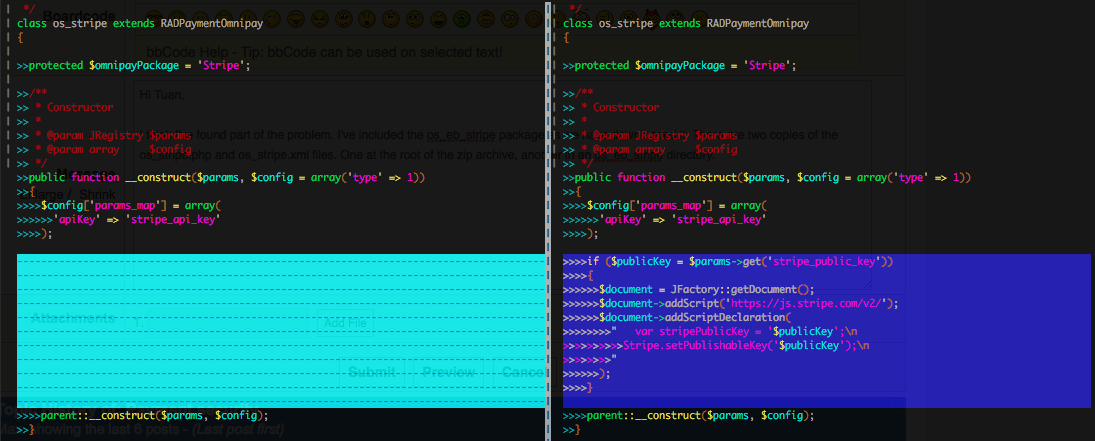
I think I've found part of the problem. I've attached the os_eb_stripe package as we have downloaded it. There are two copies of the os_stripe.php and os_stripe.xml files. One at the root of the zip archive, another in an os_eb_stripe directory.
One of the differences between both versions of os_stripe.php pertains to the inclusion of the script. The file that gets installed is the one without the call to addScript().
Moving os_eb_stripe/os_stripe.php to the root of the archive fixes the script inclusion problem. I haven't checked yet though that using the correct file would prevent the CC number to get posted on our server under all circumstances (esp. in cases where JavaScript would be disabled or the script would fail to load for whatever reason).
David
Please Log in or Create an account to join the conversation.
- Tuan Pham Ngoc
- Offline
- Administrator
-
The extension actually requires javascript to be enabled on the browser. It won't work if javascript is disabled, if javascript is disabled, I am afraid of the whole extension won't work
About the plugin package, I will check the download package on server and correct it
Regards,
Tuan
Please Log in or Create an account to join the conversation.
- David Gendron
- Offline
- New Member
-
- Posts: 5
- Thank you received: 0
David
Please Log in or Create an account to join the conversation.
- Tuan Pham Ngoc
- Offline
- Administrator
-
Please Log in or Create an account to join the conversation.
Support
Documentation
Information
The Joomla! name and logo is used under a limited license granted by Open Source Matters the trademark holder in the United States and other countries.