- Posts: 8
- Thank you received: 0

Custom Fields in individual vs. group registration
- Stefan Schmidt
- Topic Author
- Offline
- New Member
-

Less
More
8 years 10 months ago #98722
by Stefan Schmidt
Custom Fields in individual vs. group registration was created by Stefan Schmidt
Hi all,
I got one more newbee question.
I created two custom fields and assigned them to an Event (not a category). Then I remembered, that only the firstname was displayed initially, so I published the lastname in the custom fields area.
Everything worked fine, now in the individual Registration form, the lastname is displayed, too.
But if I try the group registraion, I found that the lastname is missing.
I already looked here but didn't find the place where I can add the lastname individually, depending on single/group Registration.
Until now, I only assigned the two custom fields to the Event (14,15) and not fistname, lastname (1,2).
Any hints were appreciated
Kind regards
Stefan
Kind regards
Stefan
I got one more newbee question.
I created two custom fields and assigned them to an Event (not a category). Then I remembered, that only the firstname was displayed initially, so I published the lastname in the custom fields area.
Everything worked fine, now in the individual Registration form, the lastname is displayed, too.
But if I try the group registraion, I found that the lastname is missing.
I already looked here but didn't find the place where I can add the lastname individually, depending on single/group Registration.
Until now, I only assigned the two custom fields to the Event (14,15) and not fistname, lastname (1,2).
Any hints were appreciated
Kind regards
Stefan
Kind regards
Stefan
Please Log in or Create an account to join the conversation.
- Tuan Pham Ngoc
- Offline
- Administrator
-

8 years 10 months ago #98728
by Tuan Pham Ngoc
Replied by Tuan Pham Ngoc on topic Custom Fields in individual vs. group registration
Hello Stefan
It is controlled by Display In settings. For now, edit that custom field, set Display In to All and it should work as expected
For now, edit the custom fields you want to show on group members step, set Display In to All
After that, check it again. It should work as expected
If you want to understand more about Display In setting, see eventbookingdoc.joomservices.com/basic-s...-display-in-property
Regards,
Tuan
It is controlled by Display In settings. For now, edit that custom field, set Display In to All and it should work as expected
For now, edit the custom fields you want to show on group members step, set Display In to All
After that, check it again. It should work as expected
If you want to understand more about Display In setting, see eventbookingdoc.joomservices.com/basic-s...-display-in-property
Regards,
Tuan
The following user(s) said Thank You: Stefan Schmidt
Please Log in or Create an account to join the conversation.
- Stefan Schmidt
- Topic Author
- Offline
- New Member
-
Less
More
- Posts: 8
- Thank you received: 0
8 years 10 months ago #98776
by Stefan Schmidt
Replied by Stefan Schmidt on topic Custom Fields in individual vs. group registration
Thank you Tuan,
after changing the "Display in"-Field for lastname to "ALL", everything worked fine.
Before, the value was set to "Einzel - and Gruppenanmeldung".
Off-Topic:
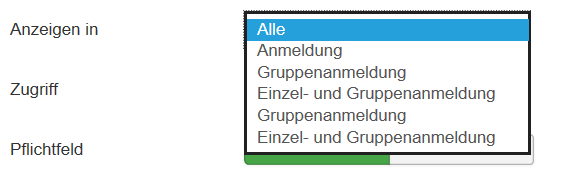
Do you have an idea, why this value is displayed twice in the Dropdown?
(see attachment)
Kind regards,
Stefan
after changing the "Display in"-Field for lastname to "ALL", everything worked fine.
Before, the value was set to "Einzel - and Gruppenanmeldung".
Off-Topic:
Do you have an idea, why this value is displayed twice in the Dropdown?
(see attachment)
Kind regards,
Stefan
Please Log in or Create an account to join the conversation.
- Tuan Pham Ngoc
- Offline
- Administrator
-
8 years 10 months ago #98787
by Tuan Pham Ngoc
Replied by Tuan Pham Ngoc on topic Custom Fields in individual vs. group registration
Hello Stefan
I think it is displayed twice because the language item was wrongly translated. You can submit a support ticket sending us super admin account of your site, I will have one developer to check it to see why the issue happens and get it sorted
Regards,
Tuan
I think it is displayed twice because the language item was wrongly translated. You can submit a support ticket sending us super admin account of your site, I will have one developer to check it to see why the issue happens and get it sorted
Regards,
Tuan
Please Log in or Create an account to join the conversation.
Moderators: Tuan Pham Ngoc
Support
Documentation
Information
Copyright © 2026 Joomla Extensions by Joomdonation. All Rights Reserved.
joomdonation.com is not affiliated with or endorsed by the Joomla! Project or Open Source Matters.
The Joomla! name and logo is used under a limited license granted by Open Source Matters the trademark holder in the United States and other countries.
The Joomla! name and logo is used under a limited license granted by Open Source Matters the trademark holder in the United States and other countries.