
Custom fields, type "Message" not shown
- Philipp
- Topic Author
- Offline
- Senior Member
-

Less
More
8 years 11 months ago #98201
by Philipp
Custom fields, type "Message" not shown was created by Philipp
Hi everyone,
I want to use a true custom field for the first time to display a general information on every registration and/or billing page. I am able to show my field UNLESS I set the type to "message". Every other field works just fine, but message is simply not shown.
Is this a known behaviour? Anything I am doing wrong here? Shopping cart is OFF, Custom fields are NOT assigned to categories, the "Display In" setting of the custom field itself is correct...
many thanks, Philipp
I want to use a true custom field for the first time to display a general information on every registration and/or billing page. I am able to show my field UNLESS I set the type to "message". Every other field works just fine, but message is simply not shown.
Is this a known behaviour? Anything I am doing wrong here? Shopping cart is OFF, Custom fields are NOT assigned to categories, the "Display In" setting of the custom field itself is correct...
many thanks, Philipp
Please Log in or Create an account to join the conversation.
- James Riley
-

- Offline
- Platinum Member
-

8 years 11 months ago #98206
by James Riley
James Riley .: EventBooking user since 2014 ::: JoomDonation user since 2016 :.
.: grfx & web design / IT / AV @ St. Therese Institute of Faith and Mission, Bruno, SK, Canada :.
Replied by James Riley on topic Custom fields, type "Message" not shown
Hmmm.... I've never had an issue like that with Custom Fields.
Make sure that Access is set to Public (or the correct access level).
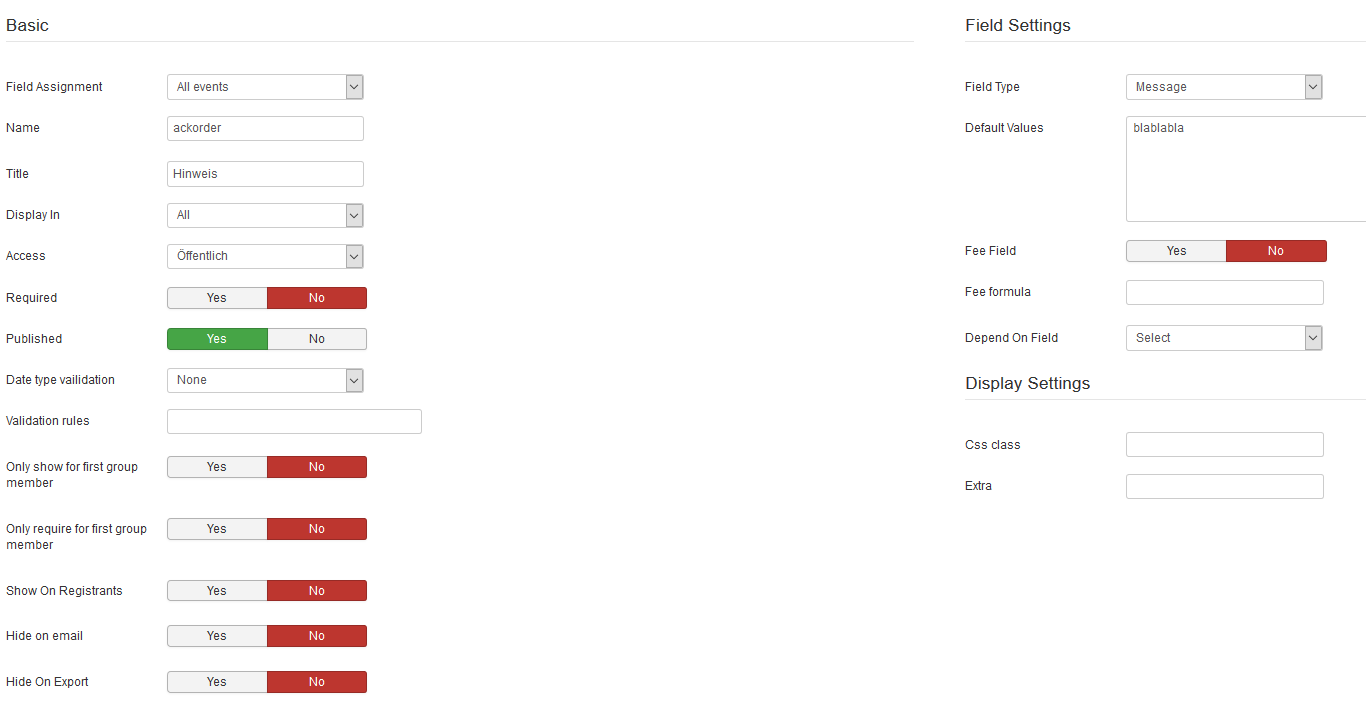
Could you post a screen shot of your settings for a non-"message" field? Maybe I or another forum member will spot the problem?
Make sure that Access is set to Public (or the correct access level).
Could you post a screen shot of your settings for a non-"message" field? Maybe I or another forum member will spot the problem?
James Riley .: EventBooking user since 2014 ::: JoomDonation user since 2016 :.
.: grfx & web design / IT / AV @ St. Therese Institute of Faith and Mission, Bruno, SK, Canada :.
Please Log in or Create an account to join the conversation.
- Philipp
- Topic Author
- Offline
- Senior Member
-
8 years 11 months ago #98208
by Philipp
Replied by Philipp on topic Custom fields, type "Message" not shown
Why, of course. I've experimented with other fields a lot (different "Display In" options, required, defined a css class): no luck. I set the assignment to one specific event: no luck. But if I change the filed type to literally anything else, the field is there...
Please Log in or Create an account to join the conversation.
- Philipp
- Topic Author
- Offline
- Senior Member
-
8 years 11 months ago #98209
by Philipp
Replied by Philipp on topic Custom fields, type "Message" not shown
Oh, I copied all the settings from the default fields like address, city and the like, fields that are displaed on both individual and group registrations events. This is the first time I wanted to use a custom custom field, so...
Please Log in or Create an account to join the conversation.
- James Riley
-
- Offline
- Platinum Member
-
8 years 11 months ago #98212
by James Riley
James Riley .: EventBooking user since 2014 ::: JoomDonation user since 2016 :.
.: grfx & web design / IT / AV @ St. Therese Institute of Faith and Mission, Bruno, SK, Canada :.
Replied by James Riley on topic Custom fields, type "Message" not shown
The settings look okay to me.
The development team is based in Vietnam. I'm sure that @Tuan will be able to assist you when his workday starts.
The development team is based in Vietnam. I'm sure that @Tuan will be able to assist you when his workday starts.
James Riley .: EventBooking user since 2014 ::: JoomDonation user since 2016 :.
.: grfx & web design / IT / AV @ St. Therese Institute of Faith and Mission, Bruno, SK, Canada :.
Please Log in or Create an account to join the conversation.
- Tuan Pham Ngoc
- Offline
- Administrator
-

8 years 11 months ago #98226
by Tuan Pham Ngoc
Replied by Tuan Pham Ngoc on topic Custom fields, type "Message" not shown
Hello Philipp
For Message custom field type, we will display the text you entered into Description of the field (honestly, I don't remember the reason behind that decision now)
So instead of entering the text into Default Values, enter it into Description of the field and it will be displayed
Regards,
Tuan
For Message custom field type, we will display the text you entered into Description of the field (honestly, I don't remember the reason behind that decision now)
So instead of entering the text into Default Values, enter it into Description of the field and it will be displayed
Regards,
Tuan
Please Log in or Create an account to join the conversation.
- Philipp
- Topic Author
- Offline
- Senior Member
-
8 years 11 months ago #98246
by Philipp
Replied by Philipp on topic Custom fields, type "Message" not shown
Ah, this is tricky. Moved my message to the description field, works like a charm.
Thanks, Tuan, and James, for the quick reply...
Thanks, Tuan, and James, for the quick reply...
Please Log in or Create an account to join the conversation.
- Tuan Pham Ngoc
- Offline
- Administrator
-
8 years 11 months ago #98285
by Tuan Pham Ngoc
Replied by Tuan Pham Ngoc on topic Custom fields, type "Message" not shown
Great. Thanks for confirming 
Tuan
Tuan
Please Log in or Create an account to join the conversation.
Moderators: Tuan Pham Ngoc
Support
Documentation
Information
Copyright © 2026 Joomla Extensions by Joomdonation. All Rights Reserved.
joomdonation.com is not affiliated with or endorsed by the Joomla! Project or Open Source Matters.
The Joomla! name and logo is used under a limited license granted by Open Source Matters the trademark holder in the United States and other countries.
The Joomla! name and logo is used under a limited license granted by Open Source Matters the trademark holder in the United States and other countries.