- Posts: 40
- Thank you received: 0

Add a text string to the time of an event (css?)
- Joyce van Heerden
-
 Topic Author
- Offline
- Senior Member
-

Less
More
8 years 11 months ago #97530
by Joyce van Heerden
Add a text string to the time of an event (css?) was created by Joyce van Heerden
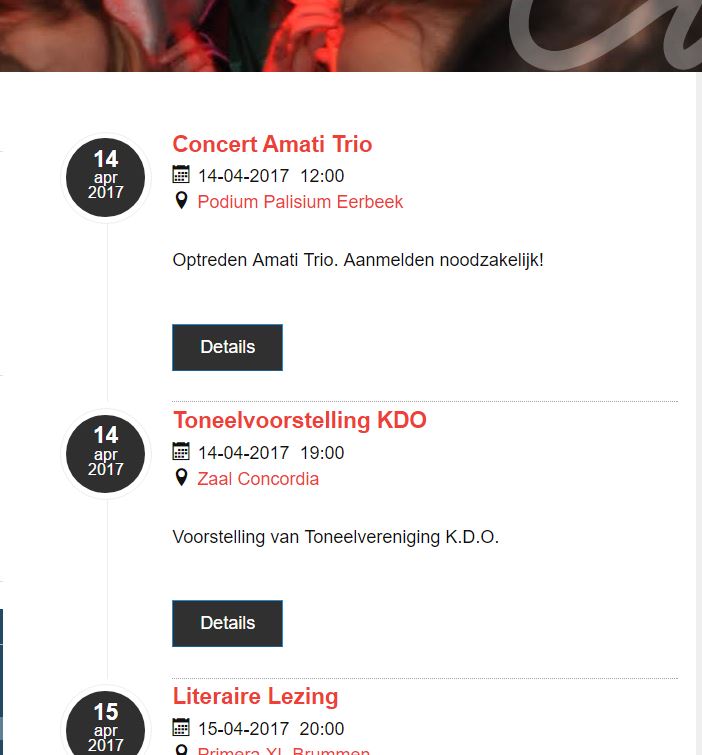
I would like to add the word "uur" to the time of an event, so that - for example - the date/time for the first event in the attached screenshot reads "14-04-2017 12:00 uur".
Is that possible? Is it something I can do myself?
Actually, as I'm typing this, I occurs to me that maybe I can do it with an :after pseudo element in css? Can I target that instance of date/time with the necessary specificity?
Please advise!
Thanks, cheers, j.
Is that possible? Is it something I can do myself?
Actually, as I'm typing this, I occurs to me that maybe I can do it with an :after pseudo element in css? Can I target that instance of date/time with the necessary specificity?
Please advise!
Thanks, cheers, j.
Please Log in or Create an account to join the conversation.
- James Riley
-

- Offline
- Platinum Member
-

8 years 11 months ago - 8 years 11 months ago #97539
by James Riley
James Riley .: EventBooking user since 2014 ::: JoomDonation user since 2016 :.
.: grfx & web design / IT / AV @ St. Therese Institute of Faith and Mission, Bruno, SK, Canada :.
Replied by James Riley on topic Add a text string to the time of an event (css?)
In [Event Booking -> Configuration - General tab], you can add your custom text into the [Date Format] or [Event Date Format ] or [Event Time Format] fields by escaping each character you want to add with a \ (backslash).
For example, if the current Date Format string is "d-m-Y H:i", change it to "d-m-Y H:i \u\u\r".
For example, if the current Date Format string is "d-m-Y H:i", change it to "d-m-Y H:i \u\u\r".
James Riley .: EventBooking user since 2014 ::: JoomDonation user since 2016 :.
.: grfx & web design / IT / AV @ St. Therese Institute of Faith and Mission, Bruno, SK, Canada :.
Last edit: 8 years 11 months ago by James Riley. Reason: changed y to Y in date format to reflect usage in User's example.
The following user(s) said Thank You: Tuan Pham Ngoc, Joyce van Heerden
Please Log in or Create an account to join the conversation.
- Joyce van Heerden
-
Topic Author
- Offline
- Senior Member
-
Less
More
- Posts: 40
- Thank you received: 0
8 years 11 months ago #97556
by Joyce van Heerden
Replied by Joyce van Heerden on topic Add a text string to the time of an event (css?)
Ah! I simply didn't know that - should I have? Anyway, thank you!!
Please Log in or Create an account to join the conversation.
- James Riley
-
- Offline
- Platinum Member
-
8 years 11 months ago #97562
by James Riley
James Riley .: EventBooking user since 2014 ::: JoomDonation user since 2016 :.
.: grfx & web design / IT / AV @ St. Therese Institute of Faith and Mission, Bruno, SK, Canada :.
Replied by James Riley on topic Add a text string to the time of an event (css?)
I only know about it because I muddle around in PHP -- I actually had to check the PHP manual and look up how to do it as it was!
If you want more info on how to further customize date/time formatting, see the date() function in the PHP manual at php.net/manual/en/function.date.php . I found the info about escaping characters in example 4 .
If you want more info on how to further customize date/time formatting, see the date() function in the PHP manual at php.net/manual/en/function.date.php . I found the info about escaping characters in example 4 .
James Riley .: EventBooking user since 2014 ::: JoomDonation user since 2016 :.
.: grfx & web design / IT / AV @ St. Therese Institute of Faith and Mission, Bruno, SK, Canada :.
The following user(s) said Thank You: Joyce van Heerden
Please Log in or Create an account to join the conversation.
- Joyce van Heerden
-
Topic Author
- Offline
- Senior Member
-
Less
More
- Posts: 40
- Thank you received: 0
8 years 11 months ago #97574
by Joyce van Heerden
Replied by Joyce van Heerden on topic Add a text string to the time of an event (css?)
Well, to be honest, I wouldn't even have known the PHP manual was the place to look  .
.
But I know now, and I'll know the next time I run into a similar question.
Thanks again!
ps I looked you up online at St.T - amazing how different EB can look... Seeing how others tackled the styling is very inspirational!
.But I know now, and I'll know the next time I run into a similar question.
Thanks again!
ps I looked you up online at St.T - amazing how different EB can look... Seeing how others tackled the styling is very inspirational!
Please Log in or Create an account to join the conversation.
- James Riley
-
- Offline
- Platinum Member
-
8 years 11 months ago - 8 years 11 months ago #97656
by James Riley
James Riley .: EventBooking user since 2014 ::: JoomDonation user since 2016 :.
.: grfx & web design / IT / AV @ St. Therese Institute of Faith and Mission, Bruno, SK, Canada :.
Replied by James Riley on topic Add a text string to the time of an event (css?)
That's why forums exist
There is a tool-tip that appears when you mouse-over the Date/Time Format in EB's Config with a link to the PHP manual, but unfortunately you can't actually click on that tool-tip link because the tool-tip disappears when you move onto the tool-tip :pinch:
@Tuan -- any suggestions on how to fix it so that people can click the link?
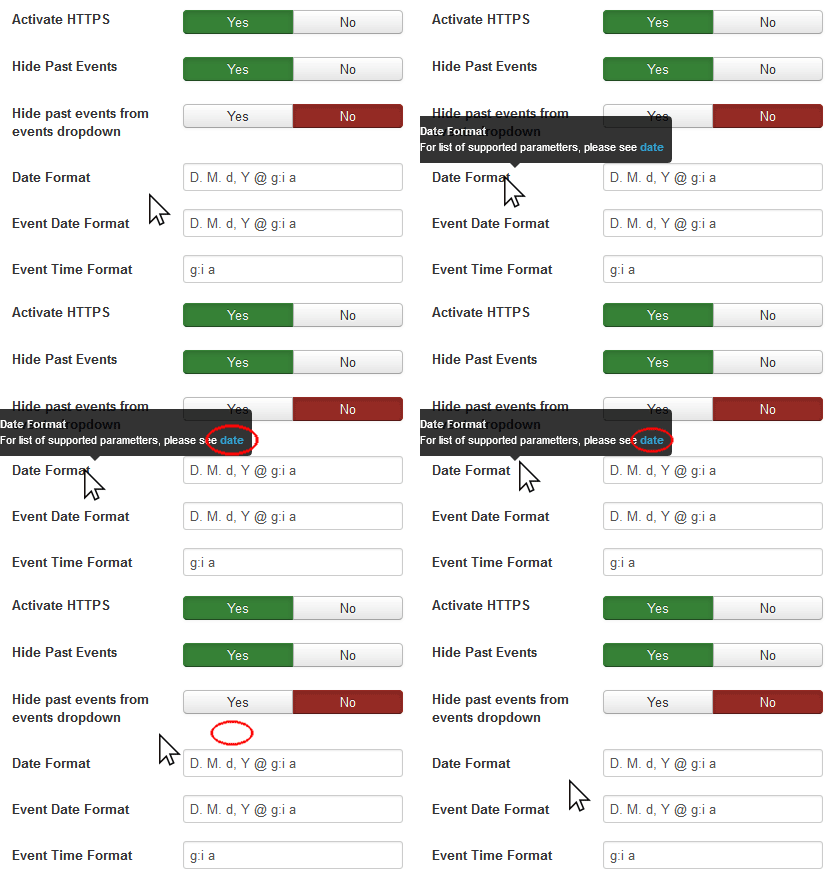
PS: If you ever want to know how I did something with my EB install, just ask ! I've made a fair number of code customizations and added a lot of CSS in order to make things integrate better with my site (as well as make it bend to my whims).
There is a tool-tip that appears when you mouse-over the Date/Time Format in EB's Config with a link to the PHP manual, but unfortunately you can't actually click on that tool-tip link because the tool-tip disappears when you move onto the tool-tip :pinch:
@Tuan -- any suggestions on how to fix it so that people can click the link?
PS: If you ever want to know how I did something with my EB install, just ask ! I've made a fair number of code customizations and added a lot of CSS in order to make things integrate better with my site (as well as make it bend to my whims).
James Riley .: EventBooking user since 2014 ::: JoomDonation user since 2016 :.
.: grfx & web design / IT / AV @ St. Therese Institute of Faith and Mission, Bruno, SK, Canada :.
Last edit: 8 years 11 months ago by James Riley.
The following user(s) said Thank You: Joyce van Heerden
Please Log in or Create an account to join the conversation.
- Tuan Pham Ngoc
- Offline
- Administrator
-

8 years 11 months ago #97659
by Tuan Pham Ngoc
Replied by Tuan Pham Ngoc on topic Add a text string to the time of an event (css?)
Honestly, I am not sure if the link in tooltip is clickable. Maybe for that, just display the instruction under the title of the config option
Regards,
Tuan
Regards,
Tuan
Please Log in or Create an account to join the conversation.
Moderators: Tuan Pham Ngoc
Support
Documentation
Information
Copyright © 2026 Joomla Extensions by Joomdonation. All Rights Reserved.
joomdonation.com is not affiliated with or endorsed by the Joomla! Project or Open Source Matters.
The Joomla! name and logo is used under a limited license granted by Open Source Matters the trademark holder in the United States and other countries.
The Joomla! name and logo is used under a limited license granted by Open Source Matters the trademark holder in the United States and other countries.