- Posts: 40
- Thank you received: 0

ics file with false start and end time
- yoso
-
 Topic Author
- Offline
- Senior Member
-

Less
More
8 years 11 months ago #97528
by yoso
ics file with false start and end time was created by yoso
Hi,
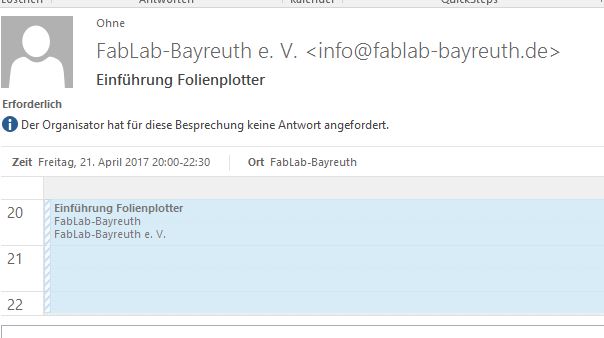
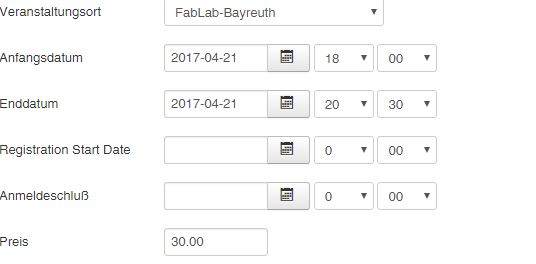
attached you find the ics-screebshot of my event. This ics-file produce false start- and endtime of the event. The correkt start is 18:00 and the end is 20:30. Where's the problem? The settings of start and endtime in the eventsettings are correct.
Best regards!
YoSo
attached you find the ics-screebshot of my event. This ics-file produce false start- and endtime of the event. The correkt start is 18:00 and the end is 20:30. Where's the problem? The settings of start and endtime in the eventsettings are correct.
Best regards!
YoSo
Please Log in or Create an account to join the conversation.
- Leon Treff
- Offline
- Premium Member
-

Less
More
- Posts: 137
- Thank you received: 30
8 years 11 months ago #97531
by Leon Treff
Replied by Leon Treff on topic ics file with false start and end time
Hello,
I do not know the reason of the issue.
But I guess the trouble is related to the fact that one time value takes into account summer time and the other one not.
Currently, Central European Summer time is GMT + 2 hours, which might explain the 2 hour difference.
Hopefully, Tuan can solve the issue.
Sincerely
Léon
I do not know the reason of the issue.
But I guess the trouble is related to the fact that one time value takes into account summer time and the other one not.
Currently, Central European Summer time is GMT + 2 hours, which might explain the 2 hour difference.
Hopefully, Tuan can solve the issue.
Sincerely
Léon
Please Log in or Create an account to join the conversation.
- Tuan Pham Ngoc
- Offline
- Administrator
-

8 years 11 months ago #97546
by Tuan Pham Ngoc
Replied by Tuan Pham Ngoc on topic ics file with false start and end time
Hello Léon
The extension uses your site timezone to Generate ICS file data. So please go to System -> Global Configuration, look at Server tab, set Server Time Zone config option to your country timezone, then check it again. It should work as expected
Regards,
Tuan
The extension uses your site timezone to Generate ICS file data. So please go to System -> Global Configuration, look at Server tab, set Server Time Zone config option to your country timezone, then check it again. It should work as expected
Regards,
Tuan
The following user(s) said Thank You: Melissa, yoso
Please Log in or Create an account to join the conversation.
- yoso
-
Topic Author
- Offline
- Senior Member
-
Less
More
- Posts: 40
- Thank you received: 0
8 years 11 months ago #97572
by yoso
Replied by yoso on topic ics file with false start and end time
Perfect - THX!
Please Log in or Create an account to join the conversation.
Moderators: Tuan Pham Ngoc
Support
Documentation
Information
Copyright © 2026 Joomla Extensions by Joomdonation. All Rights Reserved.
joomdonation.com is not affiliated with or endorsed by the Joomla! Project or Open Source Matters.
The Joomla! name and logo is used under a limited license granted by Open Source Matters the trademark holder in the United States and other countries.
The Joomla! name and logo is used under a limited license granted by Open Source Matters the trademark holder in the United States and other countries.