- Posts: 2
- Thank you received: 0

Custom field text on one line
- Corrie McGaughey
- Topic Author
- Offline
- New Member
-

Less
More
9 years 3 days ago #96566
by Corrie McGaughey
Custom field text on one line was created by Corrie McGaughey
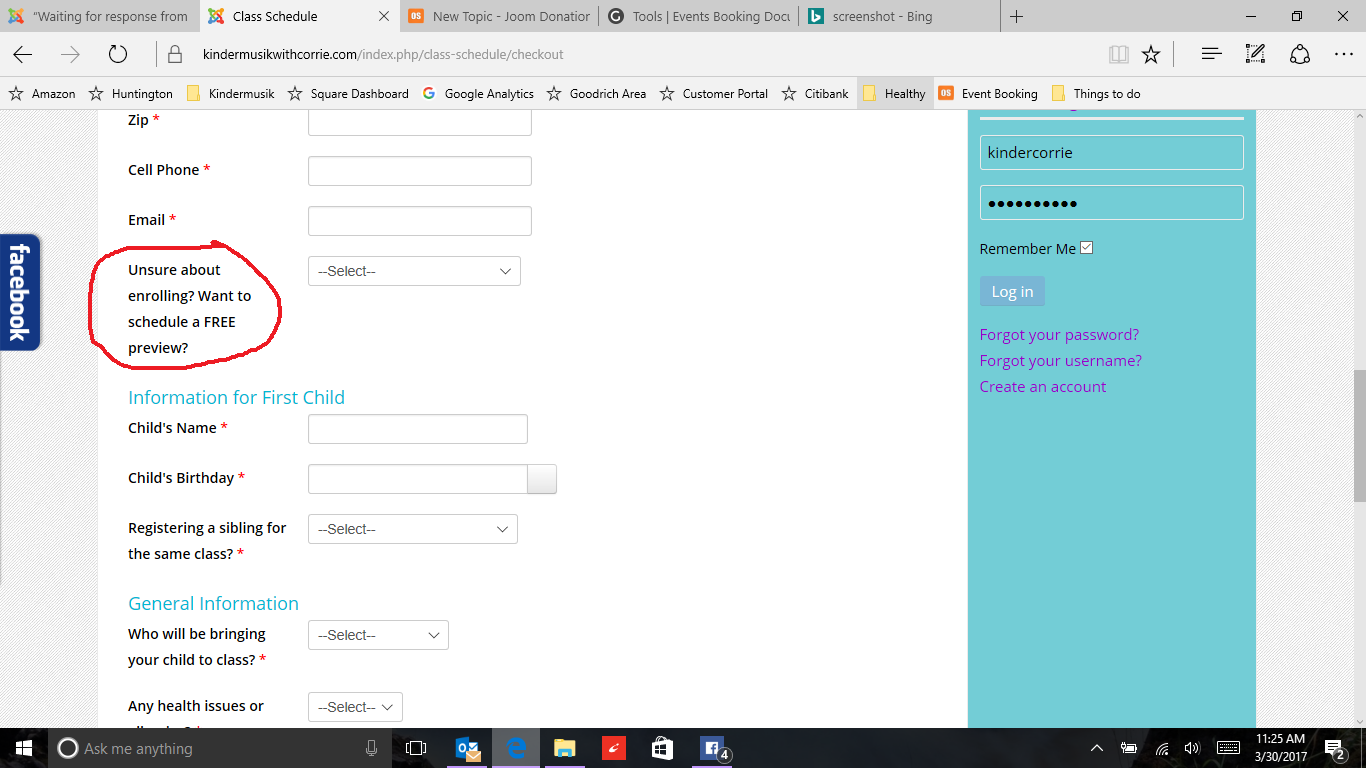
I'm sure this is an easy fix but I can't figure out how to change this column to fit the text on one line rather than wrapping it on several lines.
Thank you
Thank you
Please Log in or Create an account to join the conversation.
- James Riley
-

- Offline
- Platinum Member
-

9 years 3 days ago #96568
by James Riley
James Riley .: EventBooking user since 2014 ::: JoomDonation user since 2016 :.
.: grfx & web design / IT / AV @ St. Therese Institute of Faith and Mission, Bruno, SK, Canada :.
Replied by James Riley on topic Custom field text on one line
If you want the text to appear in one line above the field, you can try removing the width and float that your site template defines. In [Event Booking -> Configuration -> Custom CSS tab -> Custom CSS], add the following:
and (optionally), to keep the fields indented a bit to the right, add (adjust the px value as necessary):
Code:
.eb-container .form-horizontal .control-label {
float: none;
width: 100%
}
and (optionally), to keep the fields indented a bit to the right, add (adjust the px value as necessary):
Code:
.eb-container .form-horizontal .controls{
margin-left:100px;
}
James Riley .: EventBooking user since 2014 ::: JoomDonation user since 2016 :.
.: grfx & web design / IT / AV @ St. Therese Institute of Faith and Mission, Bruno, SK, Canada :.
The following user(s) said Thank You: Tuan Pham Ngoc, Corrie McGaughey
Please Log in or Create an account to join the conversation.
Moderators: Tuan Pham Ngoc
Support
Documentation
Information
Copyright © 2026 Joomla Extensions by Joomdonation. All Rights Reserved.
joomdonation.com is not affiliated with or endorsed by the Joomla! Project or Open Source Matters.
The Joomla! name and logo is used under a limited license granted by Open Source Matters the trademark holder in the United States and other countries.
The Joomla! name and logo is used under a limited license granted by Open Source Matters the trademark holder in the United States and other countries.