- Posts: 31
- Thank you received: 0

Different ticket types
- wisma
- Topic Author
- Offline
- Junior Member
-

Less
More
9 years 3 weeks ago #95487
by wisma
Different ticket types was created by wisma
Hi I need some help
1. I have 2 different Ticket types
- a festival pass for one day
- single tickets for each event and the other days
How can i add this two ticket types to an event and how can i add different text to the register button for this different types
like register festival pass or register single ticket..
button
2.
How can i disable the 3 fields :
maximal…
Registered 81 [View List]
Available place
event property
thx a lot for support
1. I have 2 different Ticket types
- a festival pass for one day
- single tickets for each event and the other days
How can i add this two ticket types to an event and how can i add different text to the register button for this different types
like register festival pass or register single ticket..
button
2.
How can i disable the 3 fields :
maximal…
Registered 81 [View List]
Available place
event property
thx a lot for support
Please Log in or Create an account to join the conversation.
- James Riley
-

- Offline
- Platinum Member
-

9 years 3 weeks ago - 9 years 3 weeks ago #95494
by James Riley
James Riley .: EventBooking user since 2014 ::: JoomDonation user since 2016 :.
.: grfx & web design / IT / AV @ St. Therese Institute of Faith and Mission, Bruno, SK, Canada :.
Replied by James Riley on topic Different ticket types
1) Right now you can't change the text on the register buttons on a per-event level. I've hacked code into my own install that allows me to change the Group register button for each event (including showing the minimum number of people needed for group registration) , but it still takes me to the group reg page.
If you want the 2 ticket types to be completely separate, you could create 2 additional events in a non-listed category, and within your "master" event, disable registration and create new "buttons" within the event description for "Festival Pass" and "Single Ticket" which then link back to the respective unlisted events.
I don't think it is possible at present to select a default ticket type value via a URL parameter in a single event... otherwise you could hide the registration buttons on the master event with CSS (leaving registration for the event open, not disabled), create your own buttons within the description with the appropriate URL parameter, and therefore pre-select the ticket type within the registration. Of course this ability could be added into the code, but you'd have to have someone do it for you (unless you're PHP savvy yourself).
2) Look for these options within [Event Booking -. Configuration -> Themes tab] and set them as shown:
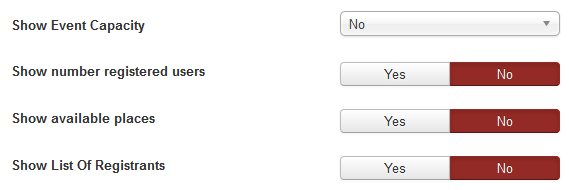
I almost think that the Show List option may also be controllable via permissions and ACL, so you might not need to / want to disable it if it is not showing up for normal users at present.
If you want the 2 ticket types to be completely separate, you could create 2 additional events in a non-listed category, and within your "master" event, disable registration and create new "buttons" within the event description for "Festival Pass" and "Single Ticket" which then link back to the respective unlisted events.
I don't think it is possible at present to select a default ticket type value via a URL parameter in a single event... otherwise you could hide the registration buttons on the master event with CSS (leaving registration for the event open, not disabled), create your own buttons within the description with the appropriate URL parameter, and therefore pre-select the ticket type within the registration. Of course this ability could be added into the code, but you'd have to have someone do it for you (unless you're PHP savvy yourself).
2) Look for these options within [Event Booking -. Configuration -> Themes tab] and set them as shown:
I almost think that the Show List option may also be controllable via permissions and ACL, so you might not need to / want to disable it if it is not showing up for normal users at present.
James Riley .: EventBooking user since 2014 ::: JoomDonation user since 2016 :.
.: grfx & web design / IT / AV @ St. Therese Institute of Faith and Mission, Bruno, SK, Canada :.
Last edit: 9 years 3 weeks ago by James Riley.
Please Log in or Create an account to join the conversation.
- Tuan Pham Ngoc
- Away
- Administrator
-

9 years 3 weeks ago #95532
by Tuan Pham Ngoc
Replied by Tuan Pham Ngoc on topic Different ticket types
Regarding the Ticket Types question, I don't really understand how to setup it. However, in Events Booking, there are two ways to setup it:
1. Use Custom Fee Field: The idea is creating a custom fee field to allow choosing Ticket Type, and then charge registrants the related fee of each ticket type. The radio / dropdown custom fee field would work, see eventbookingdoc.joomservices.com/basic-s...wn-custom-field-type
2. The other option is using Ticket Types plugin eventbookingdoc.joomservices.com/miscell.../ticket-types-plugin
Could you please take a look at two options above to see whether there is any options you can use?
Regards,
Tuan
1. Use Custom Fee Field: The idea is creating a custom fee field to allow choosing Ticket Type, and then charge registrants the related fee of each ticket type. The radio / dropdown custom fee field would work, see eventbookingdoc.joomservices.com/basic-s...wn-custom-field-type
2. The other option is using Ticket Types plugin eventbookingdoc.joomservices.com/miscell.../ticket-types-plugin
Could you please take a look at two options above to see whether there is any options you can use?
Regards,
Tuan
Please Log in or Create an account to join the conversation.
- wisma
- Topic Author
- Offline
- Junior Member
-
Less
More
- Posts: 31
- Thank you received: 0
9 years 3 weeks ago - 9 years 3 weeks ago #95544
by wisma
Replied by wisma on topic Different ticket types
Thx a lot for your replies Tuan and James
1.
The Ticket type plugin is great, but the dropdown for Ticktets starts counting the quantity for tickets with zero, wehre can i set the first value with 1.
dropdown
2. how can i add/link the tickettypename to the registerbutton:
for example:
- Reservation Einzeleintritt
- Reservation Samstagspass
pass
Thx for help+reply
regards marc
1.
The Ticket type plugin is great, but the dropdown for Ticktets starts counting the quantity for tickets with zero, wehre can i set the first value with 1.
dropdown
2. how can i add/link the tickettypename to the registerbutton:
for example:
- Reservation Einzeleintritt
- Reservation Samstagspass
pass
Thx for help+reply
regards marc
Last edit: 9 years 3 weeks ago by wisma. Reason: error
Please Log in or Create an account to join the conversation.
- wisma
- Topic Author
- Offline
- Junior Member
-
Less
More
- Posts: 31
- Thank you received: 0
9 years 3 weeks ago #95545
by wisma
Replied by wisma on topic Different ticket types
I found this: If you want number of registrants of the registration record (by default, it set to 1) calculated base on the quantity of each ticket types registrants select, go to Events Booking, find the config option Calculate Number Registrants Based on Tickets Quantity, set it to Yes
but it takes no effect.
but it takes no effect.
Please Log in or Create an account to join the conversation.
- Tuan Pham Ngoc
- Away
- Administrator
-
9 years 3 weeks ago #95600
by Tuan Pham Ngoc
Replied by Tuan Pham Ngoc on topic Different ticket types
Hello Marc
1. If you want it starts with 1, you will have to edit the code. The idea is that there can be multiple ticket types, and registrants should be allowed to choose to purchase a ticket type or not. If you get it start with 1, that mean registrants will have to purchase all ticket types available, which is not good
2. It is not possible to have it linked. Not sure why you need to link it?
Tuan
1. If you want it starts with 1, you will have to edit the code. The idea is that there can be multiple ticket types, and registrants should be allowed to choose to purchase a ticket type or not. If you get it start with 1, that mean registrants will have to purchase all ticket types available, which is not good
2. It is not possible to have it linked. Not sure why you need to link it?
Tuan
Please Log in or Create an account to join the conversation.
- wisma
- Topic Author
- Offline
- Junior Member
-
Less
More
- Posts: 31
- Thank you received: 0
9 years 3 weeks ago #95631
by wisma
Replied by wisma on topic Different ticket types
The problem is that zero tickets should cost zero Fr. . And 1 Ticket should cost the single price not the double and so on.. how can i fix this.
www.katapultfestival.ch/programm/the-odd...al-registration.html
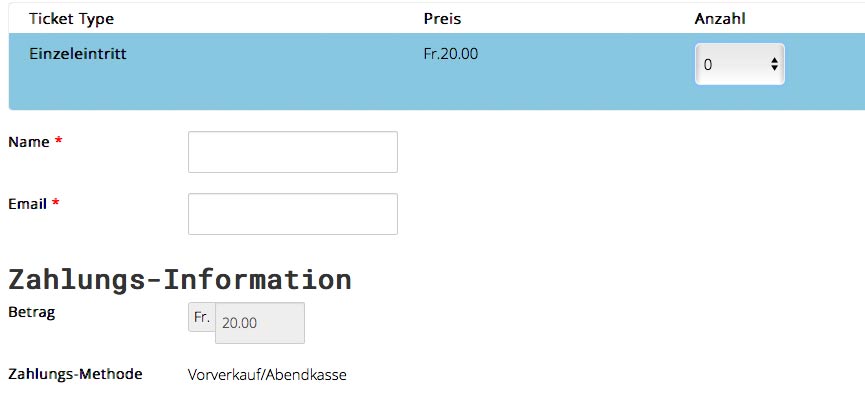
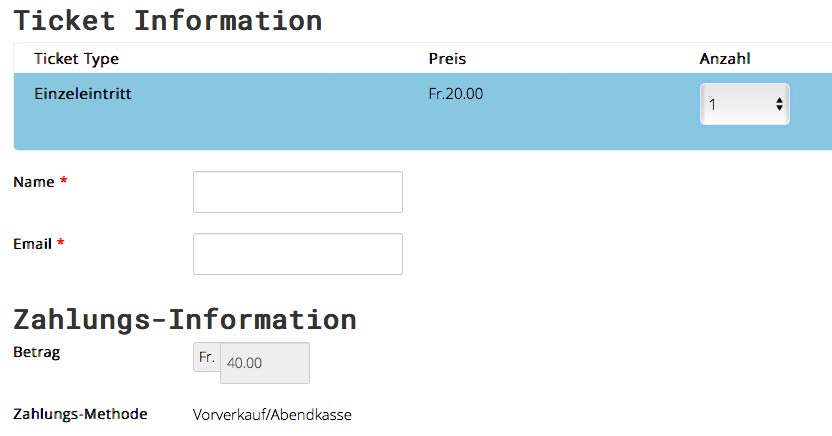
thx for reply
www.katapultfestival.ch/programm/the-odd...al-registration.html
thx for reply
Please Log in or Create an account to join the conversation.
- Tuan Pham Ngoc
- Away
- Administrator
-
9 years 3 weeks ago #95664
by Tuan Pham Ngoc
Replied by Tuan Pham Ngoc on topic Different ticket types
Your case is a special case where you only have one ticket type, so we will have to modify code
Please submit a support ticket sending us super admin account of the site and the link to the page so that we can do the modification for you
Tuan
Please submit a support ticket sending us super admin account of the site and the link to the page so that we can do the modification for you
Tuan
Please Log in or Create an account to join the conversation.
Moderators: Tuan Pham Ngoc
Support
Documentation
Information
Copyright © 2026 Joomla Extensions by Joomdonation. All Rights Reserved.
joomdonation.com is not affiliated with or endorsed by the Joomla! Project or Open Source Matters.
The Joomla! name and logo is used under a limited license granted by Open Source Matters the trademark holder in the United States and other countries.
The Joomla! name and logo is used under a limited license granted by Open Source Matters the trademark holder in the United States and other countries.