- Posts: 23
- Thank you received: 2

Need help with Joomla? We are available for hire to help with Joomla customization, upgrades, maintenance, and custom development.
Explore our services Show event details on Upcoming Events
- Emma Richardson
- Topic Author
- Offline
- Junior Member
-

Less
More
9 years 7 months ago #95095
by Emma Richardson
Show event details on Upcoming Events was created by Emma Richardson
I am using the Upcoming Events Timeline view to set up a digital signage in our front office area. Ideally, I would like to be able to create a slideshow that would rotate through the upcoming events and include the event description, location info, etc. I could manage creating the slideshow with an rss feed if necessary but cannot figure out how to get the description to show up.
Would appreciate any assistance.
Would appreciate any assistance.
Please Log in or Create an account to join the conversation.
- James Riley
-

- Offline
- Platinum Member
-

9 years 7 months ago - 9 years 7 months ago #95109
by James Riley
James Riley .: EventBooking user since 2014 ::: JoomDonation user since 2016 :.
.: grfx & web design / IT / AV @ St. Therese Institute of Faith and Mission, Bruno, SK, Canada :.
Replied by James Riley on topic Show event details on Upcoming Events
I think the RSS feed does contain description (feedEntryContent), but there is other info (event Start & End Date/Time, image, price, etc.) that doesn't seem to show up in the feed.
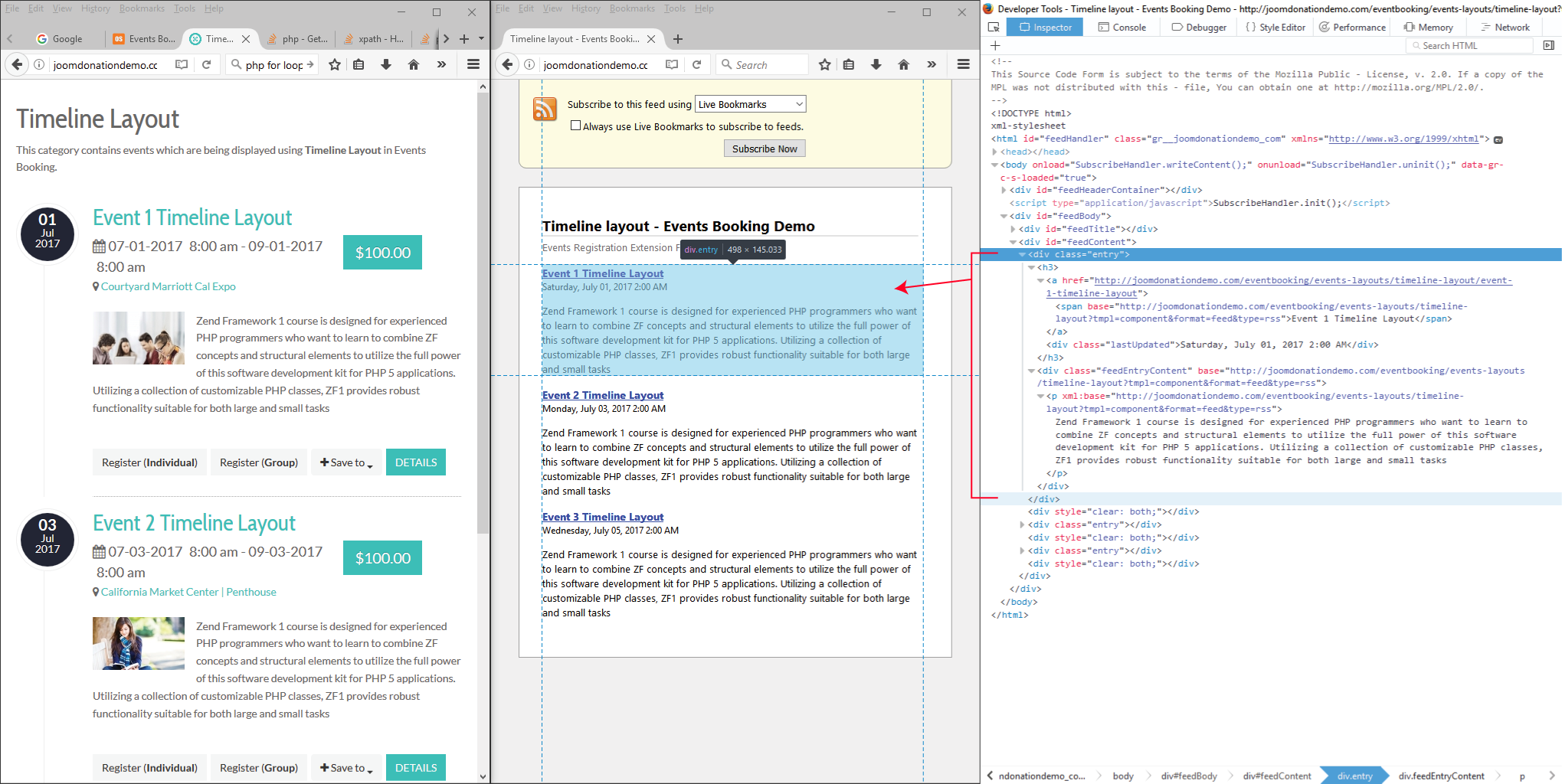
You could parse the live HTML page and then work with the individual blocks of info using code like this:
You could parse the live HTML page and then work with the individual blocks of info using code like this:
Code:
<?php
// the timeline layout page that you want to parse events from
$siteRoot = 'http://joomdonationdemo.com'; // http:// or https:// with domain name. No trailing slash.
$sitePath = '/eventbooking/events-layouts/timeline-layout/'; // the path to the timeline layout. Include slash at beginning & (optionally) end!
$siteEBMediaPath = '/eventbooking/media/com_eventbooking/'; // path to /media/com_eventbooking/ . Include slash at beginning & (optionally) end!
// build the full url
$url = $siteRoot.$sitePath;
$url .='?tmpl=component'; //Append the Joomla tmpl command to show the component content without the template
// capture the content of the URL so that we can parse the event data
$dom = new DOMDocument();
$dom->loadHTMLFile('http://joomdonationdemo.com/eventbooking/events-layouts/timeline-layout/?tmpl=component');
$xpath = new DOMXPath($dom);
// look for all <div> that are classed as "eb-event-container"
$div = $xpath->query('//*[contains(concat(" ", normalize-space(@class), " "), " eb-event-container ")]');
// place all the upcoming events into an array called $upcoming_events
$upcoming_events = array();
for ($div_i = 0; $div_i < $div->length; $div_i++) {
$event = $dom->saveXML($div->item($div_i));
// add the domain name to <image> src's and anything else linked to the media/com_eventbooking folder
$event = str_replace($siteEBMediaPath, $siteRoot.$siteEBMediaPath, $event);
// add the domain name to <a> href's and any place that the sitePath appears
$event = str_replace($sitePath, $siteRoot.$sitePath, $event);
// parse the event further
$eventDOM = new DOMDocument();
$eventDOM->loadHTML($event);
$xpath = new DOMXPath($eventDOM);
$eventDetails = array();
$xpathQuery = $xpath->query('//*[contains(concat(" ", normalize-space(@class), " "), " eb-event-date-container ")]');
$eventDetails['dateBox'] = $eventDOM->saveXML($xpathQuery->item(0));
$xpathQuery = $xpath->query('//*[contains(concat(" ", normalize-space(@class), " "), " eb-even-title-container ")]');
$eventDetails['title'] = $eventDOM->saveXML($xpathQuery->item(0));
$xpathQuery = $xpath->query('//*[contains(concat(" ", normalize-space(@class), " "), " eb-event-date-info ")]');
$eventDetails['dateTime'] = $eventDOM->saveXML($xpathQuery->item(0));
// poor CLASS support for this item... eb-colorbox-map is not a great CSS rule to use for this, but it is maybe the only one available??
$xpathQuery = $xpath->query('//*[contains(concat(" ", normalize-space(@class), " "), " eb-colorbox-map ")]');
$eventDetails['location'] = $eventDOM->saveXML($xpathQuery->item(0));
$xpathQuery = $xpath->query('//*[contains(concat(" ", normalize-space(@class), " "), " eb-individual-price ")]');
$eventDetails['price'] = $eventDOM->saveXML($xpathQuery->item(0));
$xpathQuery = $xpath->query('//*[contains(concat(" ", normalize-space(@class), " "), " eb-description-details ")]');
$eventDetails['description'] = $eventDOM->saveXML($xpathQuery->item(0));
$xpathQuery = $xpath->query('//*[contains(concat(" ", normalize-space(@class), " "), " eb-taskbar ")]');
$eventDetails['buttonBar'] = $eventDOM->saveXML($xpathQuery->item(0));
$upcoming_events[] = $eventDetails;
}
// now you can do what you want with the upcoming events list!
?>
<html>
<head>
</head>
<body>
<?php
foreach ($upcoming_events as $event) {
echo '<pre>';
print_r($event);
echo '</pre><hr />';
}
?>
</body></html>
<?php
?>
James Riley .: EventBooking user since 2014 ::: JoomDonation user since 2016 :.
.: grfx & web design / IT / AV @ St. Therese Institute of Faith and Mission, Bruno, SK, Canada :.
Last edit: 9 years 7 months ago by James Riley.
The following user(s) said Thank You: Emma Richardson
Please Log in or Create an account to join the conversation.
- James Riley
-
- Offline
- Platinum Member
-
9 years 7 months ago - 9 years 7 months ago #95111
by James Riley
James Riley .: EventBooking user since 2014 ::: JoomDonation user since 2016 :.
.: grfx & web design / IT / AV @ St. Therese Institute of Faith and Mission, Bruno, SK, Canada :.
Replied by James Riley on topic Show event details on Upcoming Events
The above code will produce an array containing the following items (with the original EventBooking HTML intact so that that style the elements):
$upcoming_events[] =
Array(
[dateBox] => 01 Jul 2017
[title] => Event 1 Timeline Layout
[dateTime] => 07-01-2017 8:00 am- 09-01-2017 8:00 am
[location] => Courtyard Marriott Cal Expo
[price] => $100.00
[description] => <event img> Zend Framework 1 course is designed for experienced PHP programmers who want to learn to combine ZF concepts and structural elements to utilize the full power of this software development kit for PHP 5 applications. Utilizing a collection of customizable PHP classes, ZF1 provides robust functionality suitable for both large and small tasks
[buttonBar] => Register (Individual)Register (Group)Google CalendarYahoo CalendarSave IcalDetails
)
$upcoming_events[] =
Array(
[dateBox] => 01 Jul 2017
[title] => Event 1 Timeline Layout
[dateTime] => 07-01-2017 8:00 am- 09-01-2017 8:00 am
[location] => Courtyard Marriott Cal Expo
[price] => $100.00
[description] => <event img> Zend Framework 1 course is designed for experienced PHP programmers who want to learn to combine ZF concepts and structural elements to utilize the full power of this software development kit for PHP 5 applications. Utilizing a collection of customizable PHP classes, ZF1 provides robust functionality suitable for both large and small tasks
[buttonBar] => Register (Individual)Register (Group)Google CalendarYahoo CalendarSave IcalDetails
)
James Riley .: EventBooking user since 2014 ::: JoomDonation user since 2016 :.
.: grfx & web design / IT / AV @ St. Therese Institute of Faith and Mission, Bruno, SK, Canada :.
Last edit: 9 years 7 months ago by James Riley.
Please Log in or Create an account to join the conversation.
- Tuan Pham Ngoc
- Offline
- Administrator
-

9 years 7 months ago #95118
by Tuan Pham Ngoc
Replied by Tuan Pham Ngoc on topic Show event details on Upcoming Events
Events Booking doesn't have a slideshow module at the moment, however, it does support rss feed. You can create a menu item to link to upcoming events timeline layout for example, then view HTML source of the page to get the rss feed URL
BTW, do you have sample slideshow module which you like? We would like to add support for it in future releases of the extension
Regards,
Tuan
BTW, do you have sample slideshow module which you like? We would like to add support for it in future releases of the extension
Regards,
Tuan
Please Log in or Create an account to join the conversation.
- Emma Richardson
- Topic Author
- Offline
- Junior Member
-
Less
More
- Posts: 23
- Thank you received: 2
9 years 7 months ago #95262
by Emma Richardson
Replied by Emma Richardson on topic Show event details on Upcoming Events
Ahh, I realized that it is pulling the short description so that helps considerably. Tuan, I think a lot of people would like a slide show - I know that when we had a DotNetNuke site, the event booking module there used to have one built in. It should just be able to pull from upcoming or maybe featured events and I think if it used something similar to the timeline layout, it would be excellent!
Thanks for all the feedback - now to see what I can put together!
Thanks for all the feedback - now to see what I can put together!
Please Log in or Create an account to join the conversation.
- Tuan Pham Ngoc
- Offline
- Administrator
-
9 years 7 months ago #95293
by Tuan Pham Ngoc
Replied by Tuan Pham Ngoc on topic Show event details on Upcoming Events
OK Emma
We will consider adding support for it, just take sometime
Tuan
We will consider adding support for it, just take sometime
Tuan
Please Log in or Create an account to join the conversation.
Moderators: Tuan Pham Ngoc
Support
Documentation
Information
Copyright © 2026 Joomla Extensions by Joomdonation. All Rights Reserved.
joomdonation.com is not affiliated with or endorsed by the Joomla! Project or Open Source Matters.
The Joomla! name and logo is used under a limited license granted by Open Source Matters the trademark holder in the United States and other countries.
The Joomla! name and logo is used under a limited license granted by Open Source Matters the trademark holder in the United States and other countries.